Site~Rite
®
8 Ultrasound System Page 51
12. PATIENT INFORMATION
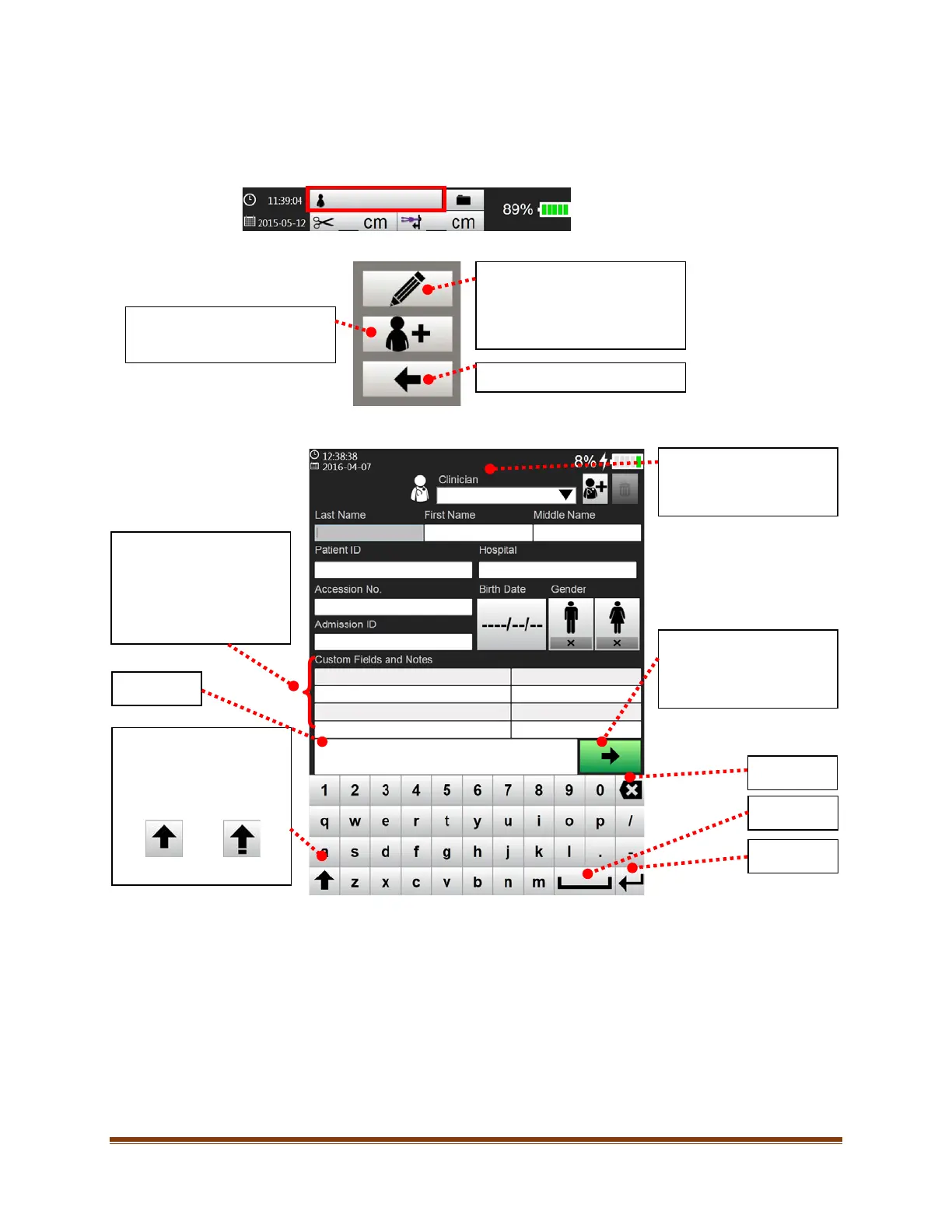
Instructions to enter patient information into the Site~Rite® 8 Ultrasound System are as follows:
1. Select the ‘Patient Information’ button.
2. The following options will appear:
3. Enter the desired patient information. All fields are optional and entered data will be saved with images.
4. Select the green arrow button to retain the information and exit this screen.
Note: See Section 14 for information on how to delete patient data.
Allows the user to edit existing
patient information. These
changes will be applied to
previously saved images for the
current patient.
Returns to the previous screen.
Add new patient. Previously
unsaved patient data will be
available. The left field is
retained as a clinician
preset (see Section
13).
Patient information may be
entered in the right field.
Notes
Shift / Display additional
Characters.
Double click to lock the shift
key.
Select the clinician
performing the procedure.
image annotation and
returns to the previous
screen.
Backspace
Space
Enter








 To Next Page