Configuring Your Router
WAN – 3G/4G LTE USB Connection Setup
BEC 8920AC User Manual
3G/4G LTE via USB Connection Setup
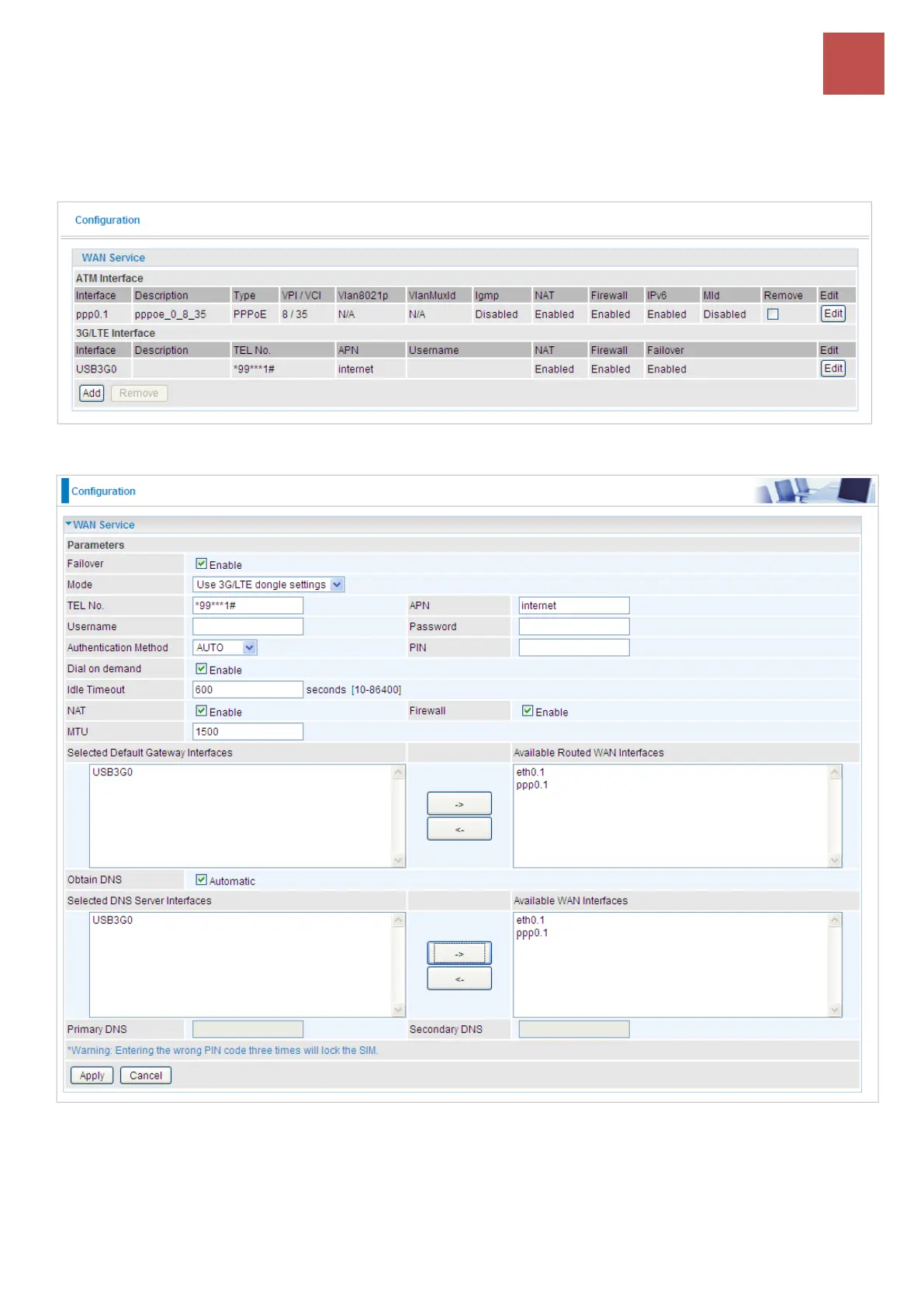
Select 3G/4G LTE to configure the route to enjoy the mobility. By default the 3G/4G LTE interface is on,
user can edit the parameters to meet your own requirements.
Click Edit button to enter the 3G/4G LTE configuration page.
Failover: If enabled, the 3G/4G LTE will work in failover mode and be brought up only when there is
no active default route. In this mode, 3G/4G LTE work as a backup for the WAN connectivity. While if
disabled, 3G/4G LTE serves as a normal interface, and can only be brought up when it has been
configured to achieve a mobile connectivity.
Mode: There are 6 options of phone service standards: GSM 2G only, UTMS 3G only, GSM 2G



 To Next Page