PN A51387AB
5-24
Setting View and Print Preferences
Creating a Preferences File
Reviewing Your Preferences Settings
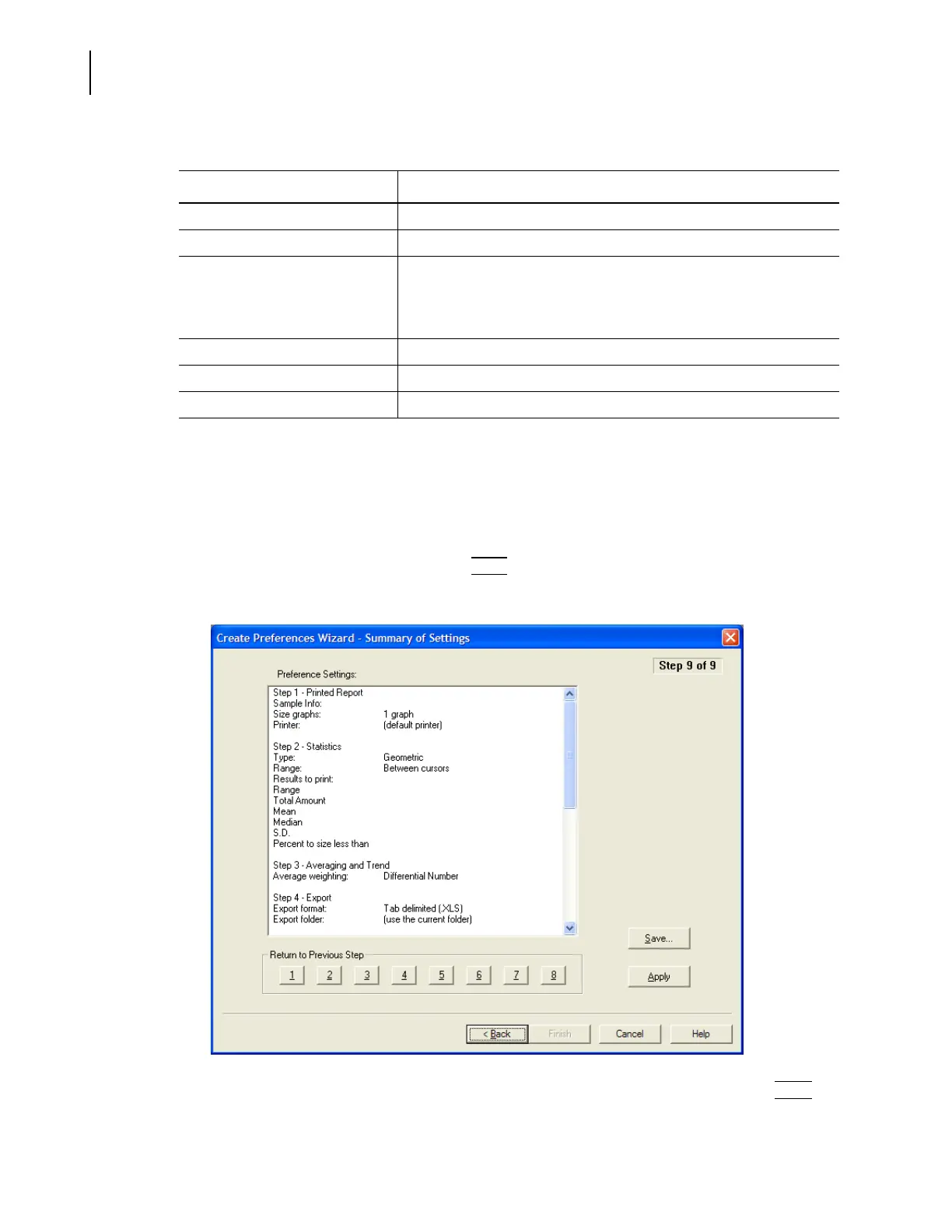
To review your preferences using the Create Preferences Wizard:
1. Select
SOP > Create Preferences Wizard on the Main Menu bar.
2. In the Create Preferences Wizard, click
(
Next
)
until you reach the Summary of Settings window
(Step 9).
3. In the Summary of Settings window, review your settings. To change a setting, click
(
Back
)
or
one of the numbered buttons below the text box to return to a previous step.
Volume Units Select the volume unit you want to use.
Specific Surface Area Units Select the surface area units you want to use.
Blank Subtract Select Allow negative results if you want to display the negative result
when a bin in the blank run contains more particles than a bin in the
sample run. If you do not select this option, the displayed value will be
zero (0).
Numbers Select the numerical format you want to use.
Date Format Select the date format you want to use.
Time Format Select the time format you want to use.
Table 5.6 Preferences Wizard: Set View Options
View Preferences Description



 To Next Page