PN A51387AB
8-15
Configuring Software and Security
Bar Code Reader Configuration Options
8
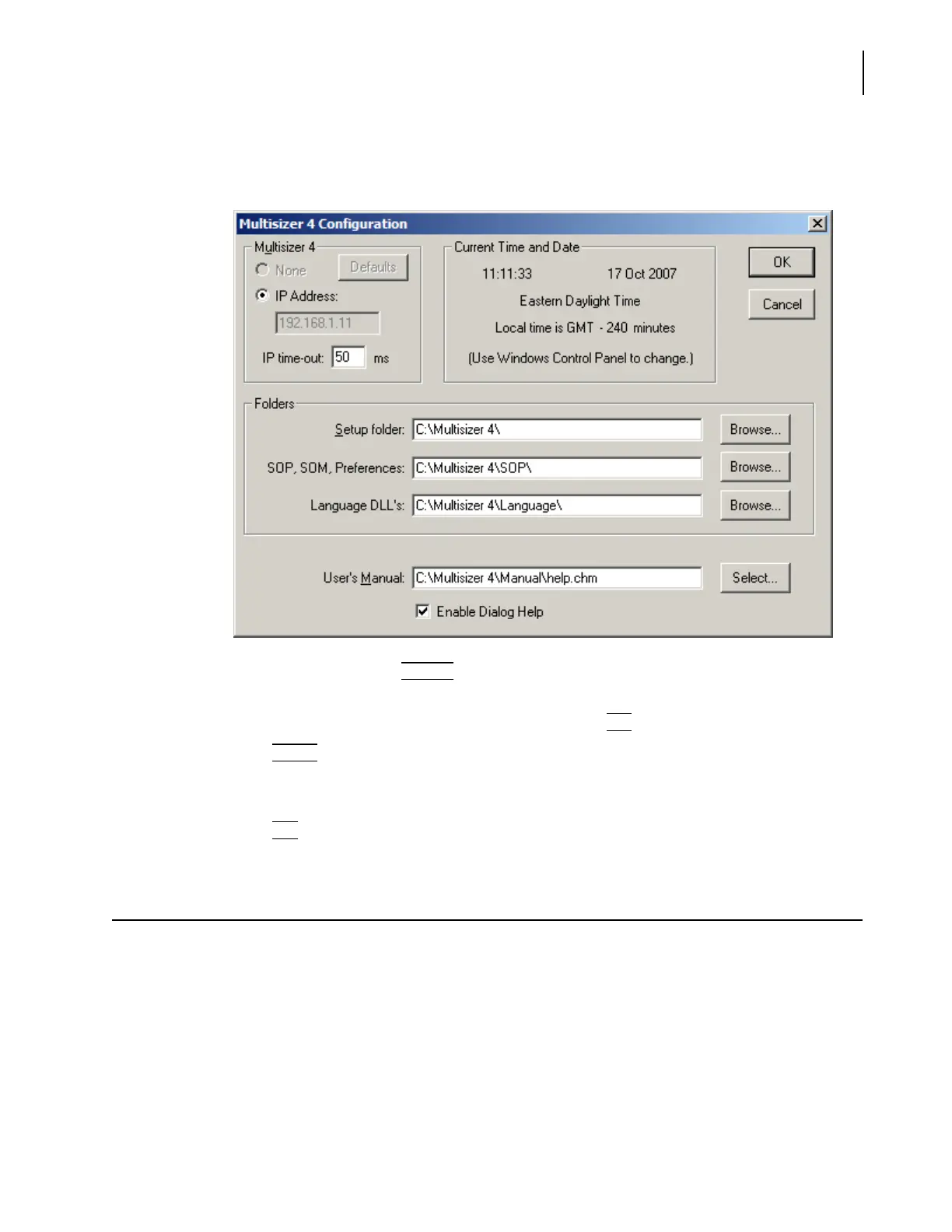
If you are running security mode, select Multisizer 4 Configuration in the Administrator or
Supervisor drop-down menu.
2. In the Folders pane, click
(
Browse
)
next to the Setup folder; SOP, SOM, Preferences; or Language
DLL’s. The Browse for Folder window opens.
3. Navigate to and select the appropriate folder, and click
(
OK
)
to close the Browse window.
4. Click
(
Select
)
next to User’s Manual to select the location of the Multisizer 4 User Manual.
5. Select Enable Dialog Help to display a shortcut to context-sensitive online Help topics in
Multisizer 4 software windows. Help topics are not available from all windows.
6. Click
(
OK
)
to save your settings.
Bar Code Reader Configuration Options
You can use the Bar Code Reader on the Analyzer Control Panel to scan:
• Beckman Coulter ISOTON® II
• Beckman Coulter Multisizer 4 Smart Technology Beakers
• Beckman Coulter Smart Technology Aperture Tubes
• Sample packets
The Bar Code Reader (page 1-7) allows the operator to:
• Identify expired Beckman Coulter ISOTON® II by verifying lot number and expiration date.



 To Next Page