PN A51387AB
3-26
Installing and Calibrating an Aperture Tube
The Change Aperture Tube Wizard
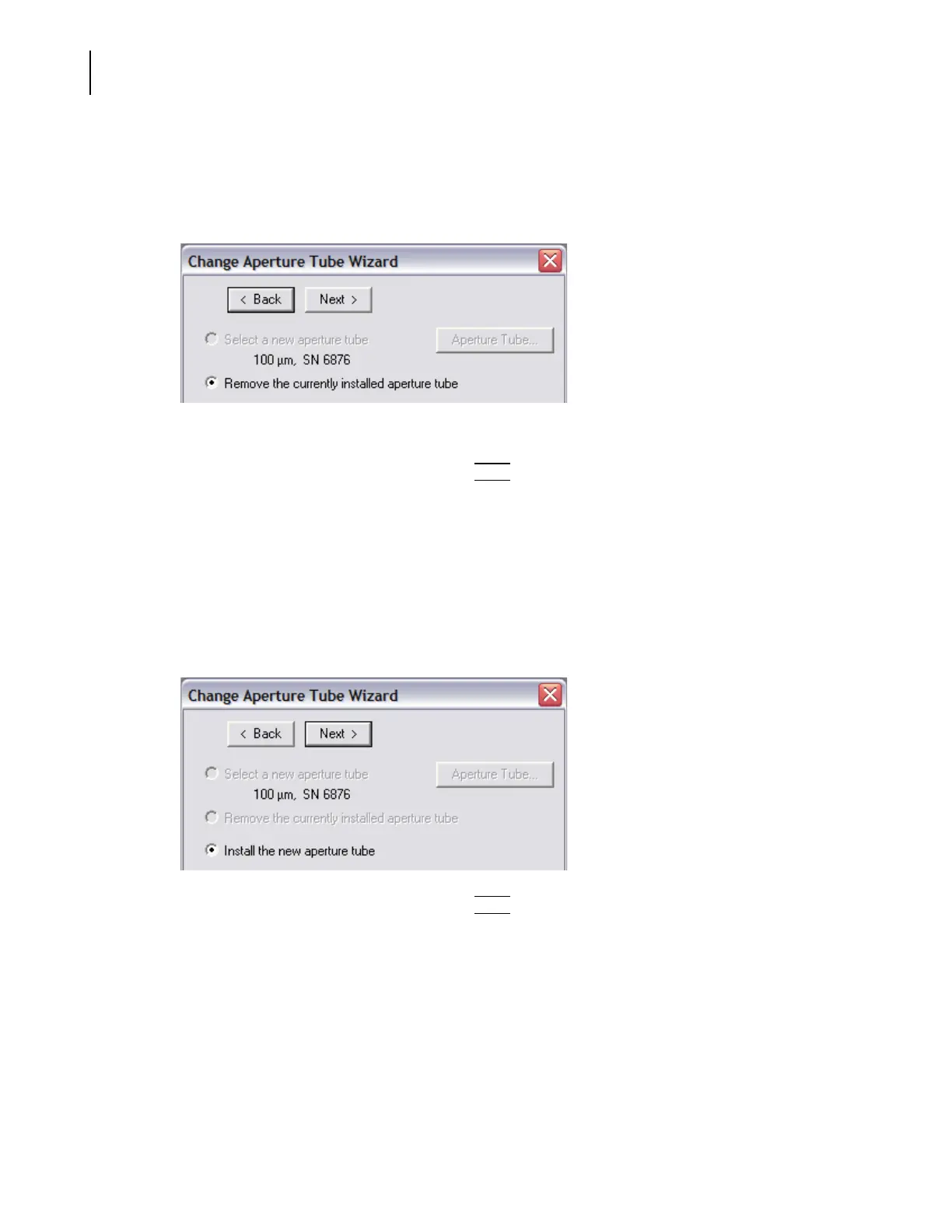
Step 2: Remove the Currently Installed Aperture Tube
The Change Aperture Tube Wizard prompts you to remove the currently installed aperture tube
from the Sample Compartment, if necessary.
For information on removing an aperture tube, see Installing an Aperture Tube, page 3-2.
In the Change Aperture Tube Wizard, click
(
Next
)
to proceed to the next step, Install the new
aperture tube (page 3-26).
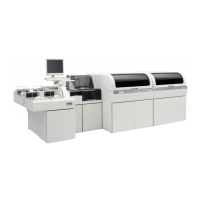
Step 3: Install the New Aperture Tube
After you remove the previously installed aperture tube from the Sample Compartment, the Change
Aperture Tube Wizard prompts you to install the new aperture tube.
For instructions, see Installing an Aperture Tube, page 3-2.
In the Change Aperture Tube Wizard, click
(
Next
)
to proceed to the next step, Place a beaker of
clean electrolyte on the platform.



 To Next Page