PN A51387AB
2-3
Software Overview
Main Menu
2
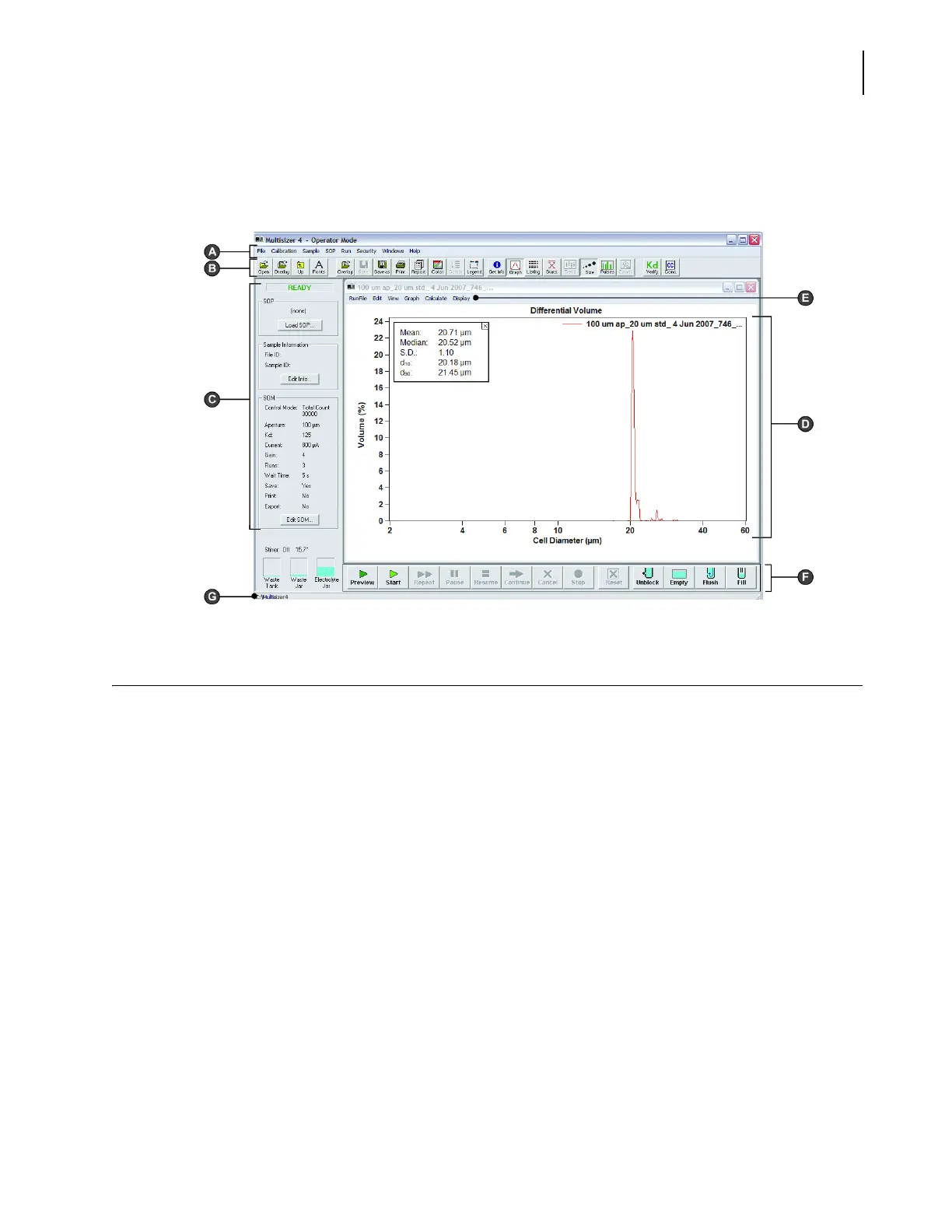
All Multisizer 4 software functions are available from drop-down menu items in the Main Menu (A)
and Run Menu (E). Many menu item functions are duplicated by shortcut buttons on the Main
Toolbar (B) or the Instrument Toolbar (F).
Main Menu
The Main Menu bar appears in the upper left corner of the Multisizer 4 software window. For
information on Main Menu bar drop-down menus, see the table below.
The Main Menu bar and its drop-down menu items change based on security settings. For example,
if you are running the Multisizer 4 software in no security mode, a Configuration drop-down menu
appears. If you are running the Multisizer 4 software in security mode with Administrator or
Supervisor privileges, an Administrator or Supervisor drop-down menu appears that includes
configuration and other security-related items.
Menu items in the Configuration, Administrator, or Supervisor drop-down menu allow the user to
remove items from the drop-down menus (see Customizing Main Menus, page 8-3).
NOTE
If you are running the Multisizer 4 software in security mode, certain menu items will appear only
to user types with sufficient privileges. The system administrator sets privileges for each user type.
In the table below, Main Menu items that may not be available based on security settings are
italicized.



 To Next Page