PN A51387AB
3-31
Installing and Calibrating an Aperture Tube
The Change Aperture Tube Wizard
3
4. When the process is complete, the Status Panel displays READY. The noise level is displayed as
a percentage of aperture size below the Measure noise level step (in grey text). The Wizard
automatically highlights the next step, Verify Calibration (page 3-31).
Step 10: Verify Calibration
This step in the Change Aperture Tube Wizard assumes that you have already calibrated the
currently installed aperture tube (page 3-10). The Multisizer 4 software will automatically verify the
calibration of the aperture tube using the serial number you entered in Step 1: Select the new aperture
tube, page 3-23.
If you have not calibrated the aperture tube, exit the Wizard and calibrate the aperture (page 3-10).
To verify aperture tube calibration:
1. In the Change Aperture Tube Wizard, click
(
Next
)
until you reach the step Verify Calibration.
2. To the right of the Verify Calibration step, click
(
Verify
)
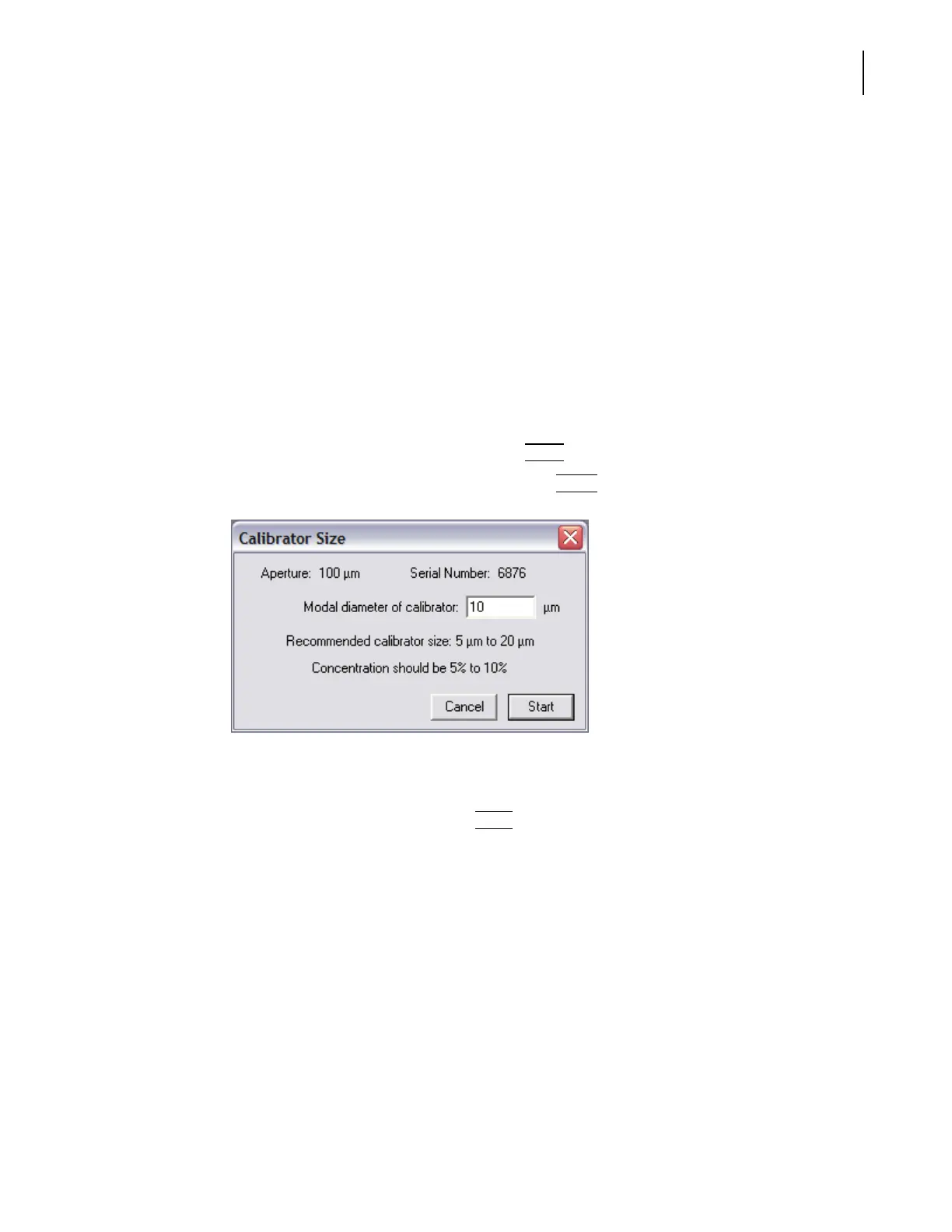
. The Calibrator Size window opens.
3. Enter the appropriate calibrator size.
4. Prepare the Analyzer for calibration.
5. In the Calibrator Size window, click
(
Start
)
. For more information on the verification
procedure, see Verifying the Calibration, page 3-18.



 To Next Page