PN A51387AB
1-18
Analyzer Overview
Starting the Analyzer
Starting the Analyzer
To start the Analyzer:
1. Power ON the Analyzer.
2. Empty the Waste Jar, if necessary.
3. Fill the Electrolyte Jar with electrolyte, if necessary.
4. Open the Multisizer 4 software and connect the software to the Analyzer.
5. On the Multisizer 4 software Main Menu bar, select
Run > Instrument Start-Up.
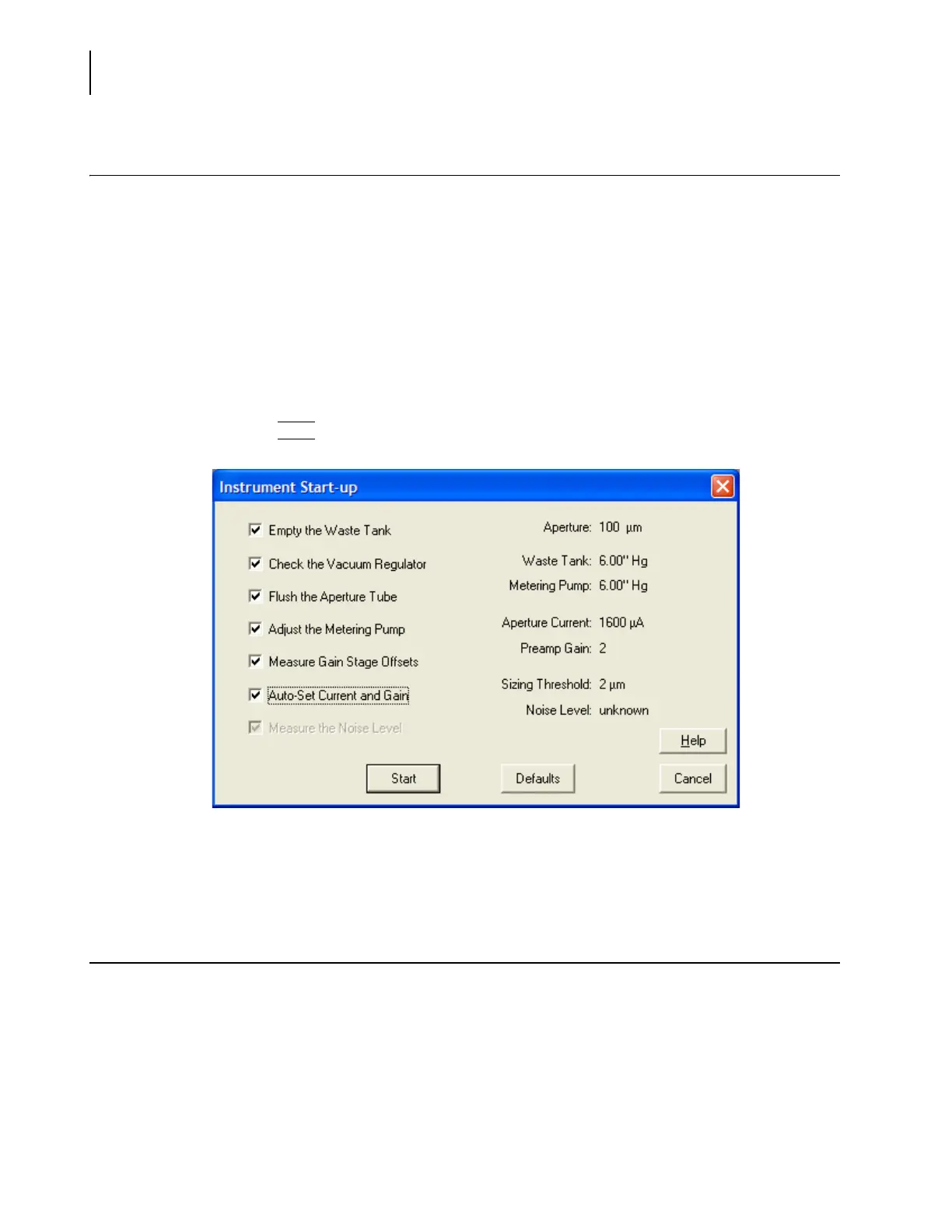
6. In the Instrument Start-Up dialog box:
a. Select checkboxes for each function you would like the Analyzer to perform on startup.
b. Click
(
Start
)
.
NOTE
The Multisizer 4 performs best when it has reached a steady working temperature. This
typically takes 15 minutes from powering on the Analyzer.
Preparing the Analyzer for Sample Runs
To prepare the analyzer for a calibration, control, or sample analysis run:
1. Start the Analyzer and connect the software to the Analyzer (see Starting the Analyzer,
page 1-18).
2. Wash the ST Aperture Tube and ST Beaker or Accuvette® ST (see Cleaning the Aperture Tube,
Beakers, and Accuvette® STs, page 1-15).
3. Fill an ST Beaker or Accuvette® ST with clean electrolyte solution.



 To Next Page