PN A51387AB
3-32
Installing and Calibrating an Aperture Tube
The Change Aperture Tube Wizard
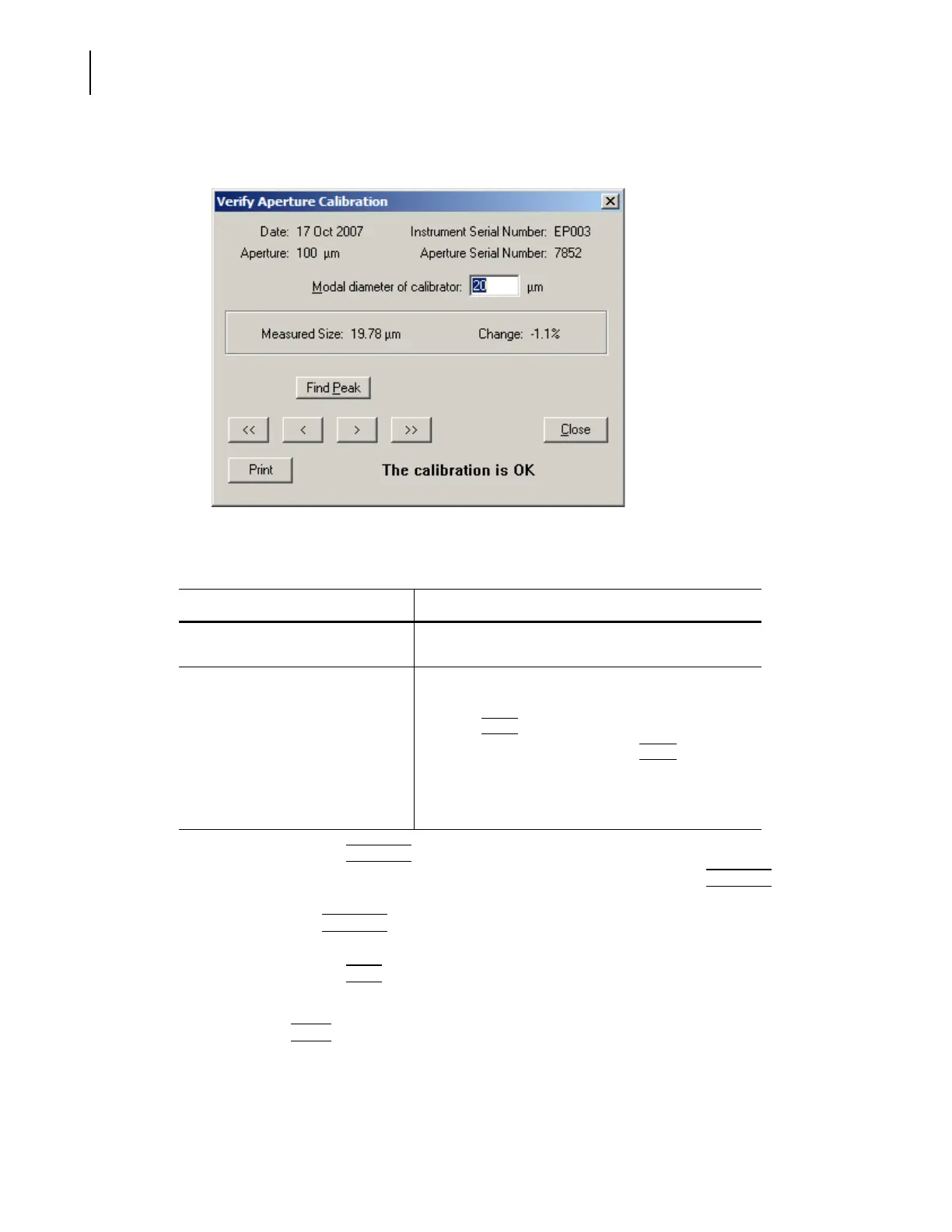
6. When the verification is complete, the Verify Aperture Calibration window opens.
7. In the Verify Aperture Calibration window:
• If desired, click
(
Find Peak
)
to place cursors at or on either side of the peak of the
calibration graph. If you are performing a modal calibration, clicking
(
Find Peak
)
automatically places a cursor on the modal channel. If you are performing a mean
calibration,
(
Find Peak
)
automatically places two cursors on the graph, one on either side
of the peak. The cursor(s) define the mode or median used to calculate the new Kd.
• If desired, click
(
Print
)
to print the window. This button does not display a dialog box or
allow you to change print settings.
When you click
(
Close
)
to exit the Verify Aperture Calibration window, the Change Aperture Tube
Wizard closes.
Table 3.6 Verify Aperture Calibration Window
If the window displays... Then...
The calibration is OK The measured particle size is within 3% of the actual
calibrator size, and the calibration was successful.
The instrument needs to be
recalibrated
The measured variation is too great, and the calibration
was not successful.
1. Click
(
Close
)
to exit the window.
2. In the Instrument Toolbar, click
(
Reset
)
.
3. If necessary, adjust the amount of calibrator in the
electrolyte.
4. Restart the calibration procedure.



 To Next Page