PN A51387AB
1-6
Analyzer Overview
Control Panel
Viewing Control Panel Actions in Run Information
If you use Control Panel buttons to adjust stirrer operation during an analysis run, the Multisizer 4
software stores all changes in stirrer operation, direction, and speed with sample run information.
To view sample and run information:
1. Open an analysis file.
2. Select
RunFile > Get Info on the Run Menu bar.
ON Light
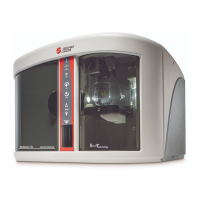
The blue ON light is located at the top of the Control Panel (Figure 1.3, A)
Analyzing and Attention Lights
There are two status lights (Figure 1.3, B): Analyzing and Attention, below the ON light.
• The green Analyzing light is on when the Analyzer is running an analysis. It duplicates the
function of the green LED light in the Sample Compartment.
• The amber Attention light flashes when an error prevents the Analyzer from starting a run (for
example, when the door is open or the sample platform is not in place). The amber Attention
light duplicates the function of the amber LED light in the Sample Compartment. When the
amber light flashes, the Multisizer 4 software displays an error message.
Stir ON Button
The Stir ON button is located below the Analyzing and Attention lights on the Control Panel
(Figure 1.3, C). The toggle button turns the stirrer on or off. It is lit when the stirrer is ON. The Stirrer
operates only when the platform is in the raised position for sample analysis. It will not spin when
the platform is in the loading position.
Stirrer Direction Controls
You can select or change stirrer direction before or during an analysis run using the clockwise (CW)
or counter-clockwise (CCW) button (Figure 1.3, D).
The direction of the stirrer influences particle suspension. The clockwise (CW) direction circulates
fluid and sample particles downwards and inwards toward the base of an ST Beaker. The counter-
clockwise (CCW) direction circulates fluid and particles upwards and outwards toward the edges of
the beaker.



 To Next Page