PN A51387AB
3-17
Installing and Calibrating an Aperture Tube
Calibrating the Aperture
3
Example
This example uses a 10 µm calibrator and a 100 µm Aperture Tube.
Updating the Mean Kd Value
If you have calculated the mean calibration constant (Kd) value for the aperture (page 3-16), you can
manually enter the Kd value using the Change Aperture Tube Wizard.
To enter the mean Kd value:
1. Select
Run > Change Aperture Tube Wizard on the Main Menu bar.
2. In the Change Aperture Tube Wizard, click
(
Aperture Tube
)
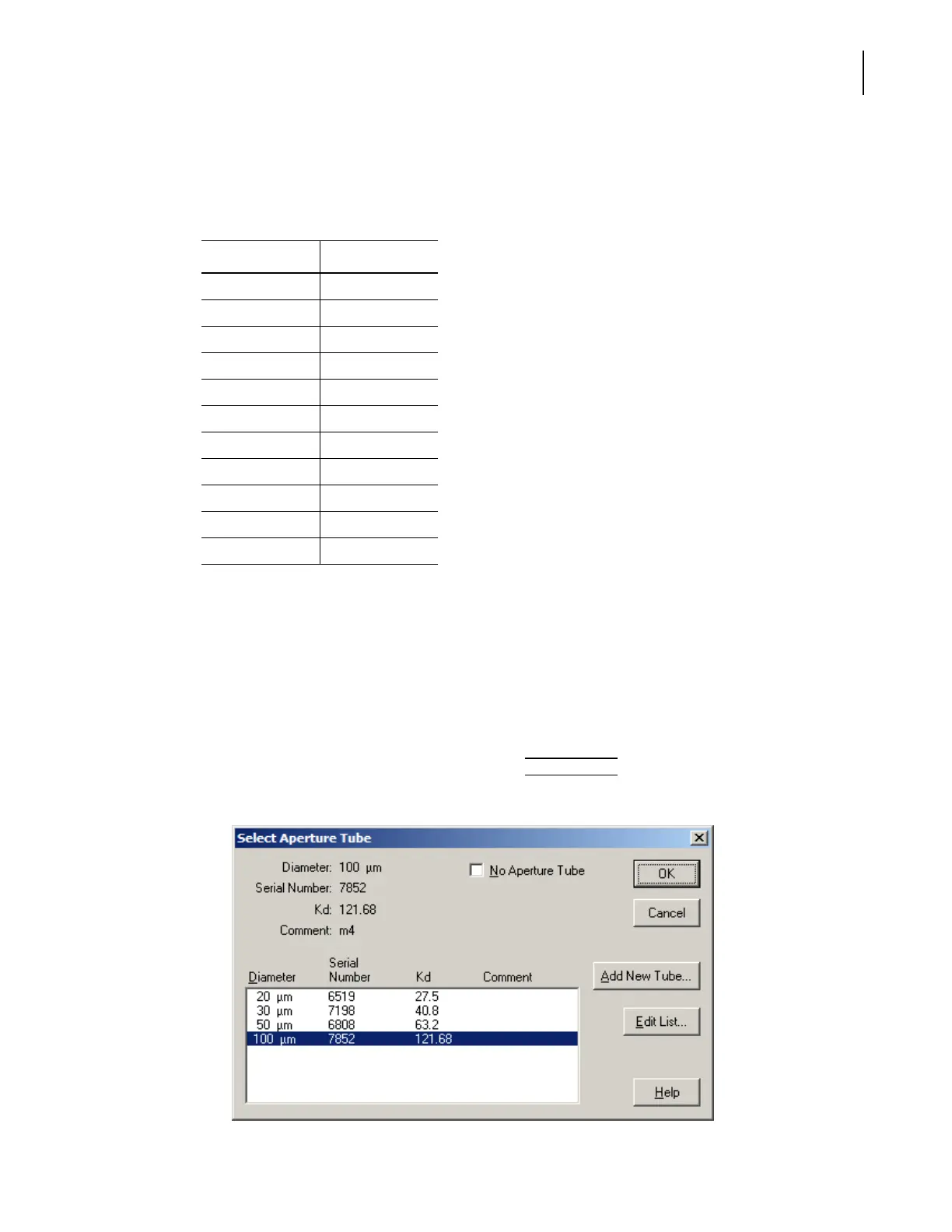
to the right of the Select a new
aperture tube step. The Select Aperture Tube window opens.
Table 3.4 Obtaining Mean Kd Value
Run Kd
1124.15
2125.82
3125.13
4125.23
5125.43
6125.13
7124.25
8125.62
9124.25
10 125.03
MEAN 125



 To Next Page