PN A51387AB
10-4
Regulatory Compliance
File History and Audit Trail
Setting Audit Trail Options
In addition to the auditing associated with the electronic file itself, the Multisizer 4 software offers
two additional levels of auditing. First, a general system audits records and stores information at a
system level (for example, who logged in when, or when users were added to the system). Second,
the Multisizer 4 software generates an error log that stores and records errors associated with the
system (for example, missing files and bad communications).
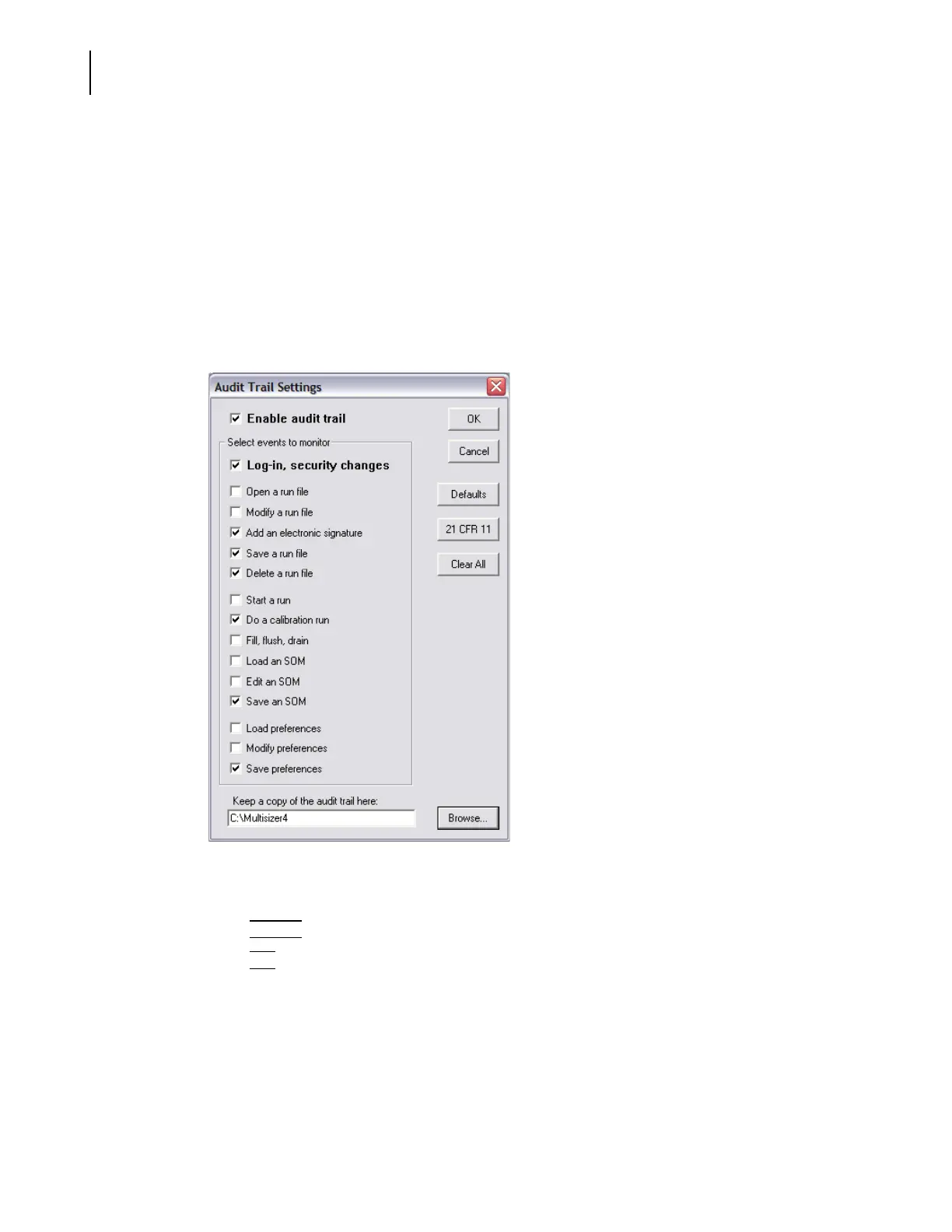
To select audit trail settings:
1. Select
File > Open on the Main Menu bar. The Audit Trail Settings window opens.
2. In the Audit Trail Settings window, select Enable audit trail.
3. In the Select events to monitor pane, select the required options.
4. Click
(
Browse
)
to select the location of audit trail records.
5. Click
(
OK
)
.
NOTE
The dialog has a button marked 21 CFR 11. When activated, this ensures all options are set so
that the settings meet with the rules that apply to 21 CFR part 11.





 To Next Page