PN A51387AB
7-6
Working with Analysis Files
Viewing Analysis Files
Blockage Monitors Column Format
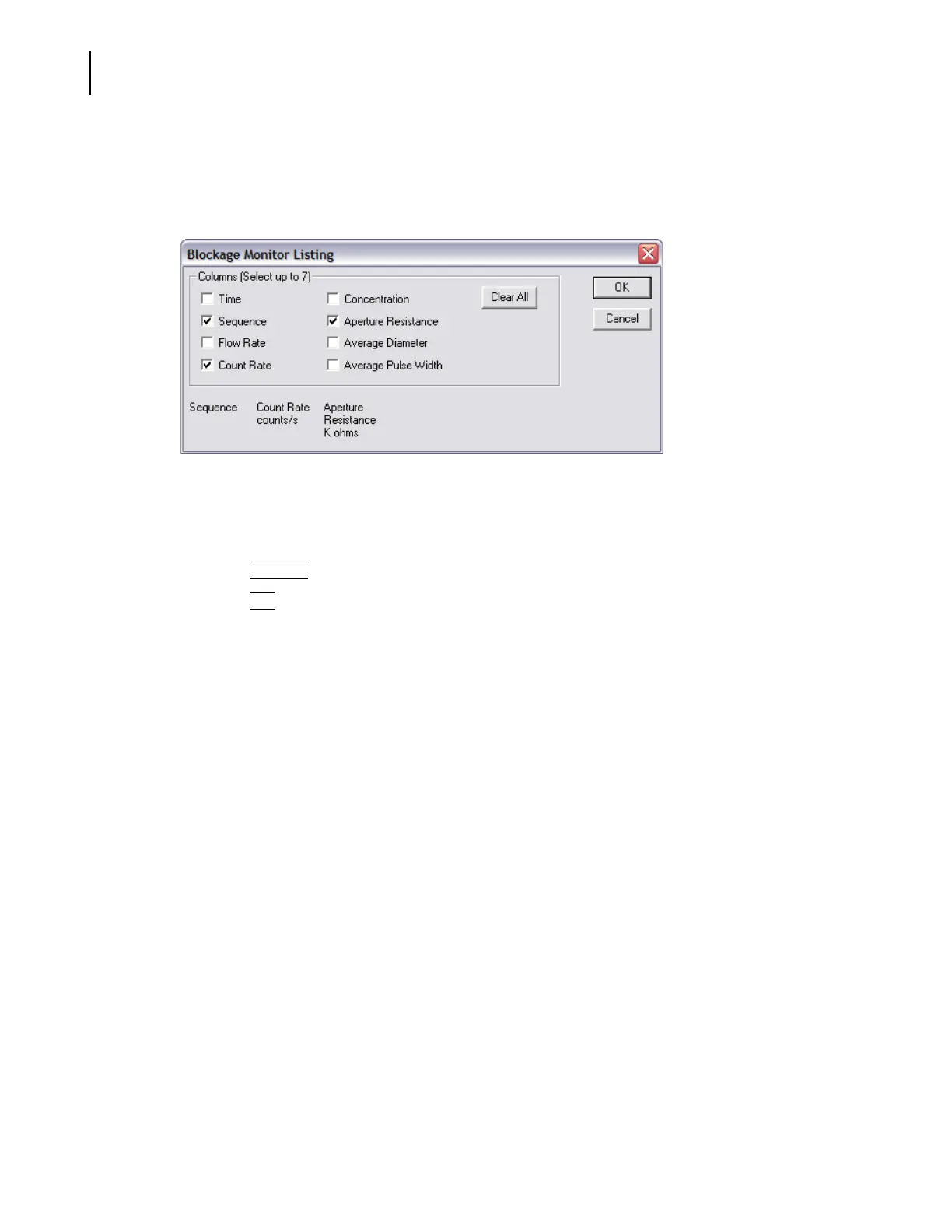
If you select View > Listing then select Blockage Monitors, the Blockage Monitor Listing window
opens when you select
Listing > Column Format.
To select the data columns that will appear in the Blockage Monitor listing:
1. In the Blockage Monitor Listing window, select the data you want to display in the Columns
pane.
2. Click
(
Clear All
)
to clear all selections.
3. Click
(
OK
)
.
Calculate Menu
For information on available menu items in the Calculate drop-down menu, see Viewing Statistics,
page 7-8.
Viewing Interpolations
An interpolation allows you to divide a particle size distribution into any number of bins (channels)
of any size. Interpolation is similar to viewing results by statistical percentiles, but offers greater
flexibility.
The
Interpolate menu option on the Run Menu bar is only available if you are viewing results by
particle size (
View > Interpolate and Size is the only possible combination).
To view an interpolation:
1. Select
View > Interpolation on the Run Menu bar, then select Size.



 To Next Page