PN A51387AB
3-25
Installing and Calibrating an Aperture Tube
The Change Aperture Tube Wizard
3
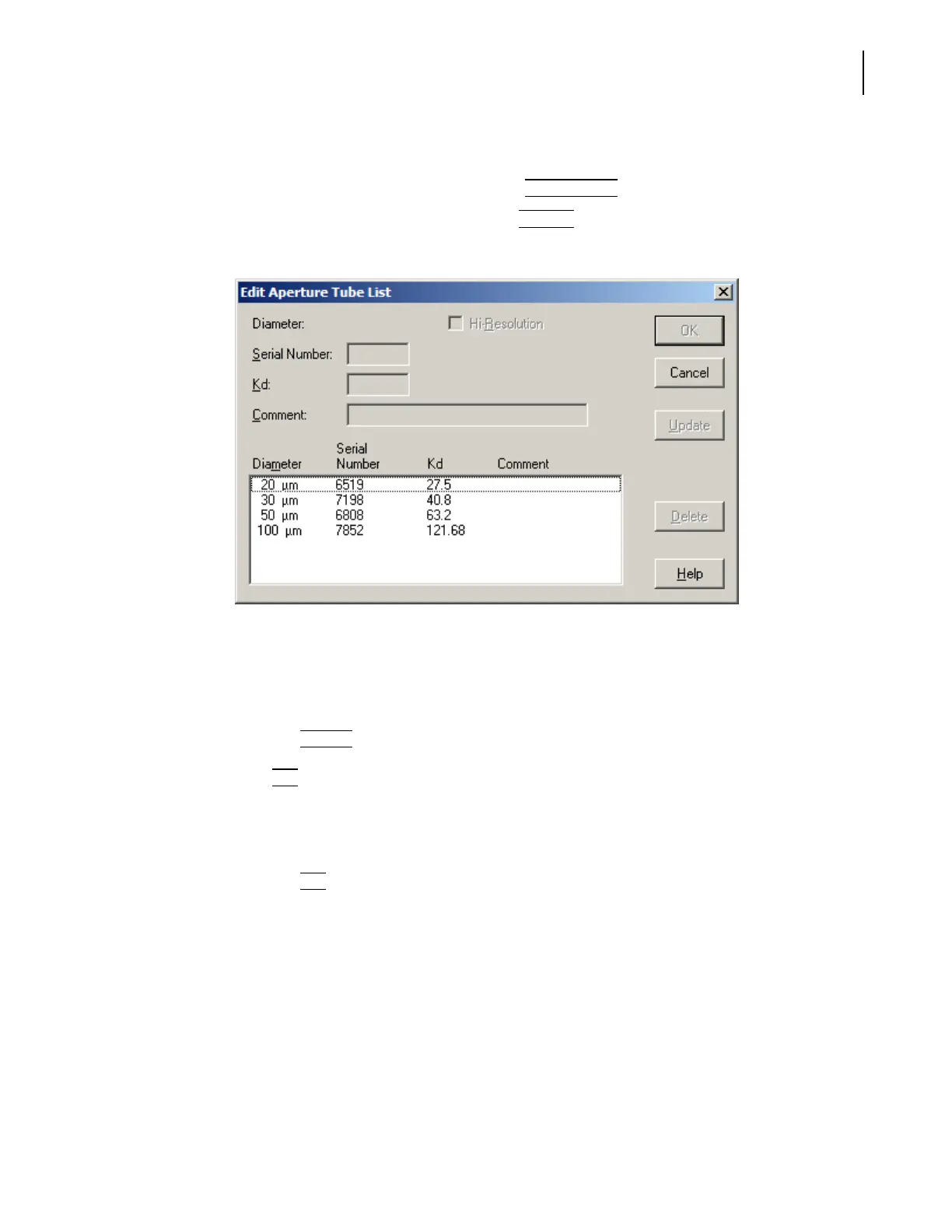
To edit the aperture tube list:
1. In the Change Aperture Tube Wizard, click
(
Aperture Tube
)
.
2. In the Select Aperture Tube window, click
(
Edit List
)
. The Edit Aperture Tube List window
opens.
3. In the Edit Aperture Tube List window:
a. In the Diameter/Serial Number/Kd/Comment box, click the row you would like to edit.
b. Enter a new Serial Number and/or the mean Kd in the text fields (see Obtaining the Mean
Kd, page 3-16).
c. Click
(
Update
)
.
4. Click
(
OK
)
to return to the Select Aperture Tube window.
5. In the Select Aperture Tube window:
a. In the Diameter/Serial Number/Kd/Comment box, click to highlight the row displaying
serial number and Kd of the aperture tube you installed.
b. Click
(
OK
)
to return to the Wizard.
The Wizard automatically highlights the next step, Remove the currently installed aperture tube
(page 3-26).



 To Next Page