PN A51387AB
3-22
Installing and Calibrating an Aperture Tube
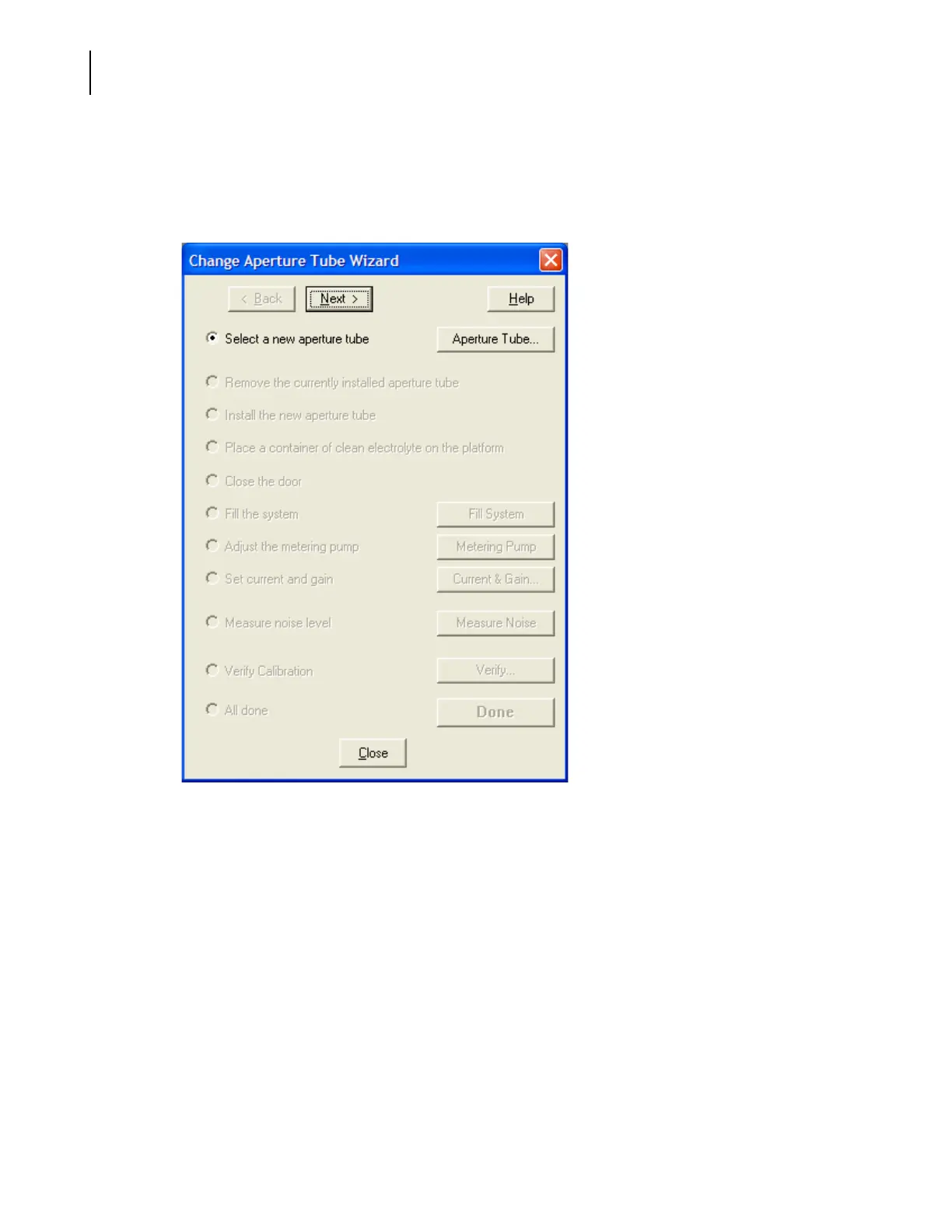
The Change Aperture Tube Wizard
To use the Change Aperture Tube Wizard:
Select
Run > Change Aperture Tube Wizard on the Main Menu bar. The Change Aperture Tube Wizard
window opens.
The following sections describe how to use the Change Aperture Tube Wizard:
• Step 1: Select the new aperture tube, page 3-23
• Step 2: Remove the Currently Installed Aperture Tube, page 3-26
• Step 3: Install the New Aperture Tube, page 3-26
• Step 4: Place a Beaker of Clean Electrolyte on the Platform, page 3-27
• Step 5: Close the Door, page 3-27
• Step 6: Fill the System, page 3-28
• Step 7: Adjust the Metering Pump, page 3-28
• Step 8: Set Current and Gain, page 3-28
• Step 9: Measure Noise Level, page 3-30
• Step 10: Verify Calibration, page 3-31
• Step 11: All Done, page 3-33



 To Next Page