PN A51387AB
3-29
Installing and Calibrating an Aperture Tube
The Change Aperture Tube Wizard
3
CAUTION
If you are using a 20-µm or 30-µm aperture tube, the recommended current
setting is 600 µA. Higher currents can erode the aperture and create electrical
noise. Beckman Coulter recommends that you set the gain to 4, and the current to
600 µA. For information on how to change current and gain settings, see Standard
Operating Method: Threshold, Current and Gain, page 4-13.
To set current and gain:
1. In the Change Aperture Tube Wizard, click
(
Next
)
until you reach the step Set Current and
Gain if it is not already highlighted.
2. To the right of the Set Current and Gain step, click
(
Current & Gain
)
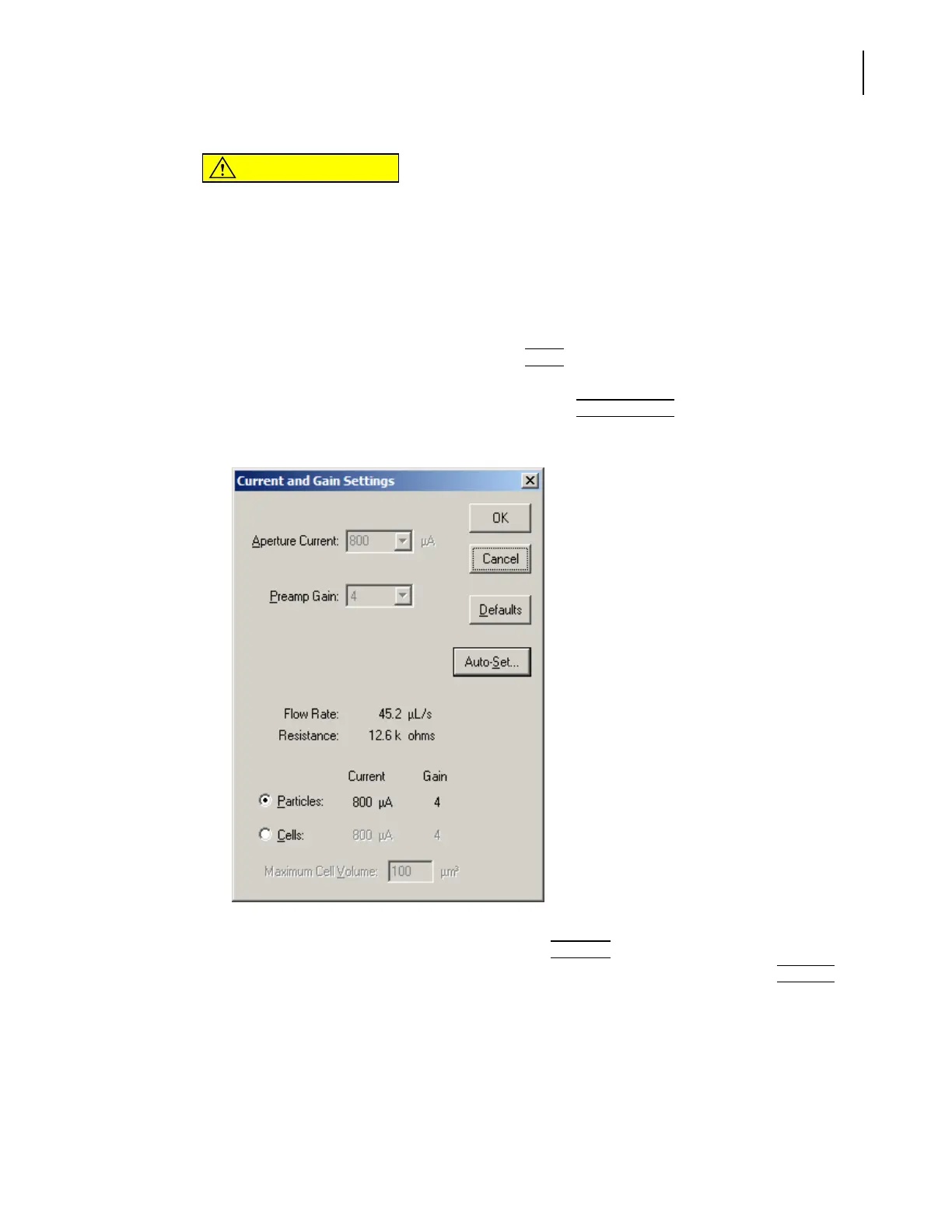
. The Current and Gain
Settings window opens.
3. In the Current and Gain Settings window, click
(
Auto-Set
)
. If you are using 20-µm or 30-µm
aperture tubes, Auto-Set is not available. Use the system defaults by clicking the
(
Defaults
)
button.
a. The window expands to display automatic settings for particles and cells.
b. The Analyzer measures electrical resistance through the aperture. MEASURING
RESISTANCE appears in the Status Panel.
During the Measuring Resistance procedure, the software selects a current setting based on
the size of the aperture tube and the concentration of the electrolyte solution. Using an
electrolyte solution at a lower concentration increases the electrical resistance and



 To Next Page