10
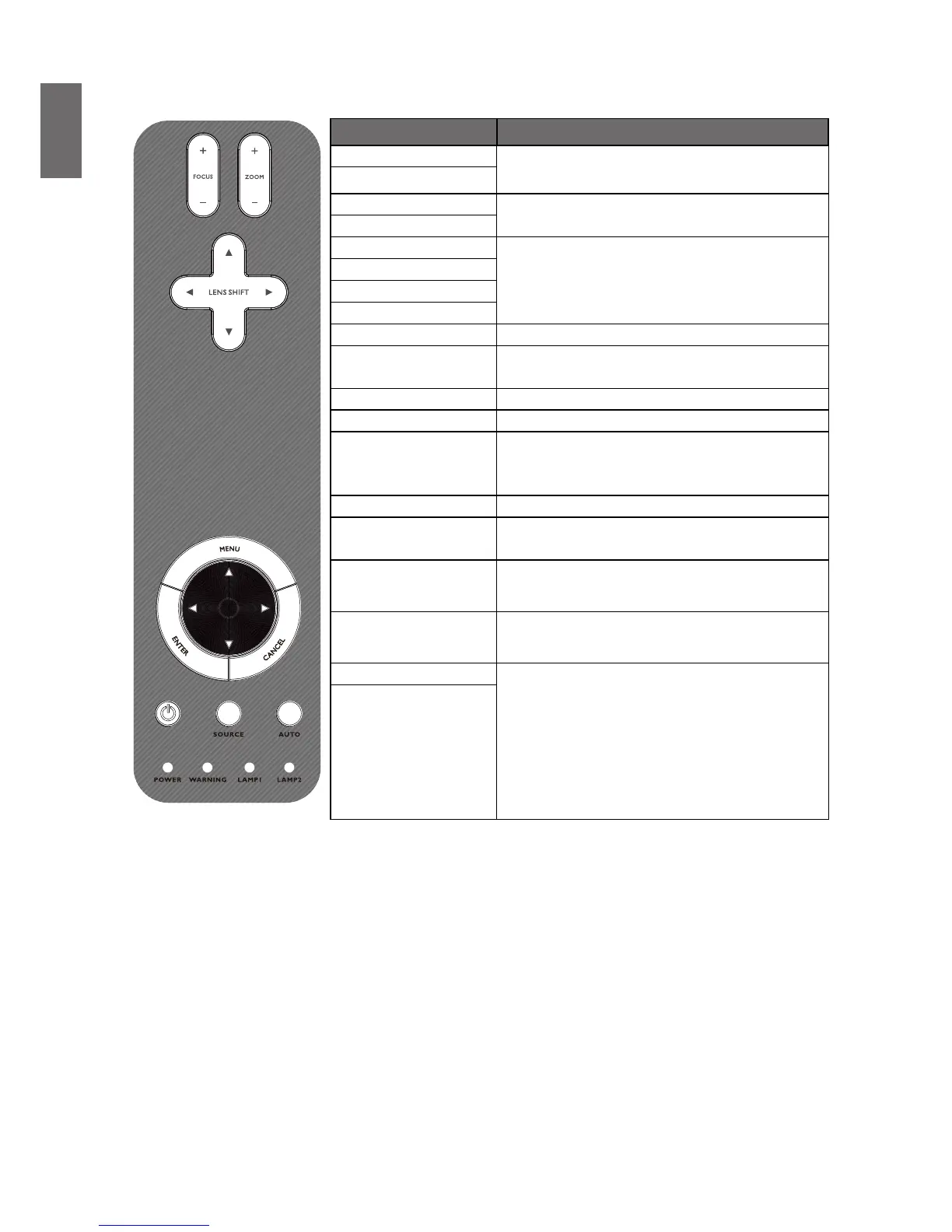
Control panel and functions
Name Function
FOCUS+
Focus the projected image
FOCUS-
ZOOM+
Increase/decrease projected image size
ZOOM-
UP BUTTON
Control Lens shift to move image left, right,
up, or down
RIGHT BUTTON
DOWN BUTTON
LEFT BUTTON
MENU Open / Close the OSD
UP/ DOWN/ LEFT/
RIGHT BUTTONS
Navigate and change settings in the OSD
ENTER
Select or change settings in the OSD
CANCEL
Exit the On-Screen Display (OSD)
POWER
Turn the projector on or off (main power
switch must be turned on rst). Press to place
the projector in standby mode
SOURCE
Select the input source
AUTO
Auto Sync to optimize image size, position,
and resolution
POWER
(LED)
Green / Red / Orange / Flashing
See “Indicator messages” on page 58
WARNING
(LED)
Green / Red / Orange / Flashing
See “Indicator messages” on page 58
LAMP 1
(LED)
Green / Flashing,
See “Indicator messages” on page 58
LAMP 2
(LED)



 To Next Page