EasyManua.ls Logo

BenQ PX9510 - Projector Exterior and Controls

BenQ PX9510
76 pages
Print Icon
To Next Page IconTo Next Page
To Previous Page IconTo Previous Page
Loading...
English
8
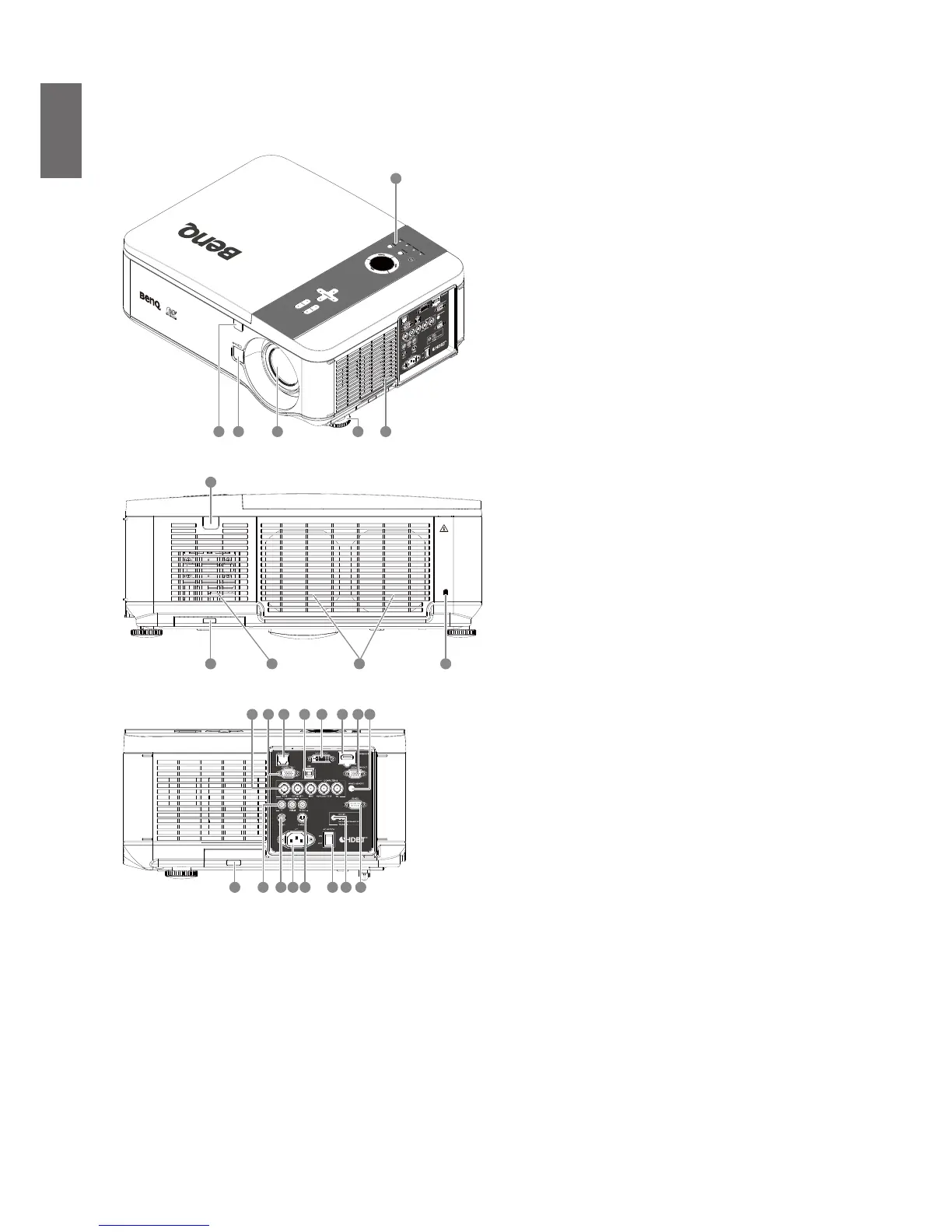
Projector exterior view
Front and upper side view
5 26
1
43
1. Control Panel
2. Air Inlet
3. Front IR sensor
4. Lens Change button
5. Lens (Remove lens hole cap before
use)
6. Foot for adjusting projector level
Rear view
10
11
9 8 7
7. Kensington Lock
8. Air Exhaust
9. Air Inlet
10. Air Filter
11. Rear IR sensor
Left side view
2320
15 16 1817 191412 13
25 2621 2422 27
12. Computer 2, RGBHV,
Y/Pb(CB)/Pr(Cr) input
13. Computer 1, VGA
14. LAN/HDBaseT
15. USB port for service
16. DVI-D Input
17. HDMI (HDCP)
18. Monitor Out, only for computer 1.
19. WIRED REMOTE
20. Air Filter
21. Components Y/Pb (Cb)/Pr(Cr) input
22. Video input
23. AC Power Cable Inlet
24. S-VIDEO input
25. AC Power Switch
26. Screen Trigger output
27. RS-232 control input

Table of Contents

Other manuals for BenQ PX9510

Related product manuals