25
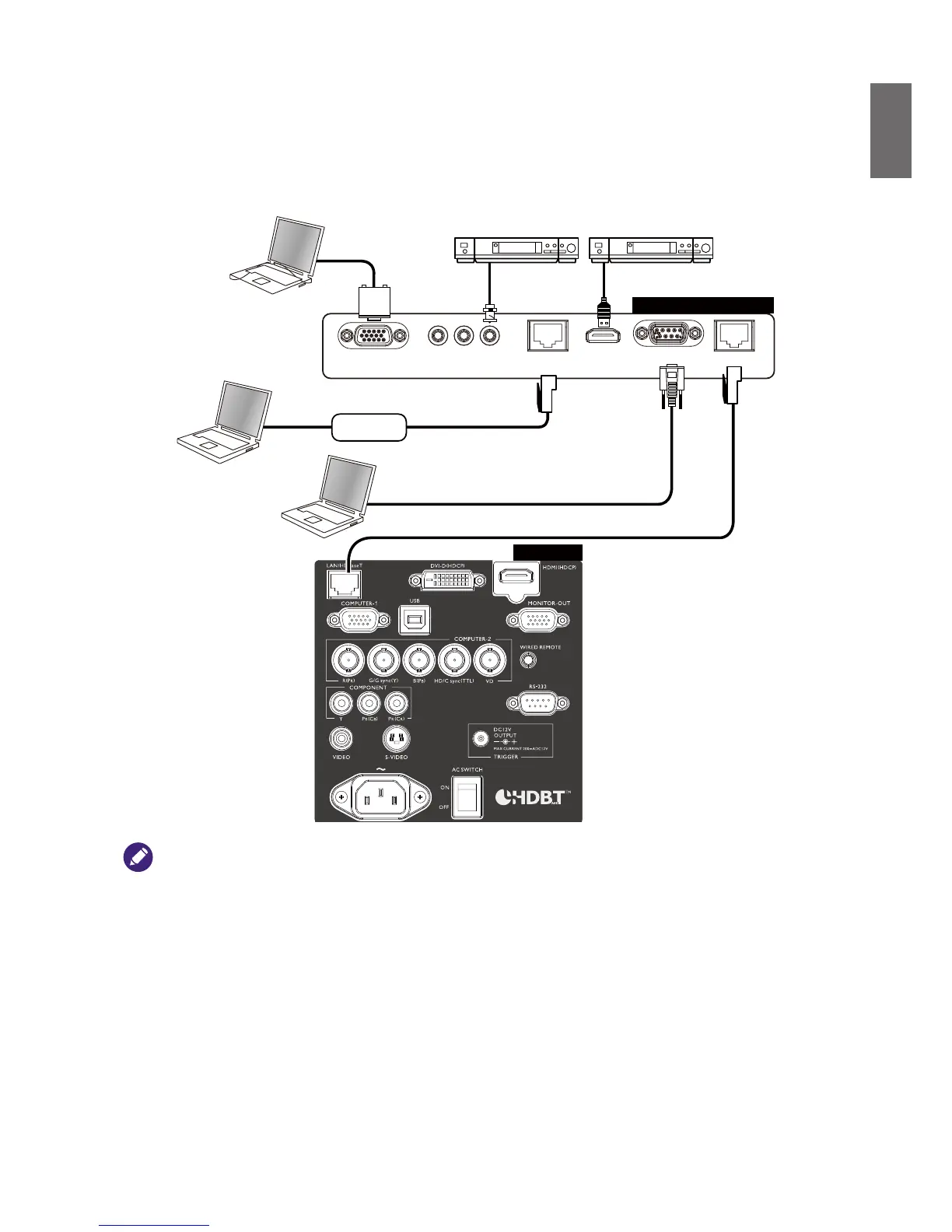
Connecting a external HDBaseT transmitter
The projector features a built-in HD Connect for you to work with optional HDBaseT
transmitter to send video, RS-232, LAN signal to projector with single RJ-45 cable. If the optional
HDBaseT transmitter supports IR remote controller I/O, you may also send IR remote controller
signal to PU9530/PW9520/PX9510 projector using the same RJ-45 cable.
VGA IN
RJ45
Lan
HDMI RS232 RJ45YPbPr
DVD Player
HUB
• The
HDBaseT/LAN
of your projector supports to video,
RS-232
, remote controller, and network control
signal receiving but not Power over Ethernet (PoE) transmission and receiving.
• To send
RS232
commands with an external digital transmitter via RJ45 cable to your projector: set
INSTALLATION
>
RS232
>
Channel
to
HDBaseT
in OSD menu, the transmission speed is changed to
9600 by the system automatically.
• Effective transmission distance of your digital transmitter is 100 meters. Transmission over 100 meters may lead to
projection screen interruption, interference, or control signal failure.
• Please use Cat.5e RJ-45 cable or better and prevent the cable from becoming twisted. Otherwise the cable may be
damaged and signal transmission quality poor, reducing transmission distance and image.
DVD Player
HDBaseT Transmitter
Projector



 To Next Page