⦁
touch «Hoop size»-icon
Functions
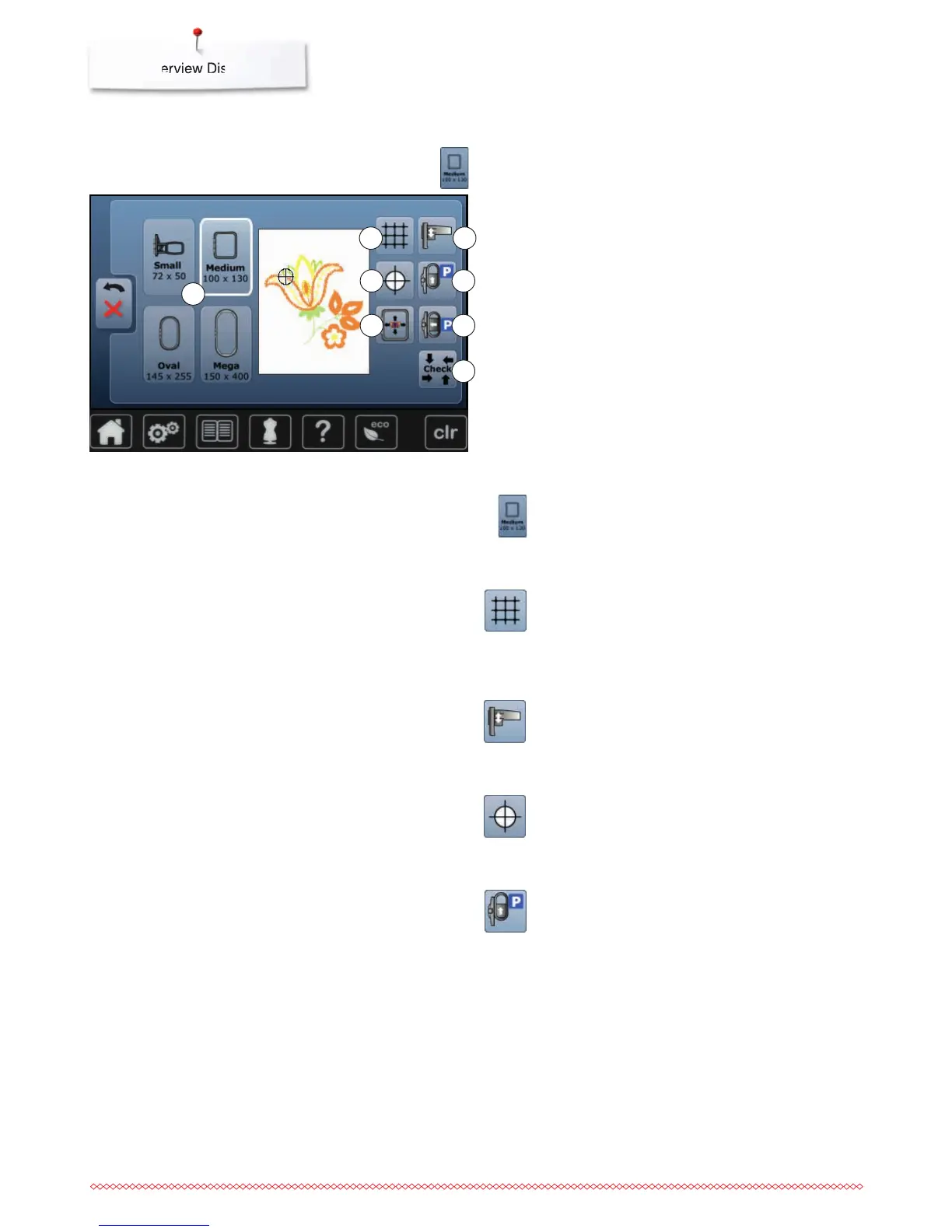
1 Select Hoop Menu
2 Grid
3 Calibrating the embroidery module
4 Motif center
5 Move hoop to back
6 Virtual positioning
7 Parking the module
8 Check hoop and motif size
Select hoop menu
►
the optimal hoop for the motif selected is displayed
⦁
touch the button
►
the Display with the Select Hoop and further
functions appear
Move hoop to back
►
the hoop moves vertically to the far back
Better access for changing the bobbin.
Calibrating the embroidery module
⦁
touch icon
►
the embroidery module is calibrated (moves to the
reference points)
The embroidery hoop mustn't be attached.
Motif center
The exact motif center is indicated by the cursor.
The embroidery hoop is moved until the needle is
positioned exactly in the center of the embroidery motif
when the function «Virtual positioning» is activated.
3
5
7
8
2
4
6
1
Grid
⦁
touch the icon
►
a large cursor shows the center of the hoop
⦁
touch the icon again
►
the grid appears
⦁
the motif can be positioned more exactly



 To Next Page