⦁
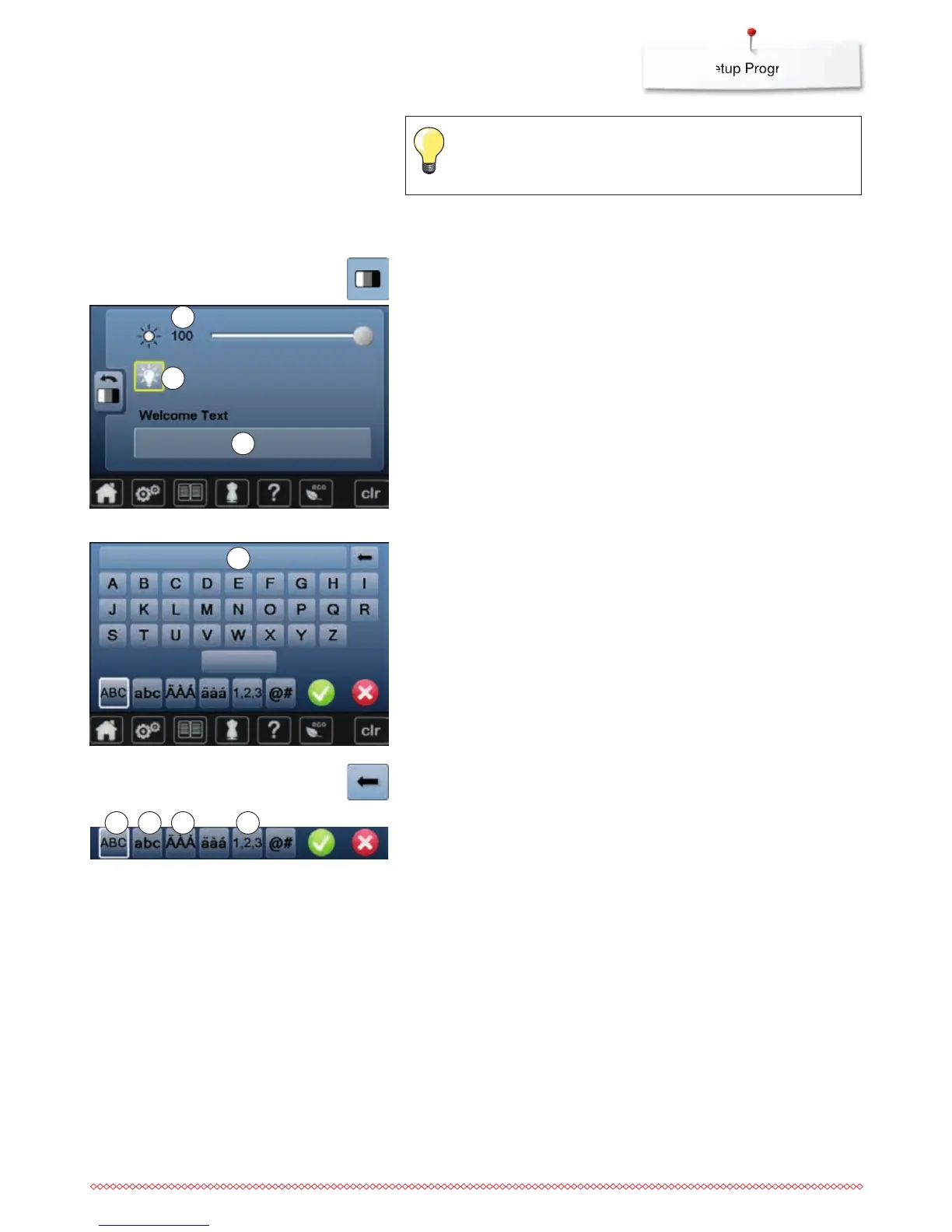
touch «Display setting»-icon
Brightness
⦁
move the round knob in the Display using the finger to the left/right or
⦁
turn the stitch width knob
►
brightness 1 of the Display is changed
►
alterations are visible in the yellow-framed icon
►
a white line indicates the basic setting
⦁
pressing the yellow-framed icon = basic setting is restored
Sewing light
►
when icon 2 is active, the sewing light is on
►
when icon 2 is inactive, the sewing light is off
Welcome text
⦁
touch icon 3 to create or edit the welcoming text
The space button is below the keyboard.
►
Welcome text 4 appears in the text icon above the letter keys
⦁
touch «Text»-icon 4
►
the entered text is completely deleted
Changing Display settings
Corrections
⦁
touch icon
►
the entered text is deleted from the right to the left
Touch the yellow-framed icon to reset to basic setting.
5 «ABC» all in upper case (Standard)
6 «abc» all in lower case
7 «Ä À Á», «ä à á» and «@ #» upper and lower special characters
8 «1,2,3» numbers and mathematical characters
1
2
4
3
5 6 7 8



 To Next Page