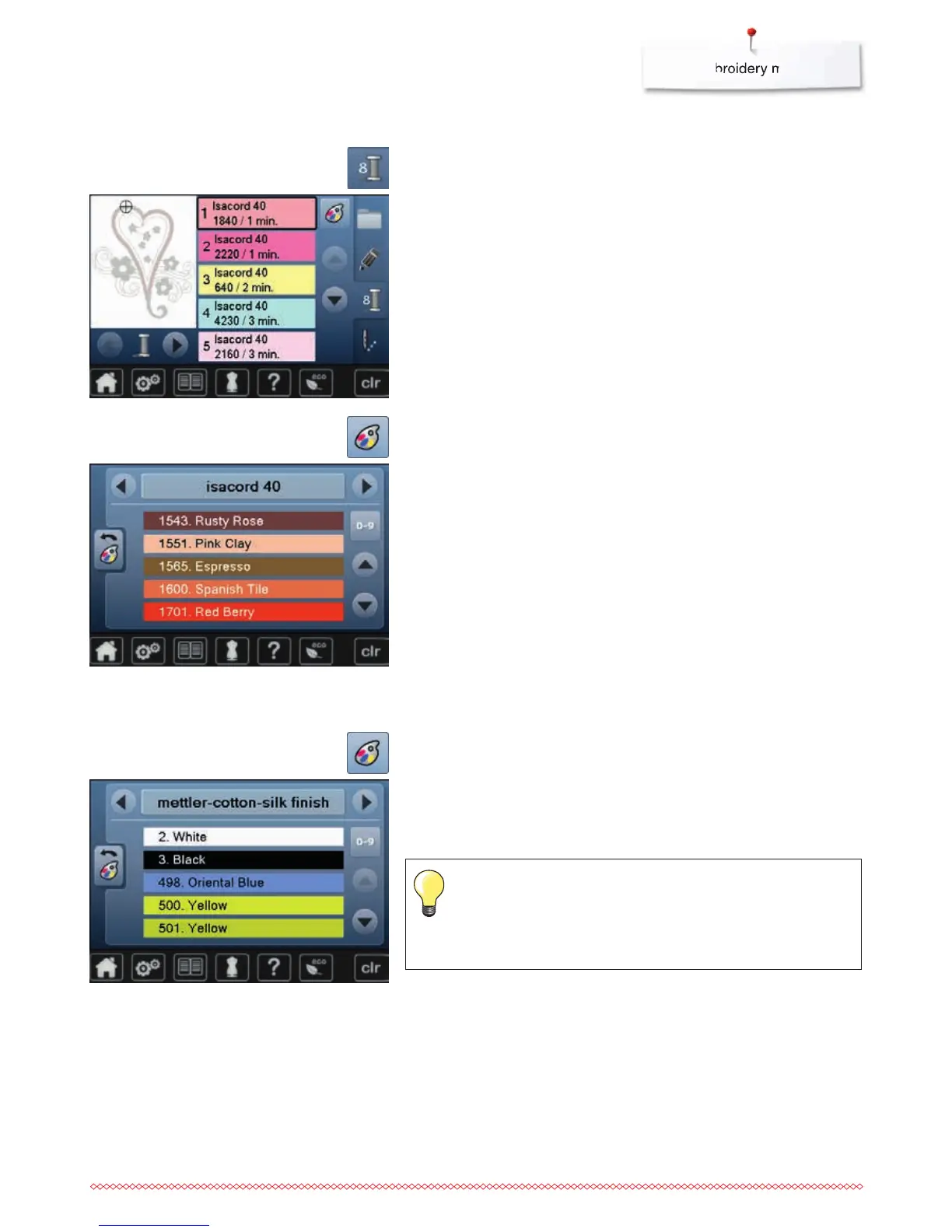
Changing the thread brand
Changing motif colors
⦁
touch «Color number»-icon in the Display
⦁
scroll with the arrow icons, if necessary, until the color to be changed
appears
⦁
select the color to be changed (e.g. 1)
⦁
touch «Thread color»-icon
⦁
scroll with the arrow icons left or right until the desired thread brand
appears
⦁
touch «Thread brand»-icon
►
the thread brand in the Display changes and the new thread details appear
⦁
touch «Back»-icon
►
the altered thread details are displayed
Motif colors
⦁
touch «Thread color»-icon
⦁
scroll with the arrow icons until the desired color appears
⦁
select the desired color or
⦁
touch «0-9»-icon and
⦁
enter the color number via the keyboard
⦁
touch the white X to close the 0-9 window and confirm the selected color
⦁
select color icon
►
the new color is reallocated
►
the altered color is displayed
Different thread brands can be assigned to the motif.
⦁
scroll to the desired thread brand
⦁
do not touch icon
⦁
scroll to the desired color
⦁
touch the icon


 To Next Page