LB 470 Level 7 Main Menu Device Setup
56925BA2 Rev. 03, 11/2017
7.4.2 100BRestore
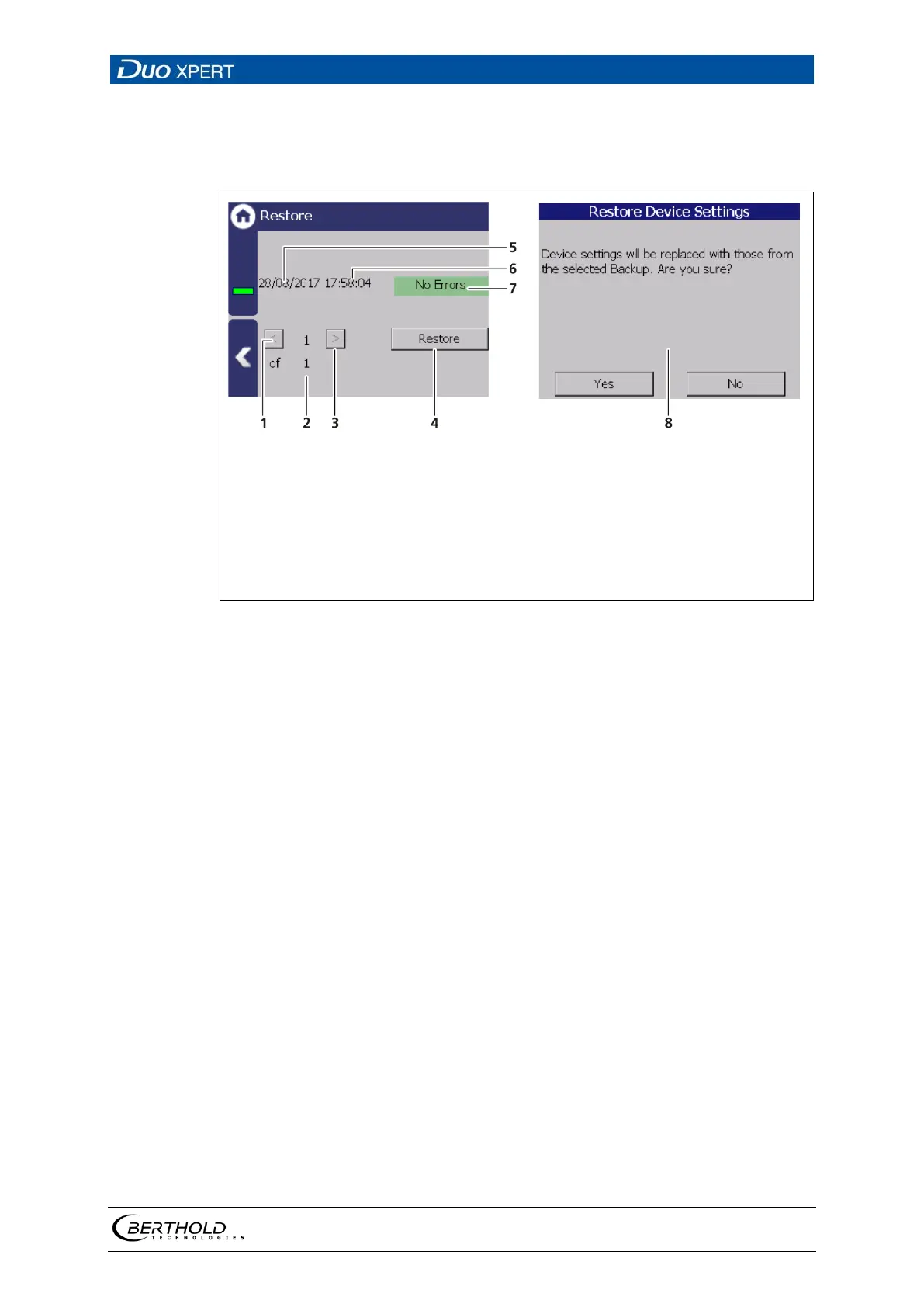
Device settings | Backup/Restore | Restore
<
″
″
Number of recovery files on the USB storage device
Button >
″
″
Button <Restore>
Recording date of the backup file
Time of backup file recording
Information about the backup data (error / error free)
Confirmation window
136 Restore
Executing restore
1. Connect a USB storage device to the device (Fig. 4, item 5).
2. Select the backup file with the buttons (Fig. 136, item 1,3)
The date and time of the backup is displayed (Fig. 136, item 5,6). Only error-
free (Fig. 136, item 7) backup files can be loaded.
3. Click on the button "Restore" (Fig. 136, item 4).
4. A confirmation message (Fig. 136, item 8) appears.
5. Click on < Yes > to confirm, click on < No > to cancel.
The restore of data is carried out.



 To Next Page