LB 470 Level 11 Decommissioning
56925BA2 Rev. 03, 11/2017
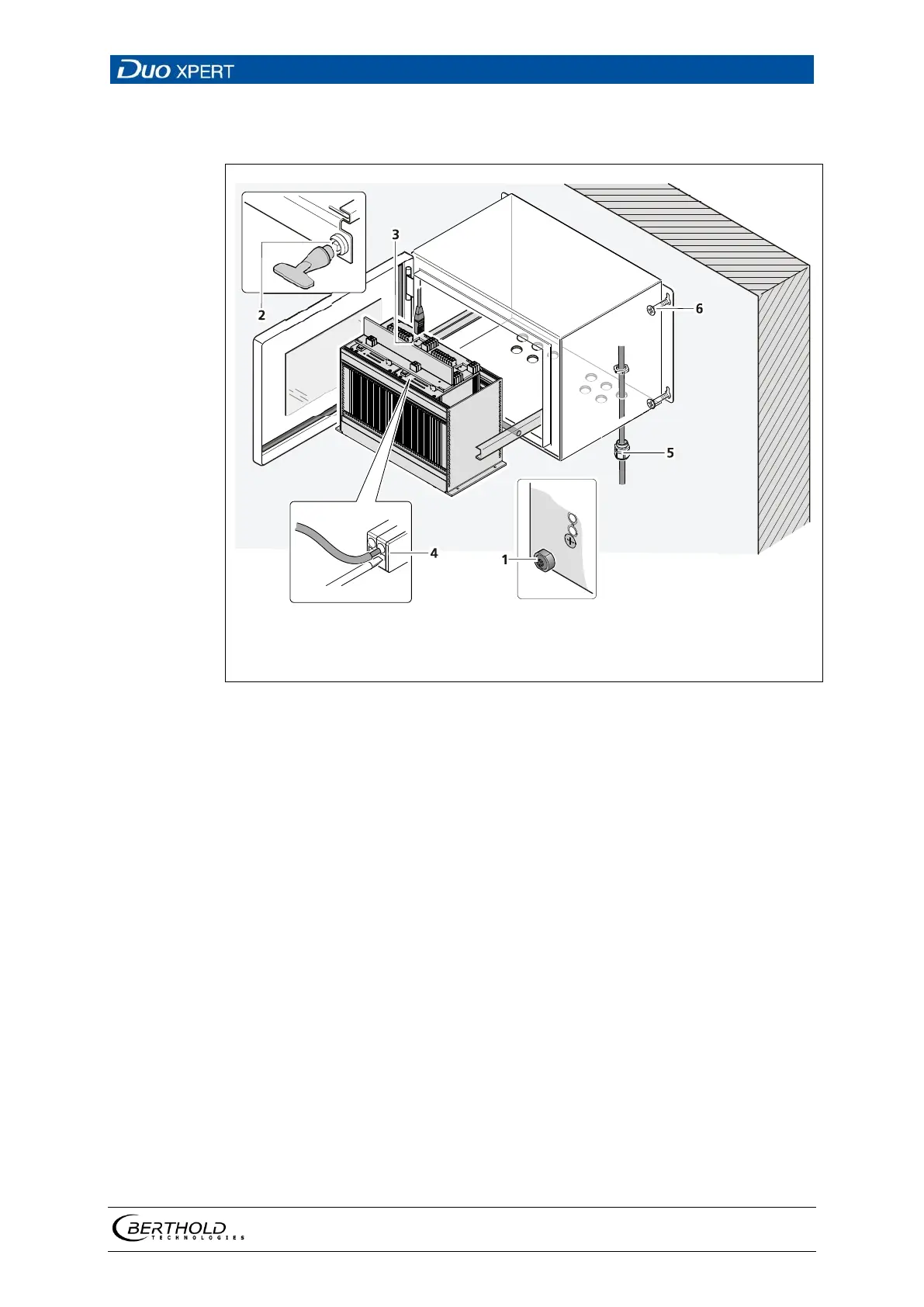
11.1 Decommissioning wall housing
Fixing screws
Locking
RJ45 connector (network)
Connecting Terminals
Cable gland
Mounting screws
149 Decommissioning wall housing
1. Make sure that the locking bolts (Fig. 149, item 1) of all modules are tight-
ened in order to prevent slipping.
2. Loosen the lock (Fig. 149, item 2) using the supplied square key and pull the
subrack out.
3. The subrack can be folded down by the folding mechanism.
4. Fold the subrack downward cautiously.
5. Remove the network plug (Fig. 149, item 3).
6. Remove all lines from the terminal board (Fig. 146, item 4).
7. Loosen the cable gland (Fig. 149, item 5) on the bottom side of the wall
housing and pull all cables from the wall housing.
8. Slide the subrack into the wall housing and close the housing doors.
9. Loosen the mounting screws (Fig. 149, item 6) and remove the wall housing.



 To Next Page