LB 470 Level 8 Main Menu Diagnostics
56925BA2 Rev. 03, 11/2017
8.4 Menu Data Log
Diagnostics | Data Log
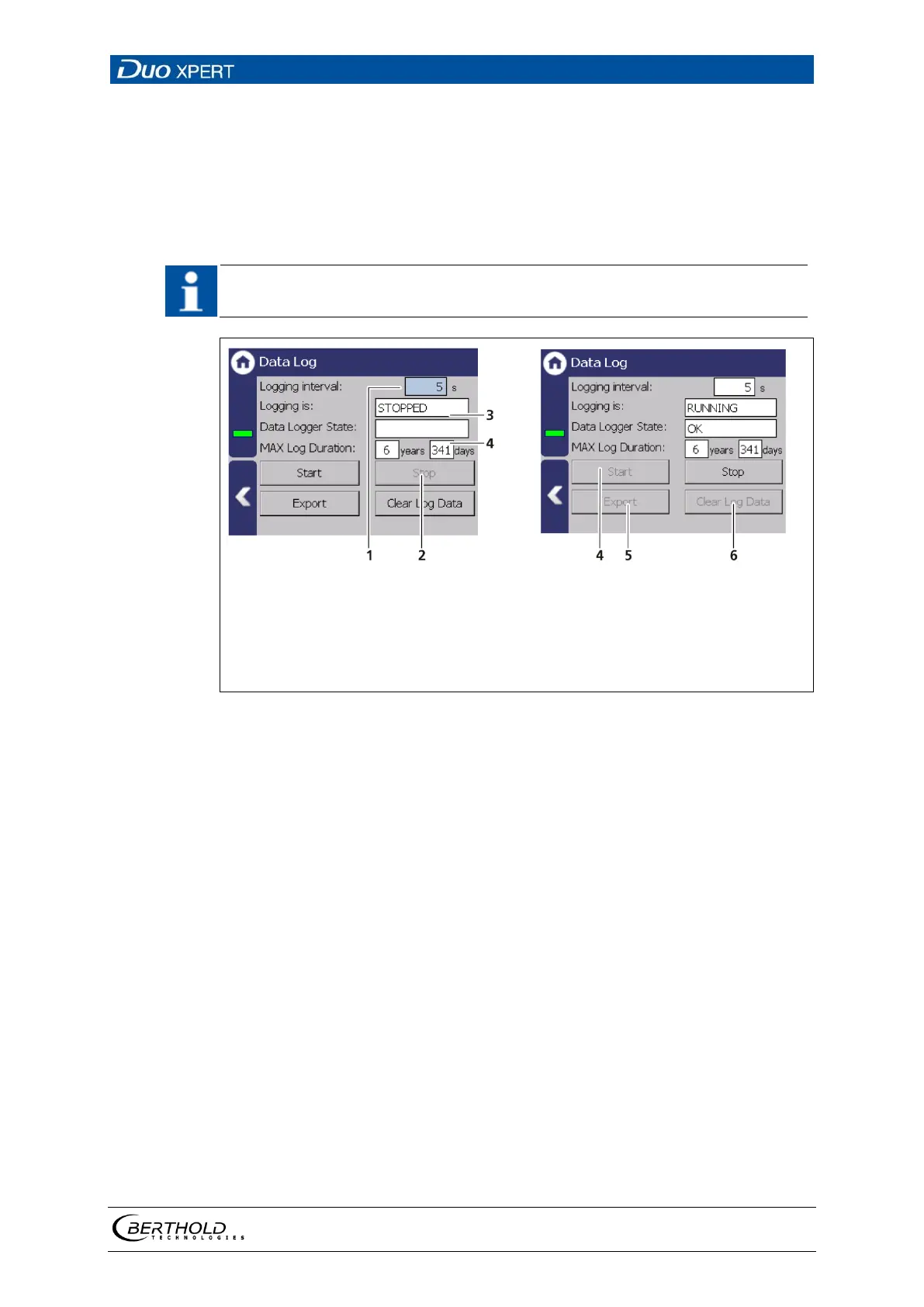
You can set the log interval as well as delete and export the log data in the sub-
menu ″Data log″.
The data cannot be viewed on the EVU Display or via Ethernet. The data must
be exported to a USB storage device to view it on a PC.
Input field Log interval [s]
Button <Stop>
Display field
Button <Start>
Button <Export>
Button <Clear log data>
144 Data Log
Change log interval
1. Click on the button <Stop> (Fig. 144, item 2) to stop the data log process.
2. Click on the input field ″Log interval″ (Fig. 144, item 1) and enter the time in
seconds.
3. Confirm with the Enter key.
The interval was accepted
4. Click on the button <Start> (Fig. 144, item 4) to start the data log process.



 To Next Page