BestCode Next Series 8 Technical Manual October 2022 Page 71 of 290
Changes the behavior of the Counter button
on the Home Screen.
When the counter button is pressed, all
counters in the current message will be reset.
When Counter Setup is set to Menu, pressing the Counter
button will open the normal counter screen.
Opens the screen calibration screen.
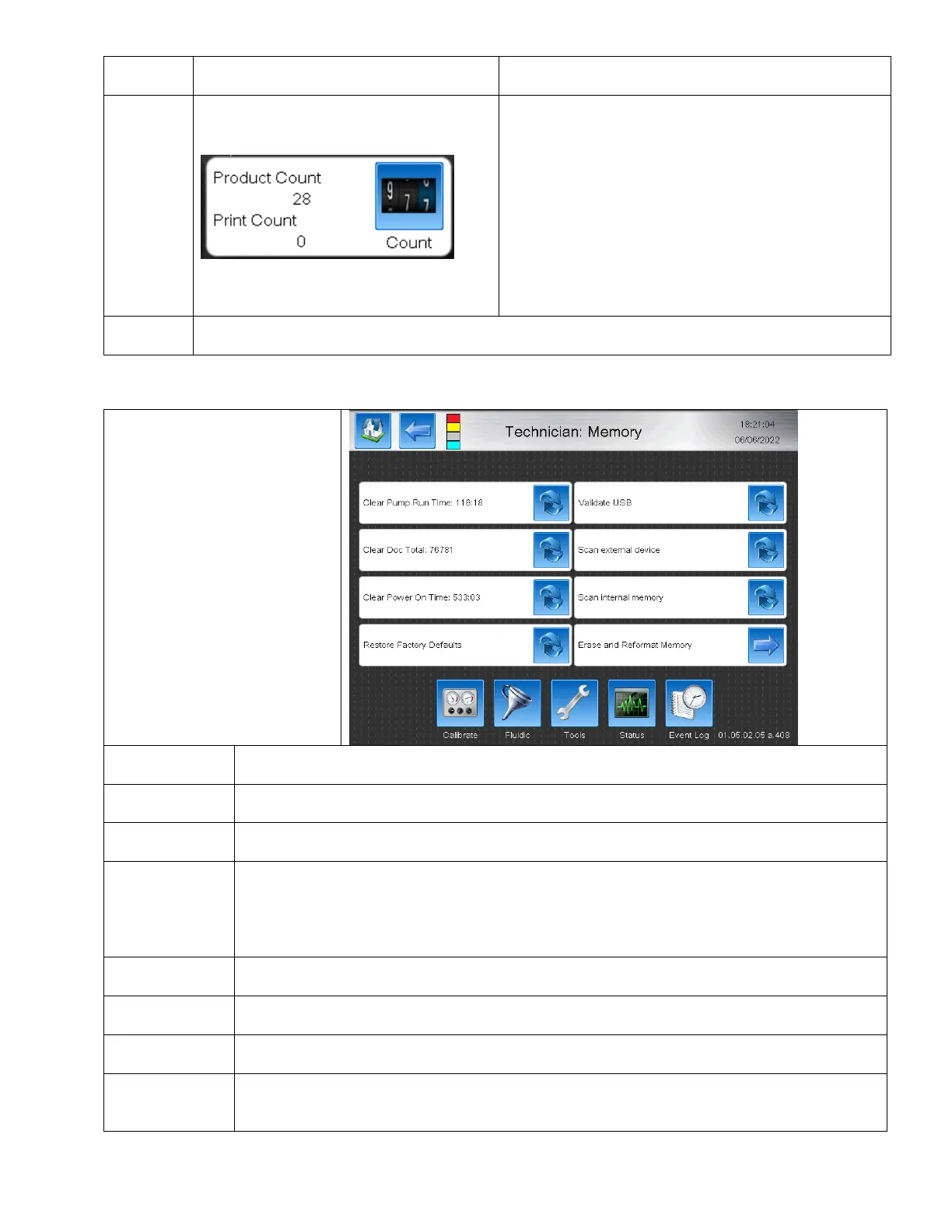
The Memory screen is used to
modify what the system
remembers and also to correct
issues with bad memory.
Resets the time counter for pump run time. Useful for total time that the printer has run the pump.
Resets the counter on the total number of messages that the printer has printed. Used mainly for
rental purposes.
Resets the time the Printer has been powered on.
Restore the machine to Factory Default. BestCode USB stick with correct Firmware Version must be
installed.
Resets the Calibration values (Modulation, Pressure, Charge), Deletes all Messages and Graphics,
Resets the Setup (Date/Time, Name, Keyboards, Language, Peripheral Settings, Network, and
Passwords), Sets all Technician Features.
Scans the currently installed USB stick for file errors. Use this feature to confirm files on the USB are
correct before performing Format Memory.
Scans the connected USB Device for errors and confirms the free memory space.
Scans the memory sectors on the Mains board for errors.
Erase and
Reformat
Memory
Deletes the memory files from the Mains board memory sectors and re-installs memory files from
the BestCode USB stick. Used if Memory faults occur.



 To Next Page