64
Return to Play Test
This section discusses the three ways to complete a Return to Play Test.
NOTE: The first method is recommended because it utilizes the built-in RTP Protocols,
which come with goals.
To complete a Return to Play Test using one of the built-in RTP Protocols:
1. Click Protocol Based Activity on the Home screen.
2. Select from the Activity Options one of the four (4) choices:
New Activity: Quick Start, New Activity: Add New Patient,
New Activity: Existing Patient, or Repeat Activity: Existing Patient.
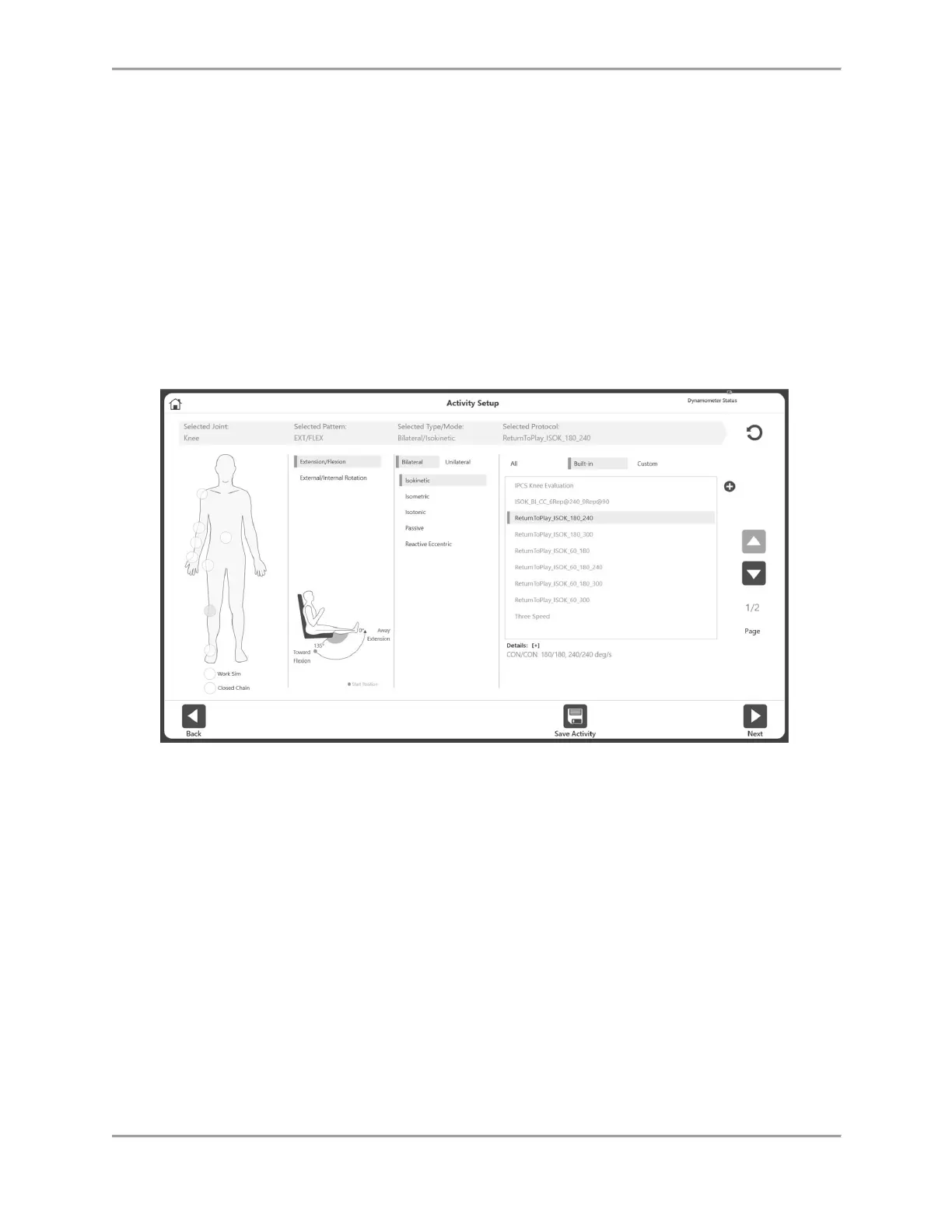
3. Select Knee for the Joint.
4. Select Extension/Flexion, Bilateral, and Isokinetic or Isometric.
5. All of the built-in RTP protocols will display (select one).
6. Click the Next icon.
7. Set the ROM.
NOTE: Always start with the Uninvolved side.
8. Perform the test.
9. Select the Next icon and prepare the activity by switching to the knee attachment for the
opposite knee.
10. Set the ROM.
11. Perform the test.
12. Select the Results icon to view the test results.
13. Select Return to Play under Select Report.
14. Click the Report icon. The RTP Report will display.



 To Next Page