13
1. 87 7. 8 7 7. 2 2 6 9 BLACKBOX.COM
NEED HELP?
LE AVE THE TECH TO US
LIVE 24/7
TECHNICAL
SUPPORT
1. 87 7. 87 7. 2 26 9
A Manager’s User Profile is protected by a username and password to permit different users to access the same unit securely.
It maintains the central database that is distributed to all Receivers in the “domain” of the Manager (i.e. discovered and added
to manager)— called the “managed domain.” This distribution ensures that there is no single point of failure in the Emerald or
InvisaPC system— each Receiver has a copy of the database. This enables each Receiver to continue operation—log users in, make
connections as required—even if the Manager goes off-line.
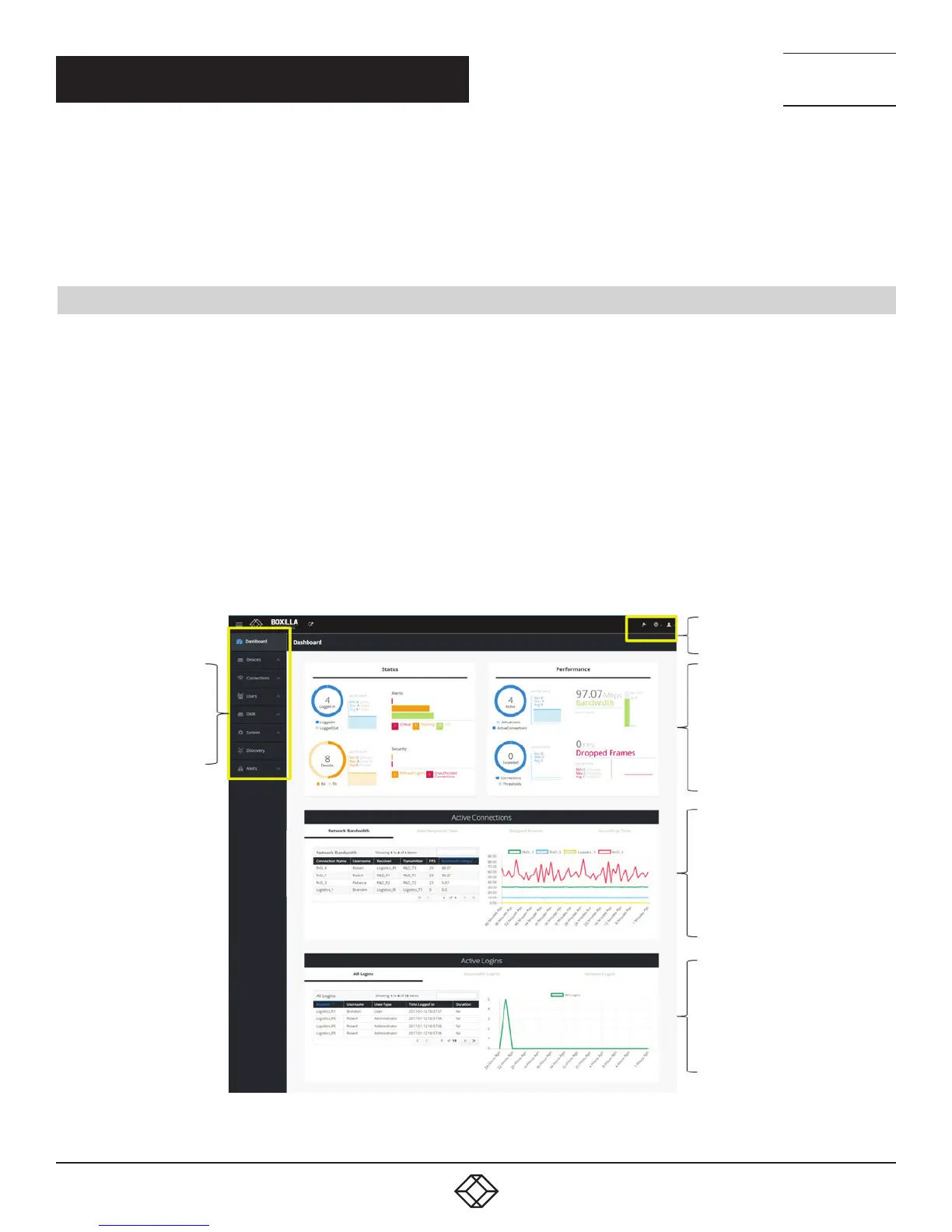
2.3 BOXILLA SCREEN LAYOUT
Boxilla is designed to provide quick access to key operational functions. This is achieved by the use of the Main Menu and Quick
Access Toolbar as shown in Figure 3. The Main Menu provides access to:
Dashboard
Devices
Connections
Users
DKM
System
Discovery
Alerts
The Quick Access toolbar provides access to active Alerts, access to Help and access to Logout.
Main
Menu
Quick Access
Toolbar
Status
&
Performance
Indicators
Active
Connections
Active
Logins
FIGURE 3. SCREEN LAYOUT
CHAPTER 2: PRODUCT OVERVIEW



 To Next Page