29
1. 87 7. 8 7 7. 2 2 6 9 BLACKBOX.COM
NEED HELP?
LE AVE THE TECH TO US
LIVE 24/7
TECHNICAL
SUPPORT
1. 87 7. 87 7. 2 26 9
6.2 DISCOVERY—MANUALLY ADDING DEVICES
Sometimes an administrator may want to add a device manually, for example, where a device is on a different subnet to the Boxilla
Manager and multicast routing is not enabled to this subnet.
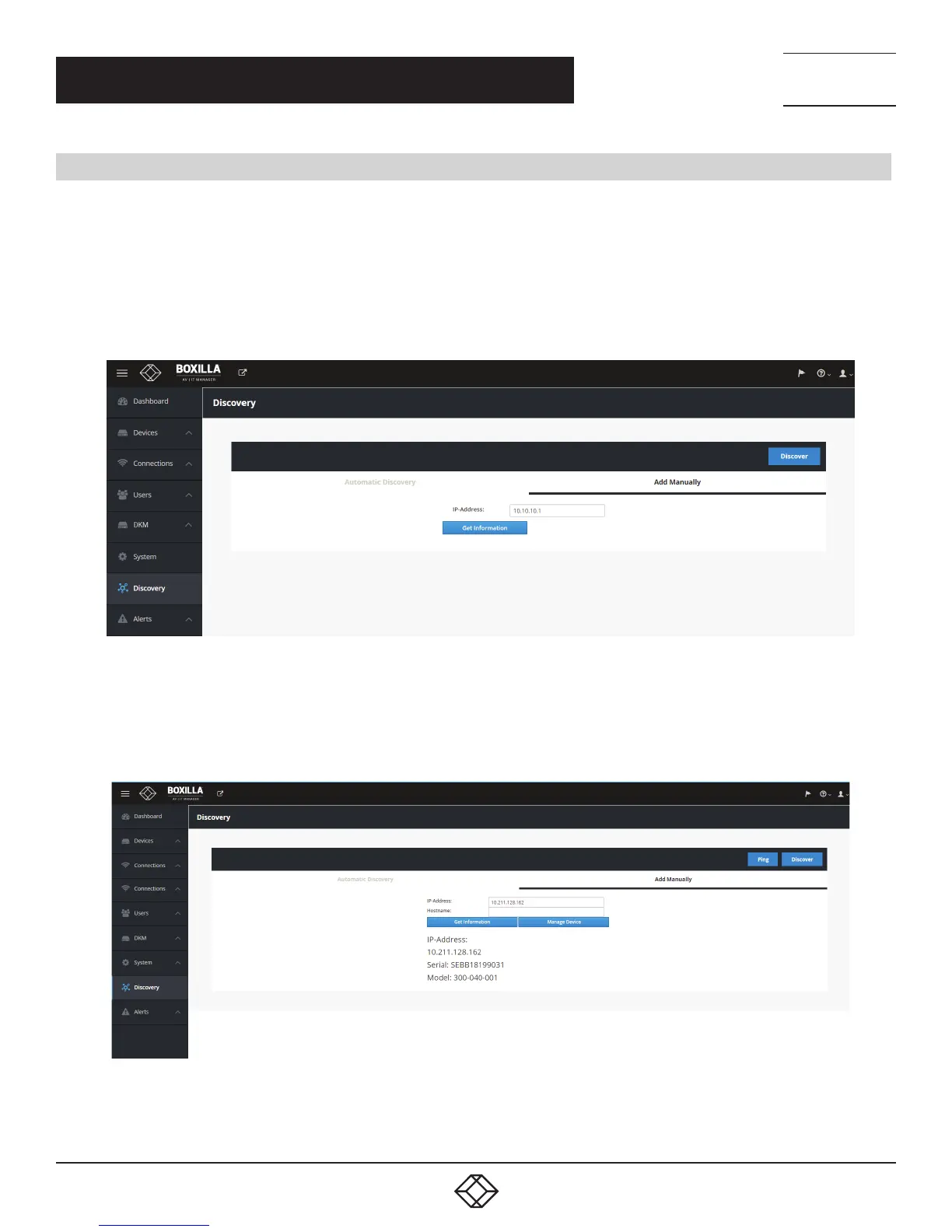
To manually add a device, click on the “Add Manually” tab on the discovery page. This brings up the page shown in Figure 20.
Enter the IP address of the device to be added and click on “Get Information.” This causes Boxilla to retrieve the device’s
information if reachable. If Boxilla has no valid path on the network to the device (or IP address is not for an Emerald or InvisaPC
device), the system will return a message of “device not reachable.”
FIGURE 20. DISCOVERY—MANUAL ADD
The administrator can give the device a name and check that the device’s details are correct if required to ensure it is the correct
device (IP address, Serial Number and Model type). To manage this device, click on “Manage Device” button as shown in Figure 21.
FIGURE 21. DISCOVERY MANUAL ADD & MANAGE DEVICE
CHAPTER 6: DISCOVERY—ADDING DEVICES



 To Next Page