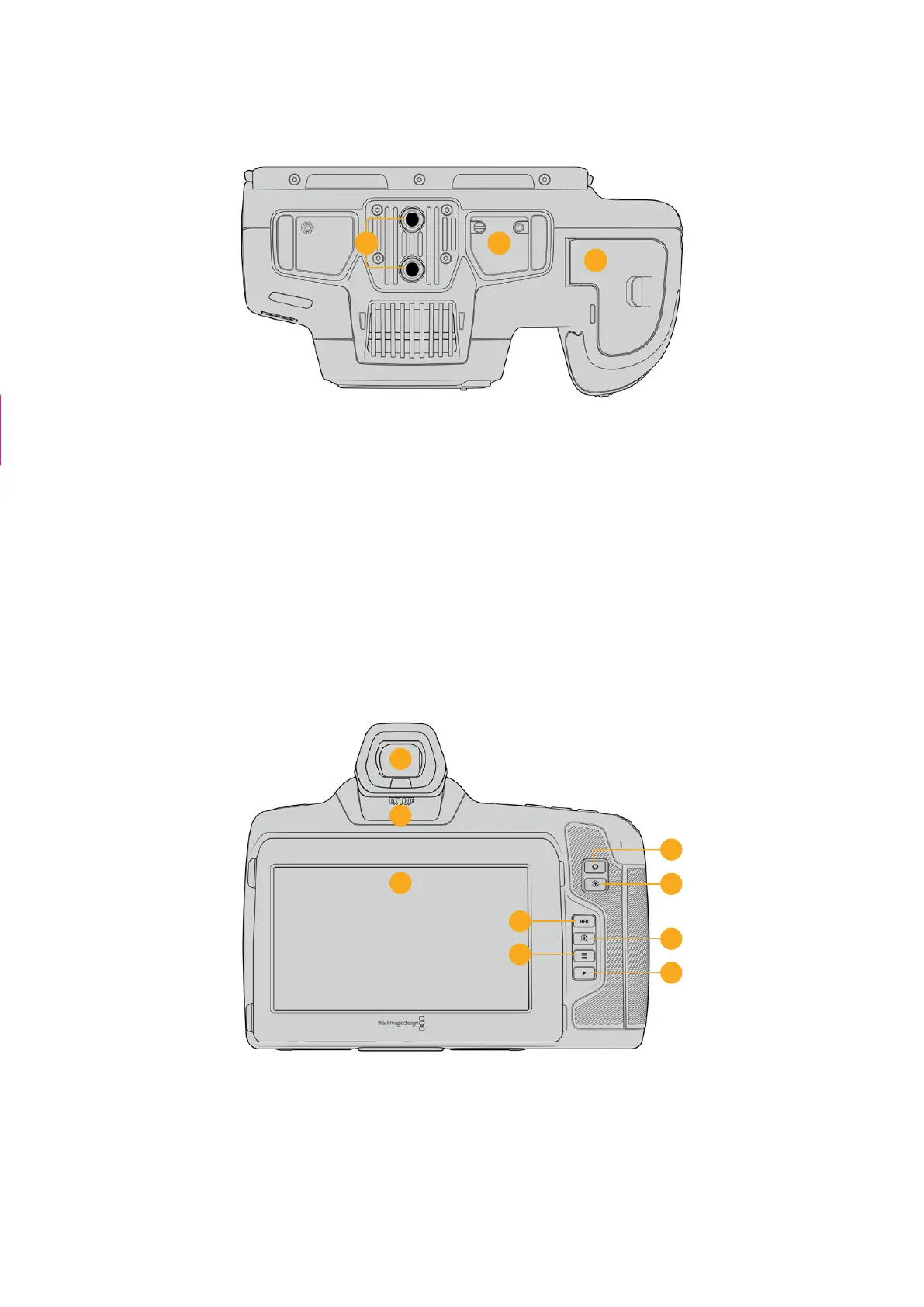
Camera Underside
25
24
23
Underside of Blackmagic Cinema Camera 6K
23 1/4-20 Mounting Points
Attach your Blackmagic Cinema Camera 6K to a tripod, rigging or accessories using the
bottom 1/4-20 mounting points.
24 Battery Door
Push the battery door release towards the lens mount to open the battery door. Toclose,
simply push the door in until it clicks shut.
25 Battery Grip Power Connector
The electrical contacts on the underside of the camera lets you connect with the optional
battery grip. This extends the running time of the camera by powering from the internal
battery and both batteries in the battery grip.
Camera Rear
27
28
30
29
31
32
26
33
34
Rear of Blackmagic Cinema Camera 6K
26 Touchscreen Display
You can tap and swipe on your camera’s LCD touchscreen to adjust settings, auto
focus, start and stop shooting, monitor clips during recording and play back clips.
Thetouchscreen also lets you manage media and make notes on the slate.
The second camera
+ caption removed
The second camera
+ caption removed
27Camera Features



 To Next Page