Functions and operation
EN
96 bora.com
5.6.4
Cooking zone power setting
When the power setting is activated, maximum cooking
zone power is available for a cooking zone. After 5
minutes, the power setting is automatically switched
back to power level 9. For the second cooking zone on
the same side, the maximum power is temporarily
lowered to power level 7.
If the power setting is set too high for the
second cooking zone, the power setting will be
automatically reset to power level 9 for the
other cooking zone.
Activating the power setting for a cooking zone
u
Tap when power level 9 is active.
T
appears in the cooking zone display.
Deactivating the power setting early
u
Setting another power level
Never heat up oil, fat and the like on the power
setting. The bottom of the pan can overheat due
to the high power output.
5.6.5
Automatic heat up function
When the automatic heat up function is activated, the
cooking zone works at full power for a certain amount
of time and is then automatically reset to the previously
set level.
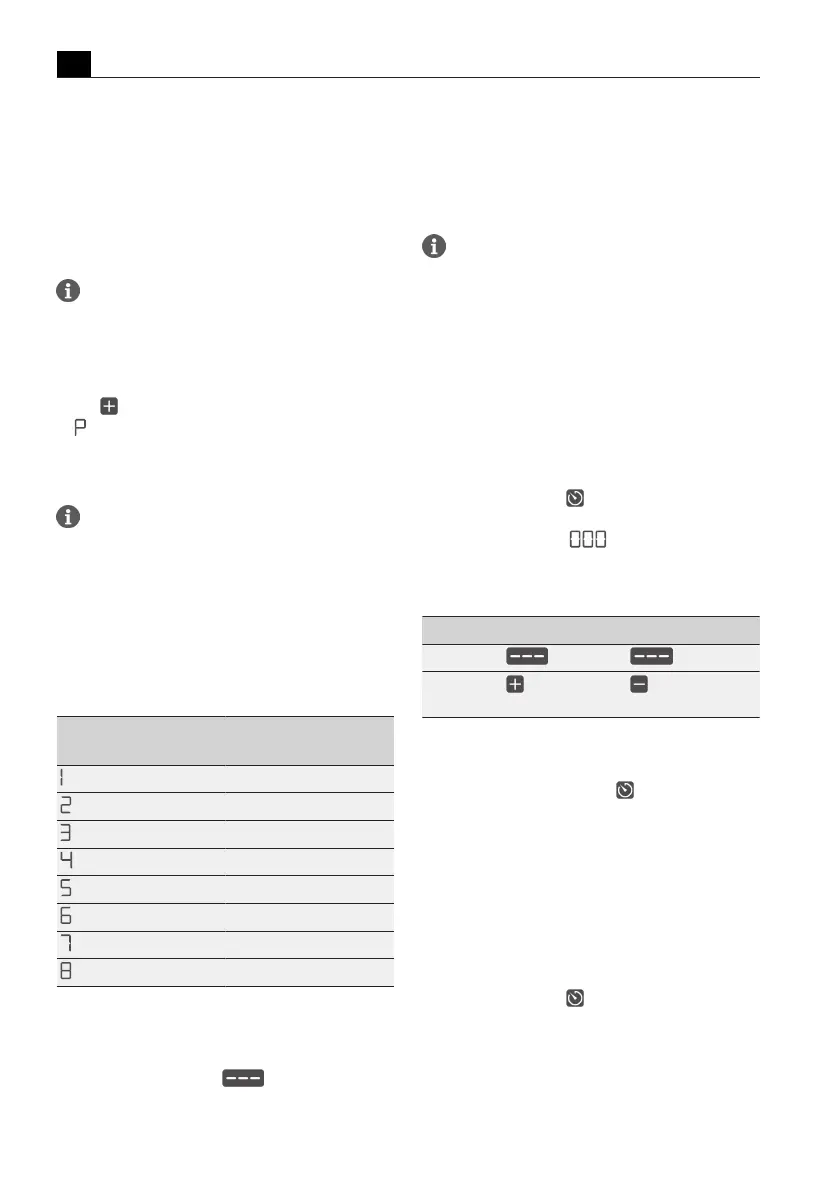
Power level Cooking duration in
min:sec.
0:40
1:00
2:00
3:00
4:20
7:00
2:00
3:00
Tab.5.5
Heating time overview
Activating the automatic heat up function
Prerequisite: Cooking zone is active (power level is set)
u
Long press on the slider at a position lower
than power level 9
T
Whilst the automatic heat up function is active, the
power level displayed will flash.
Deactivating the automatic heat up function
early
u
Setting a lower power level
If the power level is increased while the
automatic heat up function is active, the heat
up function is automatically adjusted.
5.6.6
Cooking zone timer
This automatic cut-off function automatically switches
off the selected cooking zone once a preset time has
lapsed. The timer function can also be used on several
cooking zones at the same time (multi-timer).
Activating cooking zone timers
Prerequisite: Cooking zone is active (power level is set)
u
Tap the timer button .
T
The time flashes in the multi-function display above
the slider in minutes (
).
Setting the time
u
Set the desired time:
Command Increase time Decrease time
Swipe
upwards downwards
Tap
(exact to the
minute)
(exact to the
minute)
Tab.5.6
Setting the time
Start timer
u
Tap the flashing timer button
The set time starts to count down. The remaining time
is shown on the multi-function display.
Showing the remaining time
u
Tap the cooking zone display with an active timer
T
The remaining time is shown in the multi-function
display.
Changing active timers
u
Tap the cooking zone display with an active timer
u
Tap the timer button
T
The timer is stopped.
T
The remaining time flashes in the display.
u
Change the set time and restart the timer.
Multi-timer
u
Repeat the process for additional cooking zones.



 To Next Page