User menu
EN
102 bora.com
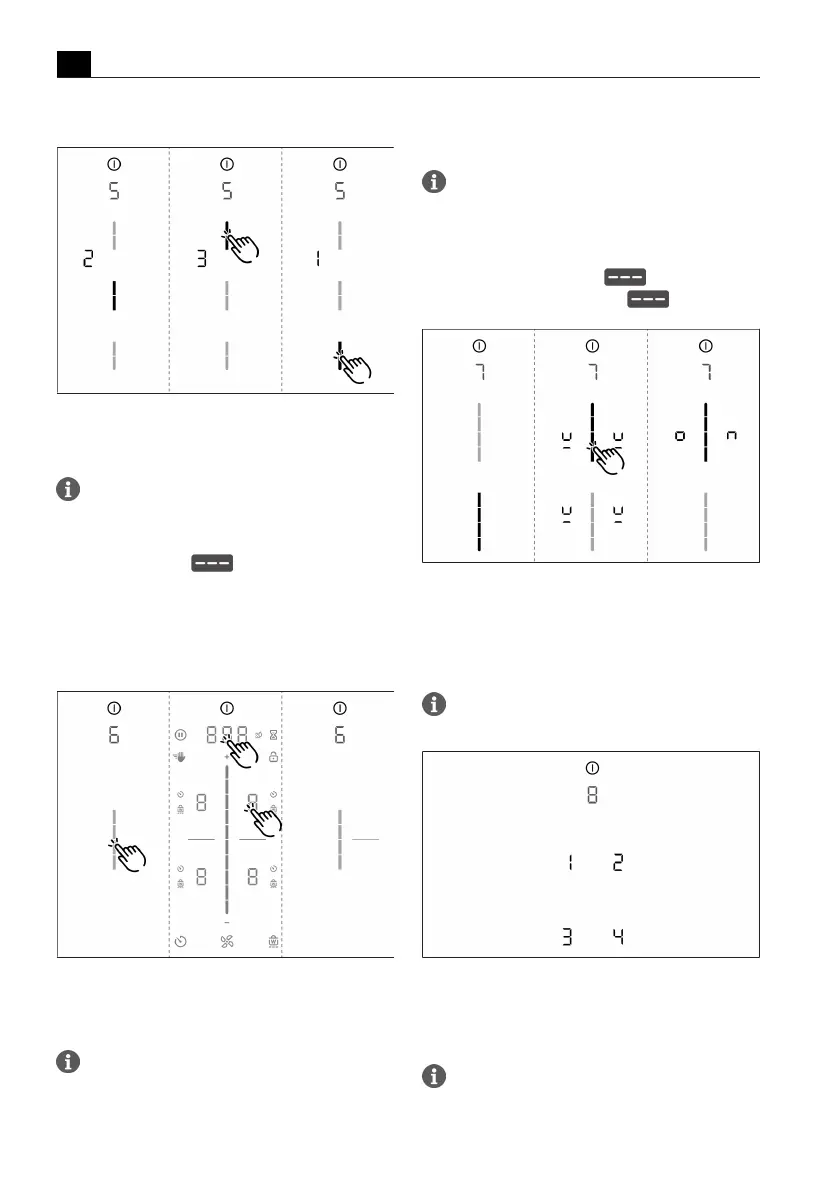
Selecting the reaction speed:
Fig.6.5
Menu item 5: Reaction speed
6.6
Menu item 6: LED test
Function inspection of all LEDs in the touch
zones.
Starting the LED test:
u
Tap the slider zone .
T
All indicators are displayed at 50 % brightness.
u
Tap any indicator you wish.
T
The selected indicator will be displayed at 100%
brightness for 1 second for testing purposes.
T
Any other indicators can be tested by touch.
Fig.6.6
Menu item 6: LED test
Ending the LED test:
u
Long press on the multi-function display.
The LED test will be automatically ended when
there has been no activity for 5 seconds.
6.7
Menu item 7: Permanent
pan size recognition
Switch permanent pan size recognition
permanently on or off.
Activate or deactivate permanent pan size
recognition:
u
Tap the top slider segment to activate.
u
Tap the bottom slider segment to deactivate.
Fig.6.7
Menu item 7: Permanent pan size recognition
6.8
Menu item 8: Show
software/hardware
version
The software/hardware version is shown via the
four 4 cooking zones indicators.
Fig.6.8
Menu item 8: Software/hardware version
6.9
Menu item 9: Safety
shut-down
The time span (level) until automatic safety
shut-down of the cooking zones can be selected
using menu item 9.



 To Next Page