User menu
EN
bora.com 103
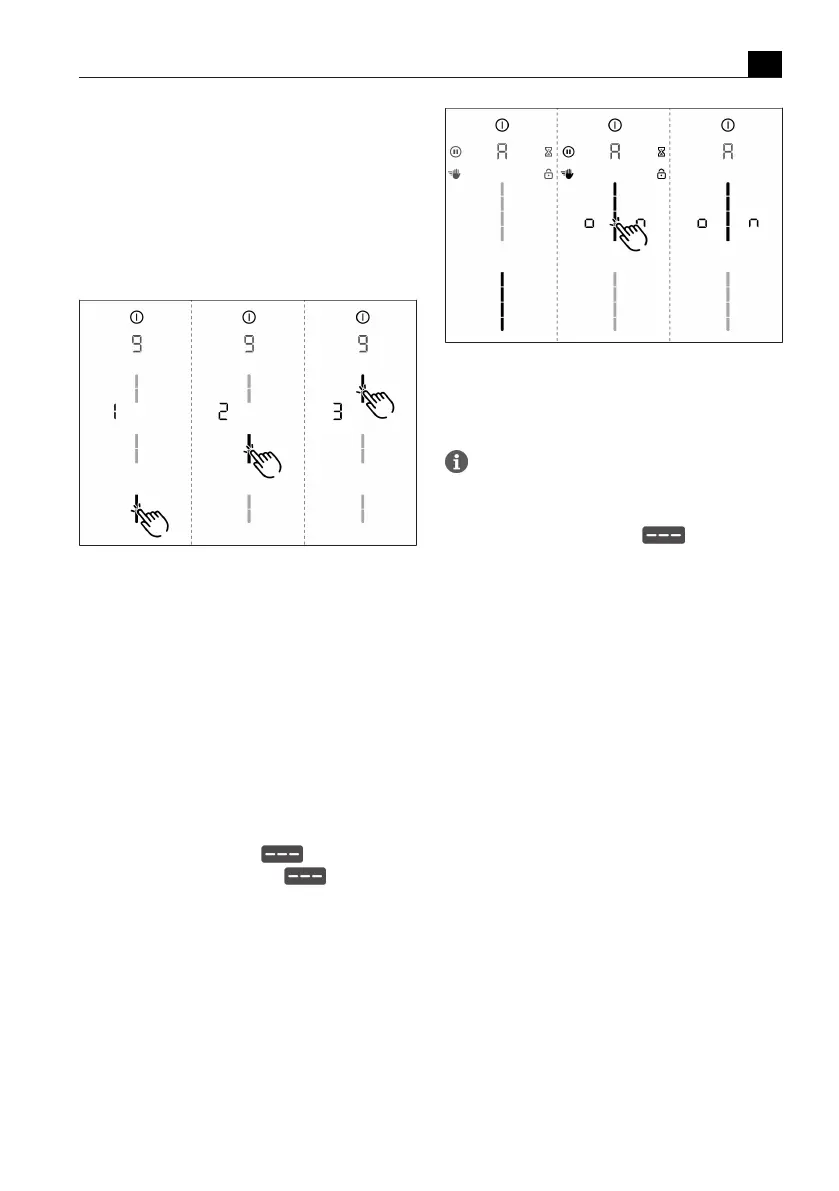
The current level is displayed:
T
Level 1: long time span until automatic safety shut-
down
T
Level 2: medium time span until automatic safety
shut-down (factory setting)
T
Level 3: short time span until automatic safety shut-
down
Selecting the level:
Fig.6.9
Menu item 9: Safety shut-down
6.10
Menu item A: Super
simple mode
The following additional functions and their indicator are
deactivated in the super simple mode:
T
Cooking zone timer
T
Short-time timer
T
Cleaning lock
T
Operating lock
T
Heat retention function
T
Pause function
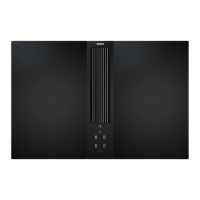
Activating or deactivating super simple mode:
u
Tap the top slider segment to activate.
u
Tap the bottom slider segment to deactivate
Fig.6.10
Menu item A: Super simple mode
6.11
Menu item 0: Reset to
factory settings
Menu item 0 enables all settings in the user
menu to be reset to the factory settings.
Resetting to factory settings
u
Long press on the slider zone .
T
After resetting, the appliance is switched off.



 To Next Page