User menu
EN
100 bora.com
6 User menu
Certain functions can be set in the user menu.
Calling up the user menu
Prerequisite: The appliance is switched on, all cooking
zone and the cooktop are inactive and there is no
residual heat.
u
Long press on the multi-function display.
T
The menu is called up and the first menu item is
displayed.
Navigating the user menu
Navigate to the next menu item:
u
Tap the multi-function display.
T
Any changed settings are automatically applied when
changing to another menu item or when exiting the
menu.
Closing the user menu
u
Long press on the multi-function display.
or
u
long press on the power button
T
The menu is closed and the appliance is switched off.
User menu overview
Menu item/Description/Selection Factory
setting
1 Volume of the acoustic signals (0–9) 4
2 Child lock (On/Off) Off
3 Show filter status
(reset filter service display)
4 Duration of the automatic after-run
function (10, 15, 20 min.)
20 min
5 Touch zone reaction speed
(1 slow, 2 medium, 3 fast)
2
6 LED test
7 Permanent pan size recognition Off
8 Software/hardware version
9 Safety shut-down
(1 long, 2 medium, 3 short)
2
A Super simple mode Off
0 Reset to factory settings
Tab.6.1
User menu overview
6.1
Menu item 1: volume of
the acoustic signals
Safety-relevant acoustic signals are always
emitted with the volume at 100%.
The acoustic signal for the power button cannot
be deactivated.
After accessing the menu item, the currently set
volume is displayed.
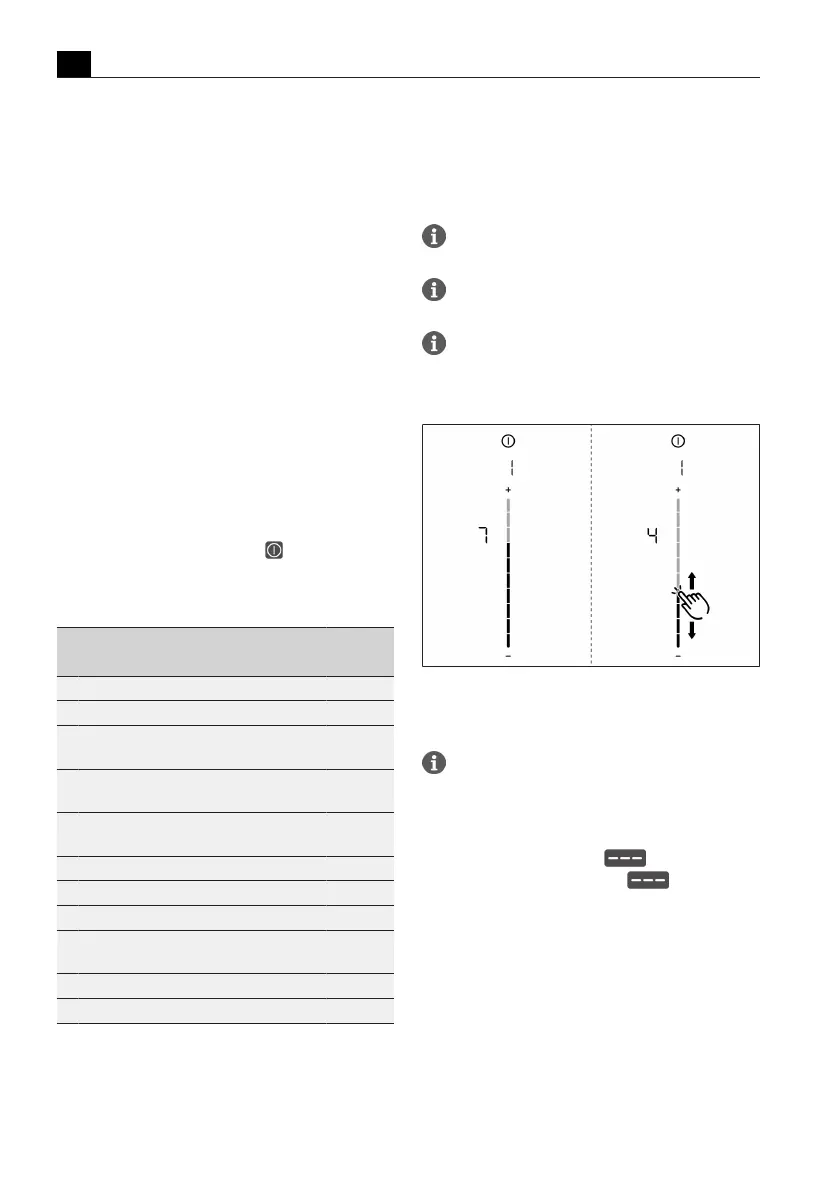
Setting the acoustic signal volume:
Fig.6.1
Menu item 1: volume of the acoustic signals
6.2
Menu item 2: Child lock
With menu item 2 the child lock can be
permanently switched on or off.
Permanently activating or deactivating the
child lock:
u
Tap the top slider segment to activate
u
Tap the bottom slider segment to deactivate



 To Next Page