Functions and operation
EN
bora.com 97
Switching the timer off early
u
Tap the cooking zone display with an active timer
u
Long press on the timer button
or
u
long press on the cooking zone display with an active
timer
T
The cooking zone remains active on the set power level.
Time lapsed
In the last 10 seconds of the countdown, the remaining
time will flash and is displayed down to the second. In
the last 5 seconds you will hear a sound.
At the end of the set time the cooking zone is
automatically deactivated (= power level
).
5.6.7
Pause function
With the pause function all cooking zones can be
quickly and easily deactivated temporarily. The cooking
processes can be interrupted for a maximum of
10 seconds. If the pause function is deactivated,
operation will resume with the original settings. Once
10 minutes have lapsed, the cooking session is
automatically ended.
The fan function, the bridging function and the
(active) minute minder cannot be interrupted.
Active cooking zone timers are stopped.
Activating the pause function
u
Tap the pause button
Deactivating the pause function
u
Long press the pause button
5.6.8
Heat retention function
The heat retention function enables meals that have
already been cooked to be kept warm without risk of
burning. The maximum duration of the heat retention
function is limited to 8 hours.
Activating the heat retention function
u
Selecting a cooking zone
u
Tap the heat retention button
T
and next to it the heat retention symbol is
shown on the cooking zone display.
Deactivating the heat retention function
u
Tap the heat retention button
or
u
Set a power level
5.6.9
Bridging function
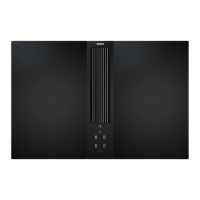
Function only available with the 2 surface
induction cooking zones on the right.
With the bridging function, two cooking zones located
one behind the other can be combined to form one large
cooking zone. The power for the combined zones is then
adjusted by a single operating control. Power adjustment
takes place simultaneously (both cooking zones are
operated on the same power level). The bridging function
is suitable for heating food, e.g. in a roaster.
If both cooking zones are active before the
bridging function is activated, the lower power
level is adopted. If timers are active on the
cooking zones, the lower timer value will be
adopted for the bridging timer.
The bridging function finishes and the cooking
zones are deactivated if no suitable cookware is
detected (pan size recognition) on any or only
one of the two cooking zones for 10 seconds.
Activating the bridging function
u
Tap both cooking zone displays at the same time.
T
Both cooking zone displays show the same power
level.
T
Active additional cooking zone functions are adopted
(dual display).
Deactivating the bridging function
u
Long press on one of the two cooking zone displays
with an active bridging function
or
u
tap both cooking zone displays with an active
bridging function simultaneously.
T
The power levels are set to 0.
T
If a cooking zone timer was active, it is deactivated.
5.6.10
Automatic bridging function
If a large enough piece of cookware (e.g. grill pan or
roasting tray) is placed on the two cooking zones that
are one behind the other, they will automatically be
combined to form one large cooking zone. The bridging
function does not need to be activated manually.
If the permanent pan size recognition function
is switched on (see"6.7Menu item 7:
Permanent pan size recognition"), the automatic
bridging function is also activated.



 To Next Page