Troubleshooting
102
BMP
®
41 User’s Manual
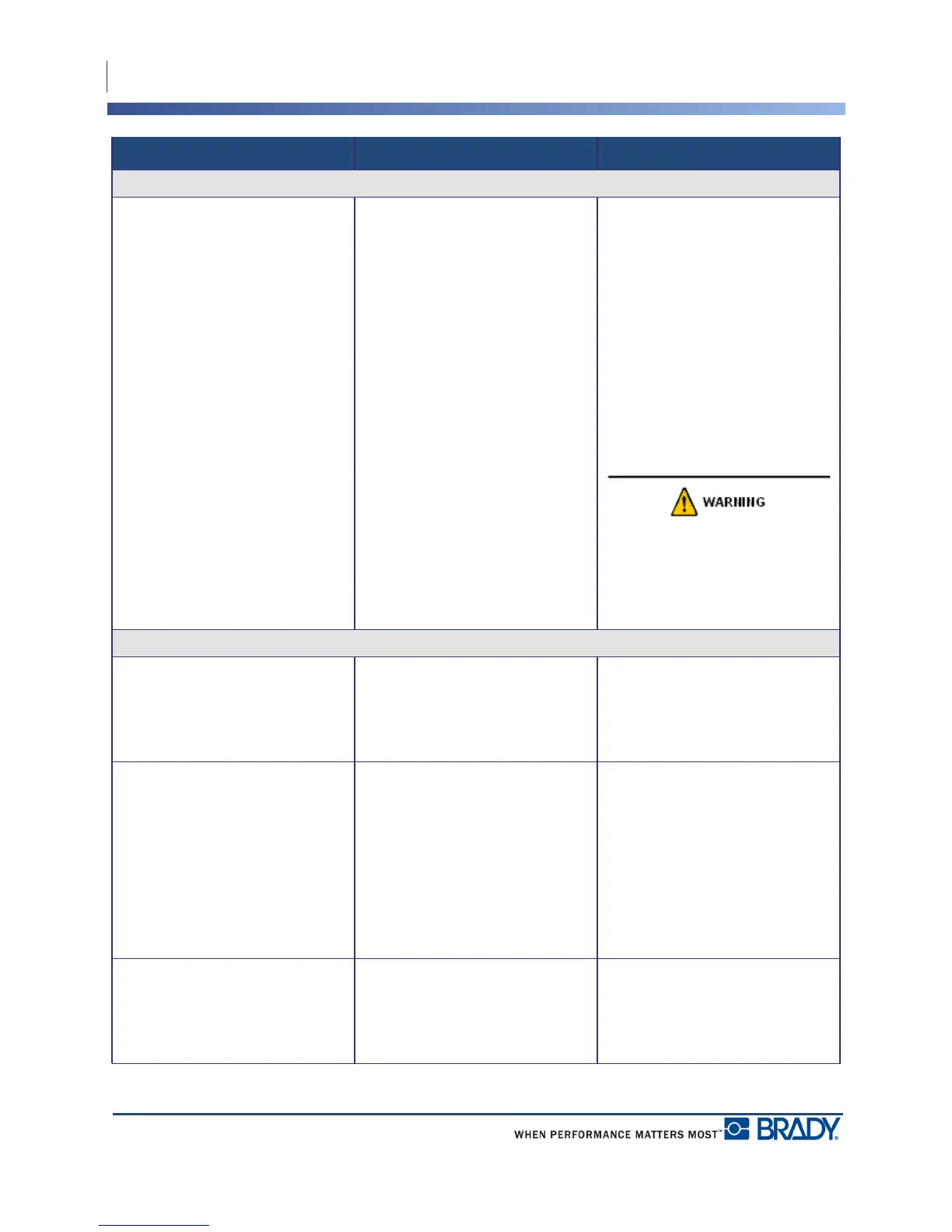
Hardware (continued)
Printer jammed, cannot feed labels Label exit chute is blocked causing
label material to back up inside
printer
To clear the jam inside the printer:
1. Open the printer cover.
2. Slide the locking lever to the
unlock position.
Note: Unlocking retracts the platen
so the cartridge can be removed. If
there is a large jam, you may have
to force the locking lever to the
unlock position.)
3. Remove the cartridge.
4. Use tweezers or a needle-nose
pliers to clear label jam.
The print head is susceptible to
damage. Using metal objects to
remove jams can scratch, dent, or
crack the print head. Use every
precaution when clearing a jam.
Power ON/OFF - Printer not working
Printer does not power up when
turned on.
Battery pack is not charged. Attach the AC Adapter to the
printer and plug into an electrical
outlet. This will supply immediate
power while charging the battery at
the same time.
Screen freezes User interface error.
1. Press Power button to turn the
printer off.
If Power button does not shut down
printer:
2. Remove the AC adapter (if
using one).
3. Remove the battery pack, then
immediately re-insert.
4. Power ON the printer.
Printer frequently powers OFF. Battery is low. Attach the AC Adapter to the
printer and plug into an electrical
outlet. This will supply immediate
power while charging the battery at
the same time.
Problem Cause Corrective Action



 To Next Page