61
61
EN
Name Sample Sanitation company
Phone 08151234567
7 Start-up
7.1 Display and operation
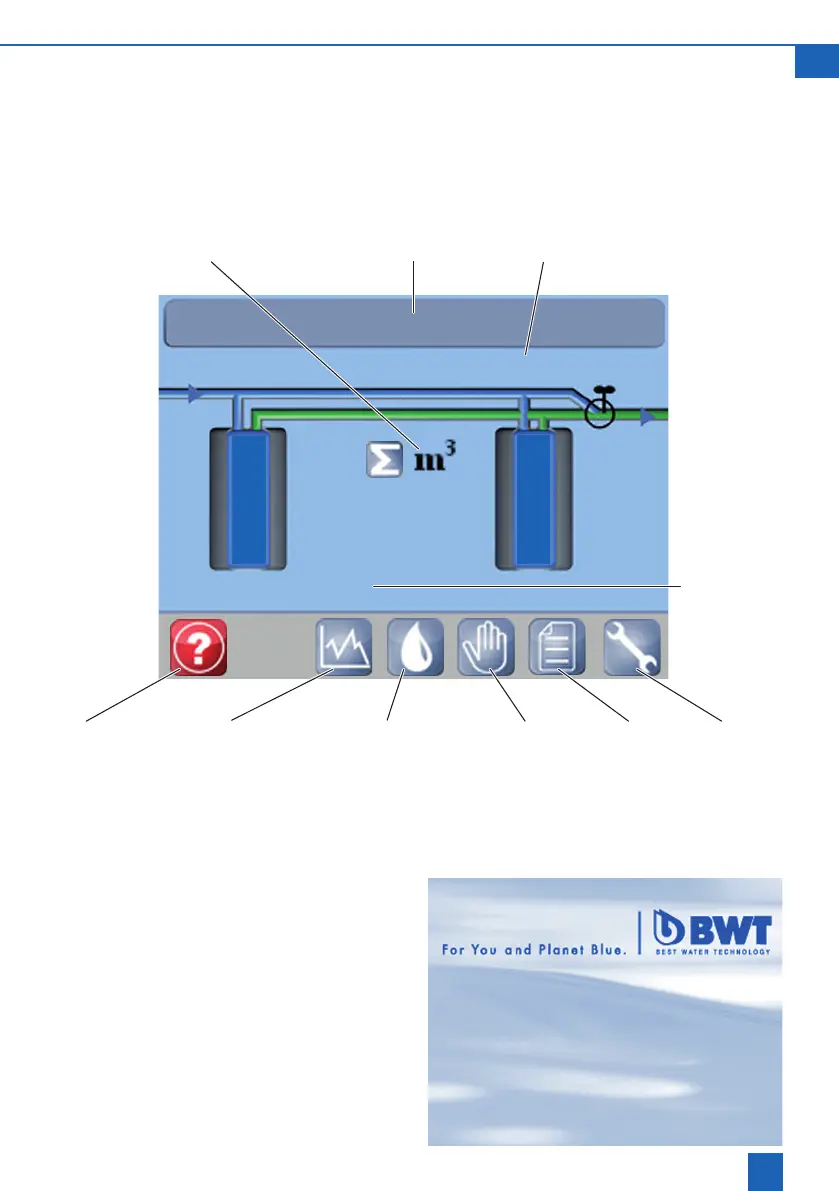
Operating display
Presstoselecttheicons,buttonsandnumberelds(e.g.time)described.Thesettingorfunctionappears.
08:50:02
1560 l
0
Time Current water
owoutletwater
Water consumption since
start-up in m
3
0 l/h
Help Trend screen Set water hardness Manual ope-
ration
Log Settings
Capacity in
litres outlet
water unit
next regene-
ration
Screensaver
The screensaver showing the telephone number
of the contact person appears after 15 minutes of
inactivity.
Touching the screen causes the operating display
to reappear.



 To Next Page