PMW20
77
Fig.1.1.3
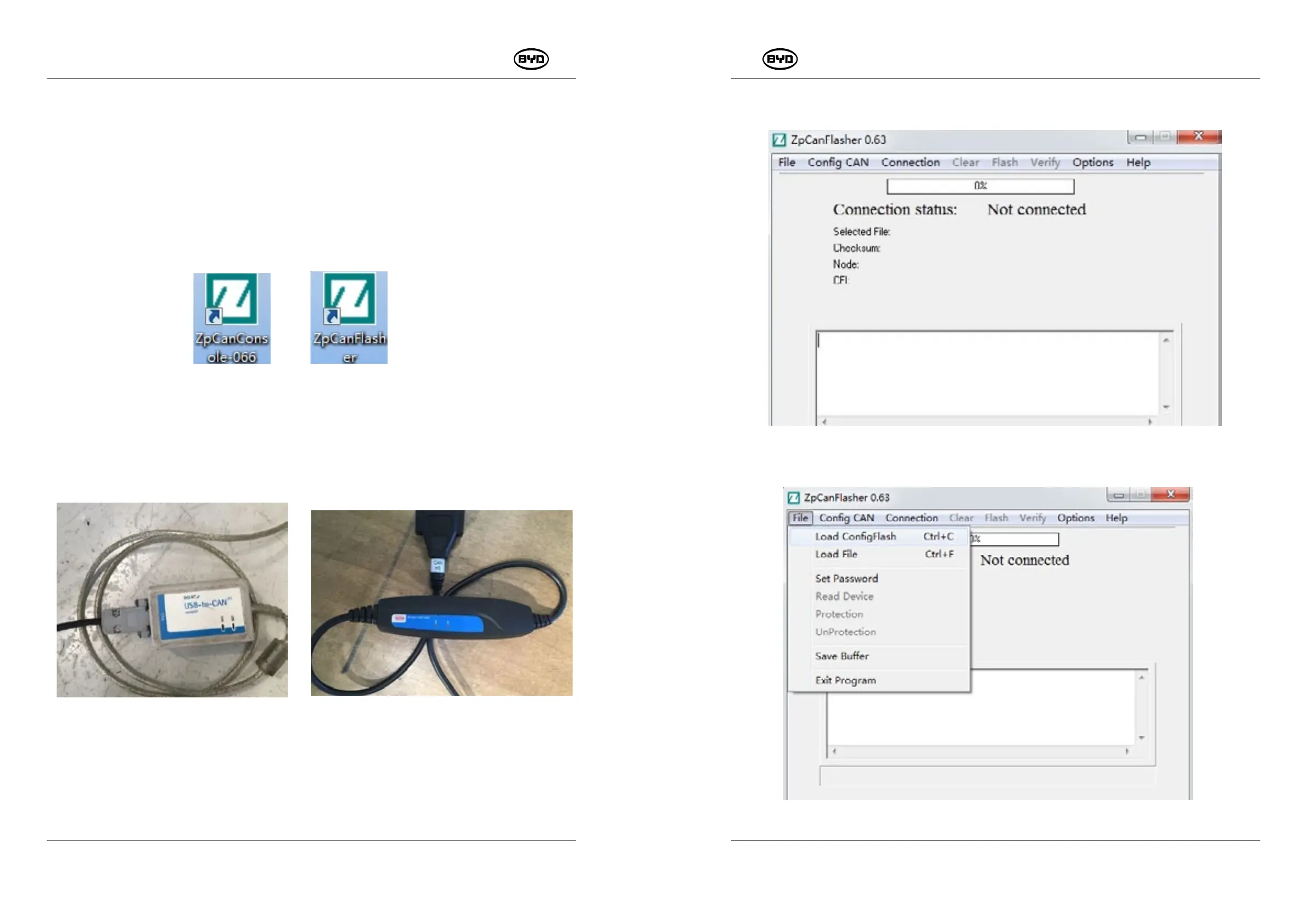
2. Click “File” → “Load ConfigFlash Ctrl+C”, as shown in Fig. 1.1.4.
Fig.1.1.4
PMW20
76
8.3 PROGRAM AND SOFTWARE
Tools:
1. IXXAT, as shown in Fig.1.1 .1
Electric forklift accessories _CAN wire _AT0001
2. Kvaser Leaf Light, as shown in Fig.1.1.2
Electric forklift accessories _CAN wire _KvaserLeafLightHS-GI
Fig.1.1.2
Steps:
1. Open the software “ZpCanFlasher”, as shown in Fig.1.1.3.
SM-PMW202020001-EN
SM-PMW202020001-EN
1) This section will introduce how to update the controller program (EPF file). The program
is designed for the controller of the forklift. Different types of programs can match with
corresponding forklifts so as to complete the control for the forklift.
2) This section provides some examples of burning ways of the controller softwares
ZpCanConsole, ZpCanFlasher. Only trained qualified technical personnels can
operate the sophisticated burning way.
Softwares: ZpCanConsole and ZpCanFlasher
Fig.1.1.1


 To Next Page