PMW20
105
PMW20
104
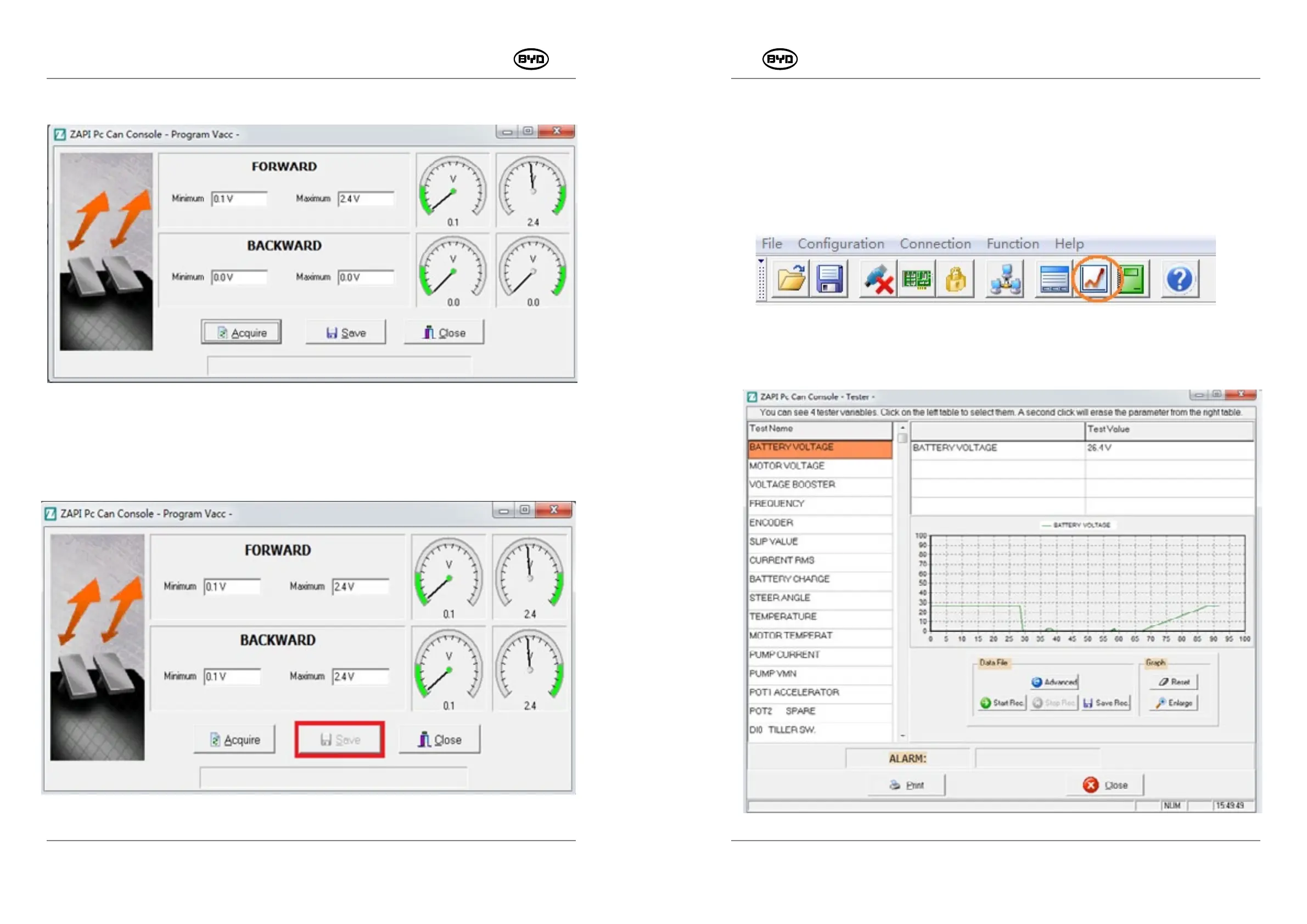
Press the handle and operate the accelerator towards the operator, as shown in the
Fig.2.3.5.
Fig.2.3.5
Click "Save" and finish the acquisition, as shown in the Fig.2.3.6.
Fig.2.3.6
8.5 MONITOR DATA
1. Monitor Menu
Function: Troubleshoot faults by monitoring the current or operating state of the part in use
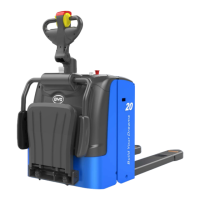
Operating procedures: Connect the CAN box, input the password, select the site and
then click the monitor menu, as shown in the Fig1.1.
Note: The NODE 2.0 station is for the main controller data while the NODE 6.0 is for the
monitoring interface of the steering controller.
Fig.1.1
The following interface can be acquired automatically. The monitoring options are
selected on the left side while relevant data will appear on the right side. It can monitor
up to four options at a time, as shown in the Fig.1.2.
Fig.1.2
SM-PMW202020001-EN
SM-PMW202020001-EN


 To Next Page