PMW20
97
8.4 ADJUST PARAMETERS
1 . Parameter Description
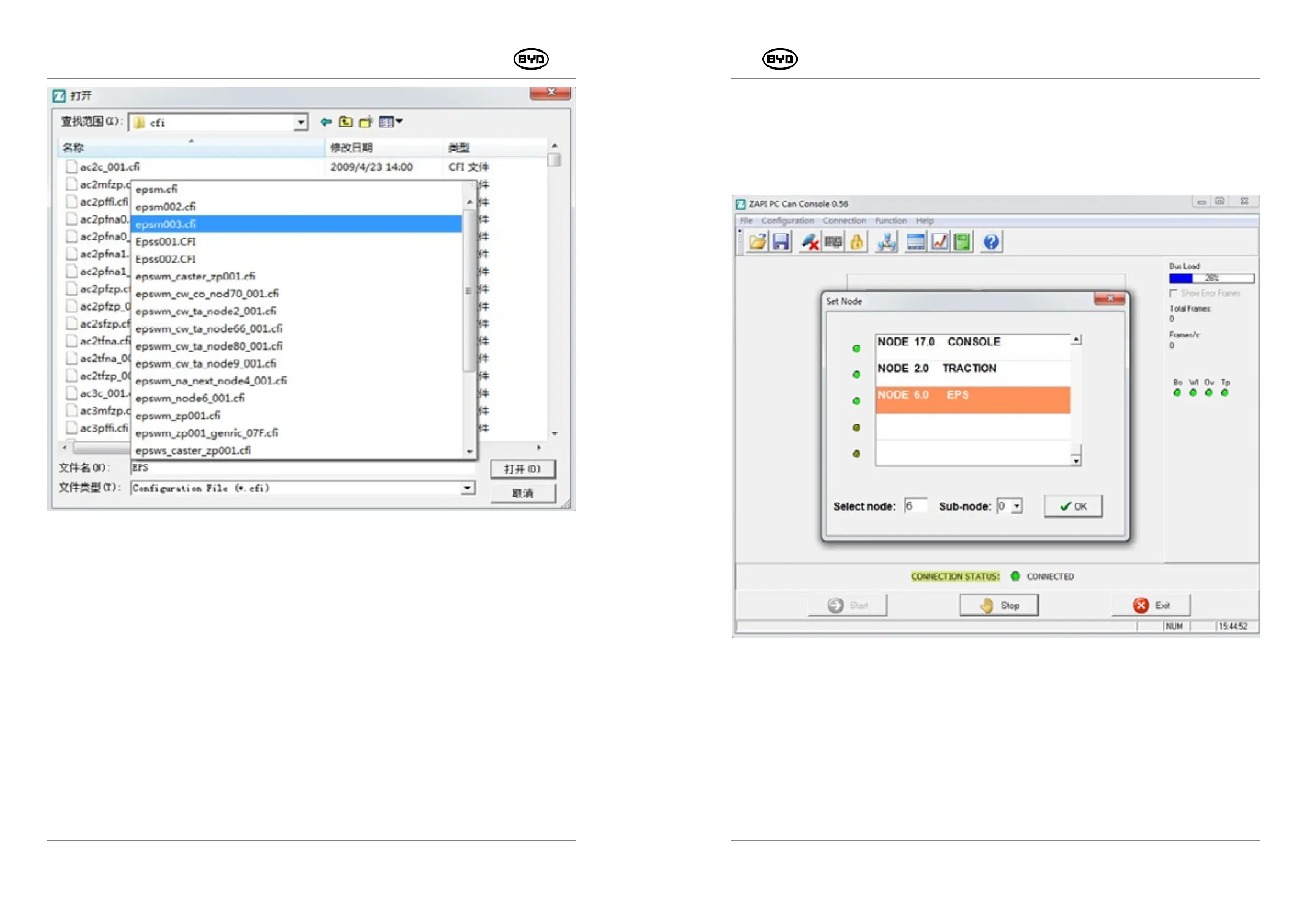
Select a same way to enter the parameter interface, but select different sites. As
shown in Fig.2.1.1, NODE 2.0 is for drive (main controller) while NODE 6.0 is for
steering controller. Other sites displayed should be neglected.
PMW20
96
Fig.1.3.7
SM-PMW202020001-EN
SM-PMW202020001-EN
Fig.1.1
If it is NODE 2.0 (main controller), 5 parameters will be displayed on the top of the
interface, as shown in Fig.1.2.
There are PARAMETER CHANGE, SET OPTIONS, ADJUSTMENT, SPECIAL ADJUST,
and HARDWARE SETTING on the interface, wherein most of them can be modified in
accordance with customer usage and requests, SET OPTIONGS is the configuration for
logical functionality and other parameters, as the default setting values of vehicle
performance and main controller, are not necessary to be modified.


 To Next Page