PMW20
85
1.2 Remove Parameters
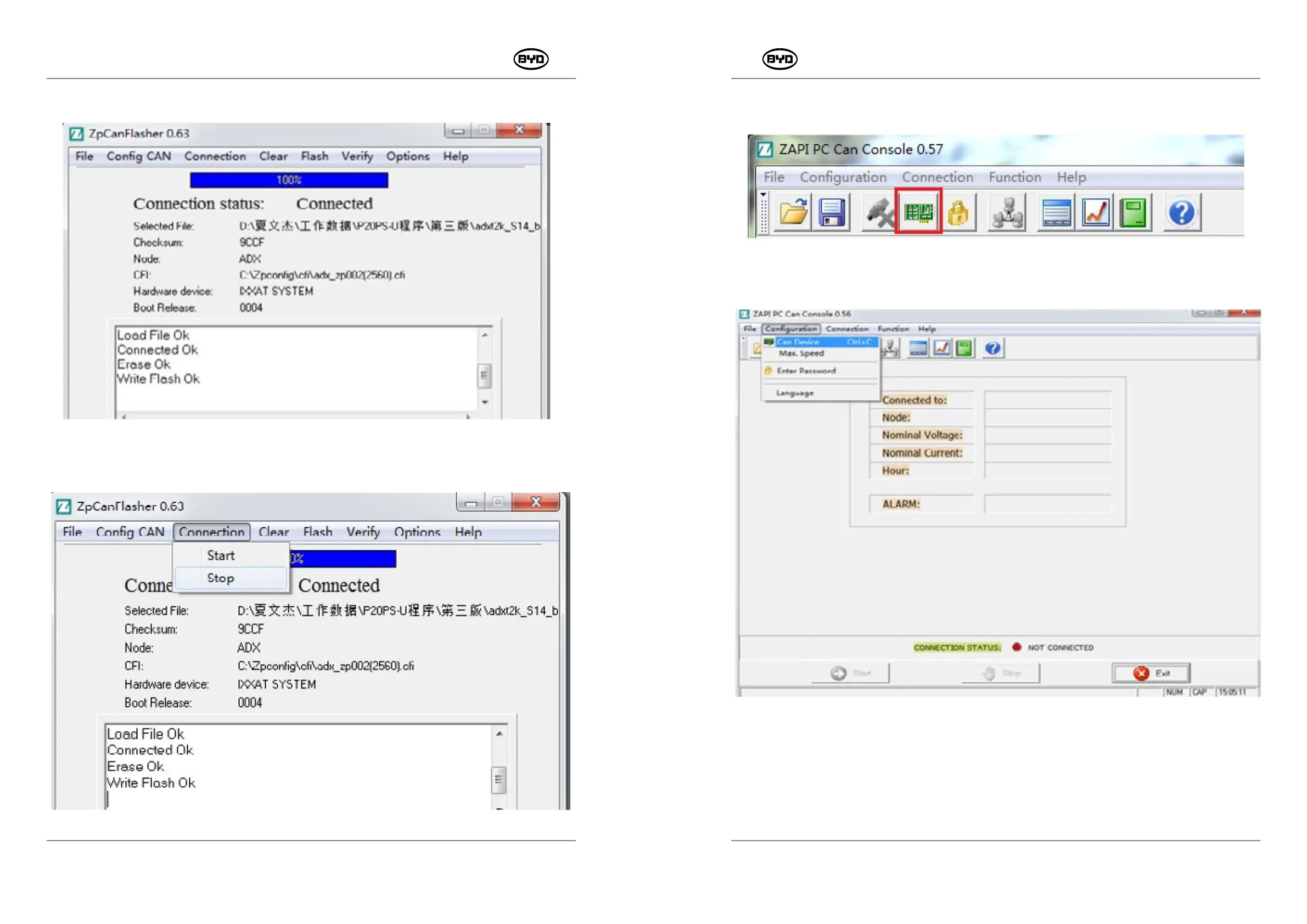
1. Open “ZpCanConsole”, select the icon, and connect CAN box, as shown in Fig.1.2.1.
Or select the CONNECTION STATUS on the main menu, as shown in Fig.1.2.2.
If you select IXXAT CAN box, see Fig.1.2.3. If you select CAN box of Kvaser Leaf Light,
see Fig.1.2.4.
Select corresponding device and Baud rate 125Kbps, click OK, and enter “next step”.
PMW20
84
9. When the software is written successfully, “Write Flash Ok” will appear in the dialogue,
as shown in Fig.1.1.16.
10. Finally click “Connection” → “stop”, as shown in Fig.1.1.17.
Fig.1.1.17
SM-PMW202020001-EN
SM-PMW202020001-EN
Fig.1.1.16
Fig.1.2.1
Fig.1.2.2


 To Next Page