2
1502154 Rev D Physical Identification 2-5
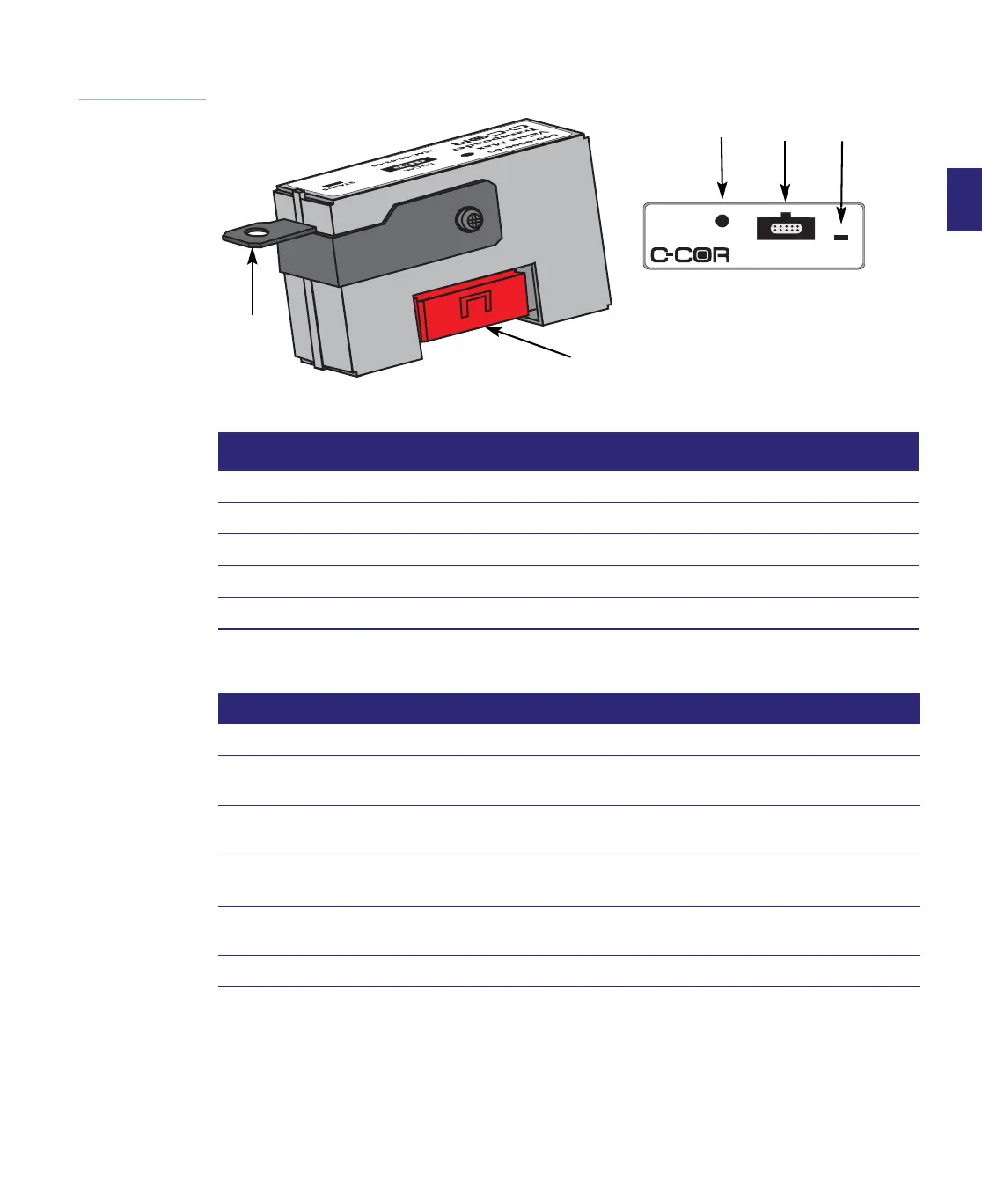
Figure 2.2
Transponder
Identification
Table 2.2 Transponder Identification
Item Label Function
1 Grounding Bracket Connects transponder to ground
2 Interface Connector Provides connection to RF board and element management system
3 Tamper Switch Detects open lid
4 LOCAL Provides local port for bench interface procedures
5 STATUS LED indicates transponder status
Table 2.3 Value Max Transponder LED Status
LED Sequence Indication
Steady on for 3 to 10 seconds During boot-up immediately following installation.
Single blink every 5 seconds On, but in search mode (RF input is low or receiver is not tuned to forward
data carrier).
Double blink every 5 seconds Registration to forward data carrier frequency may be about to occur or may
be in process.
Burst blink of transmitted data Transponder is sending data to the headend controller.
Blinks every second or so; often in multiple transponder systems.
Blinks on 0.5 second then off 0.5
second
Transmitter constantly on.
Off, stays off Fault/failure
Value Max
Transponder
LOCAL
STATUS
MAC ADRS:
AM ADRS:
xx-xx-xx-xx-xx-xx
xxxxxx
H
2
3
4 5
1
Actual size


 To Next Page