3
1502154 Rev D Upgrading Legacy FlexNet Amplifiers 3-9
Cable Adapter (9-pin to 12-pin) Installation
C-COR FlexNet 700 Series trunk and bridger amplifiers use 9-pin cables to connect the power supply
to the RF module; however, the Flex Max901e module requires a 12-pin connector. To upgrade to
the Flex Max901e RF module, a cable adapter is required.
➤ To install the 9-pin to 12-pin cable adapter (P/N 173720-02)
1. Open the amplifier housing. (See Housing Opening on page 3-4.)
2. Remove all fuses/buss bars from the AC distribution board.
3. Connect the cable adapter’s 9-pin plug to the power supply plug.
4. Connect the cable adapter’s 12-pin plug to the Flex Max901e RF module POWER PLUG
connector.
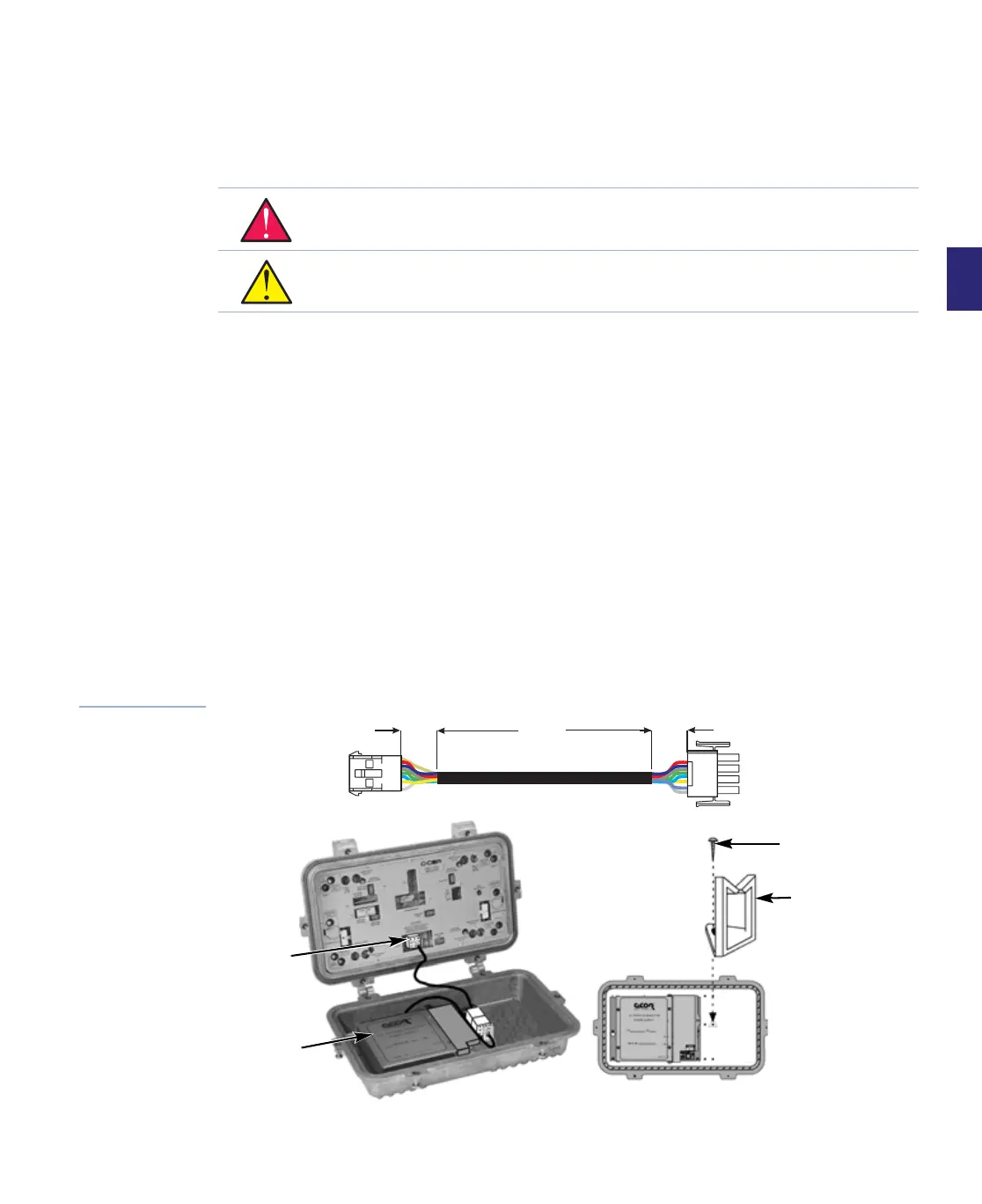
5. Using a Phillips screwdriver, install the wire saddle as shown in Figure 3.6. A mounting hole
is located in the center of the housing lid between the power supply and transponder
mounting location.
6. Route the cable as shown in Figure 3.6.
7. Set up and energize the power supply, refer to Power Supply Configuration on page 5-3 of
the Configuration chapter as necessary.
8. Close the housing. (See Housing Closing and Tightening on page 3-10.)
Figure 3.6
Cable Adapter
Installation
WARNING Hazardous voltages are present. Use approved safety equipment and
procedures.
CAUTION Use of a power supply adapter limits the amplifier’s current passing to 13
amps, regardless of the power supply or RF module current passing capability.
P/N 173720-02
10 inch cable
9-pin cap
to
700 series
power supply
12-pin cap
to
FM901e
module
.90 in.
.90 in.
6.50 in.
Mounting
screw
Wire
saddle
Power
supply
adapter
Power
supply


 To Next Page