6
6-8 Flex Max901e 1GHz Trunk and Bridger Amplifiers 1502154 Rev D
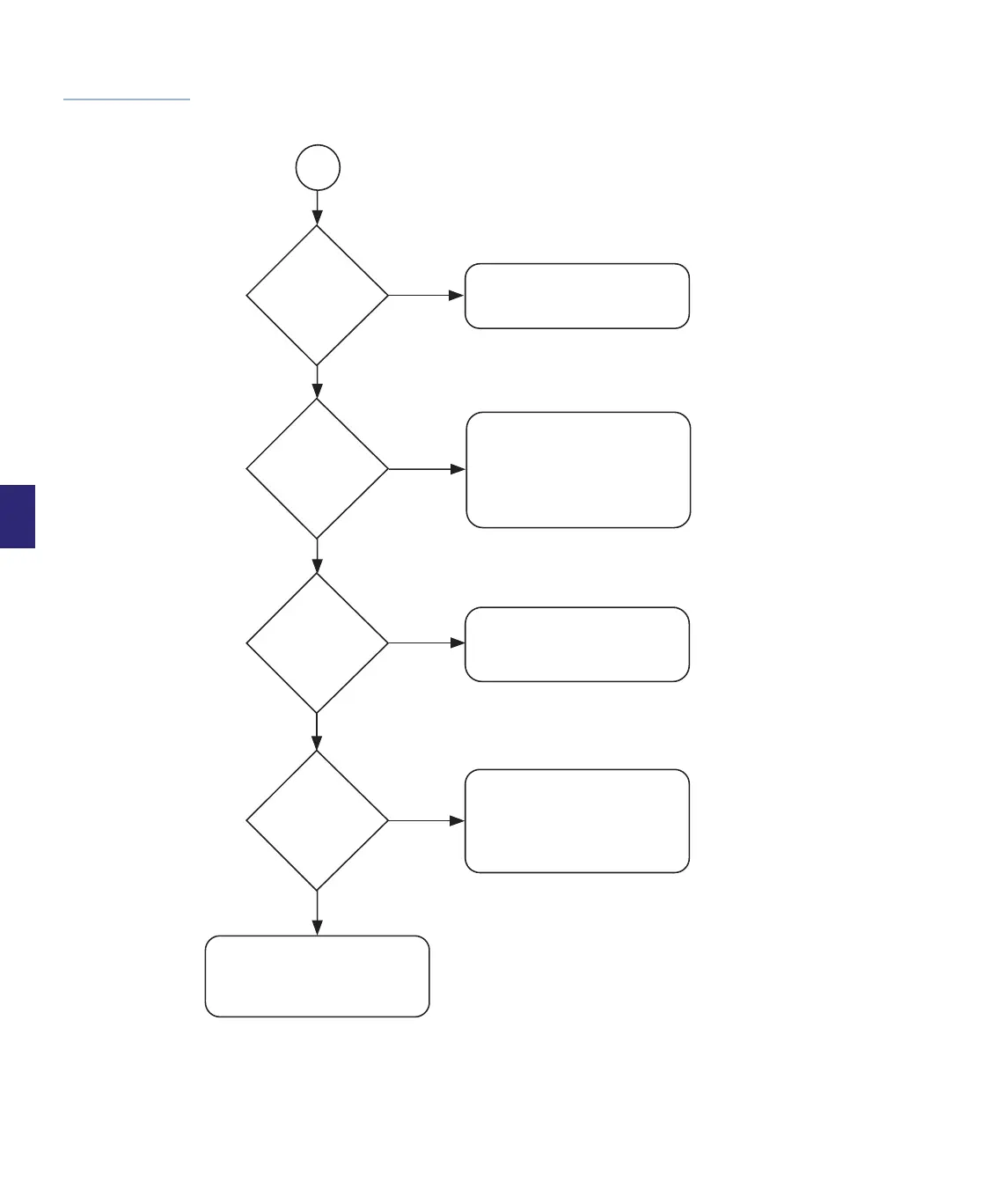
Figure 6.4
Troubleshooting
Flow Diagram
(2 of 2)
1
FWD RF signal
input levels
correct?
Sheet 1
Check previous amplifier
for output and cable and
conductors for damage.
No
Yes
FWD RF signal
input levels
correct?
No
Check that all EQs and PADs
are securely in place. If so,
and outputs are still incorrect,
replace the RF module and
rebalance. If still not within
range, replace the housing.
Yes
No
Check cable on output port
for damage. Check next amplifier
in chain away from
headend.
Yes
No
REV RF
signal
input levels
correct?
REV RF
signal
output levels
correct?
Yes
Check that the Reverse PAD
and EQ are securely in place.
If so, and outputs are still
incorrect, replace the RF
module. If still not within
range, replace the housing.
Troubleshooting procedure has
been successfully completed.
All amplifier voltage and signal
levels are correct.


 To Next Page