66 APOLLO Digital Broadcast Production Console External Control
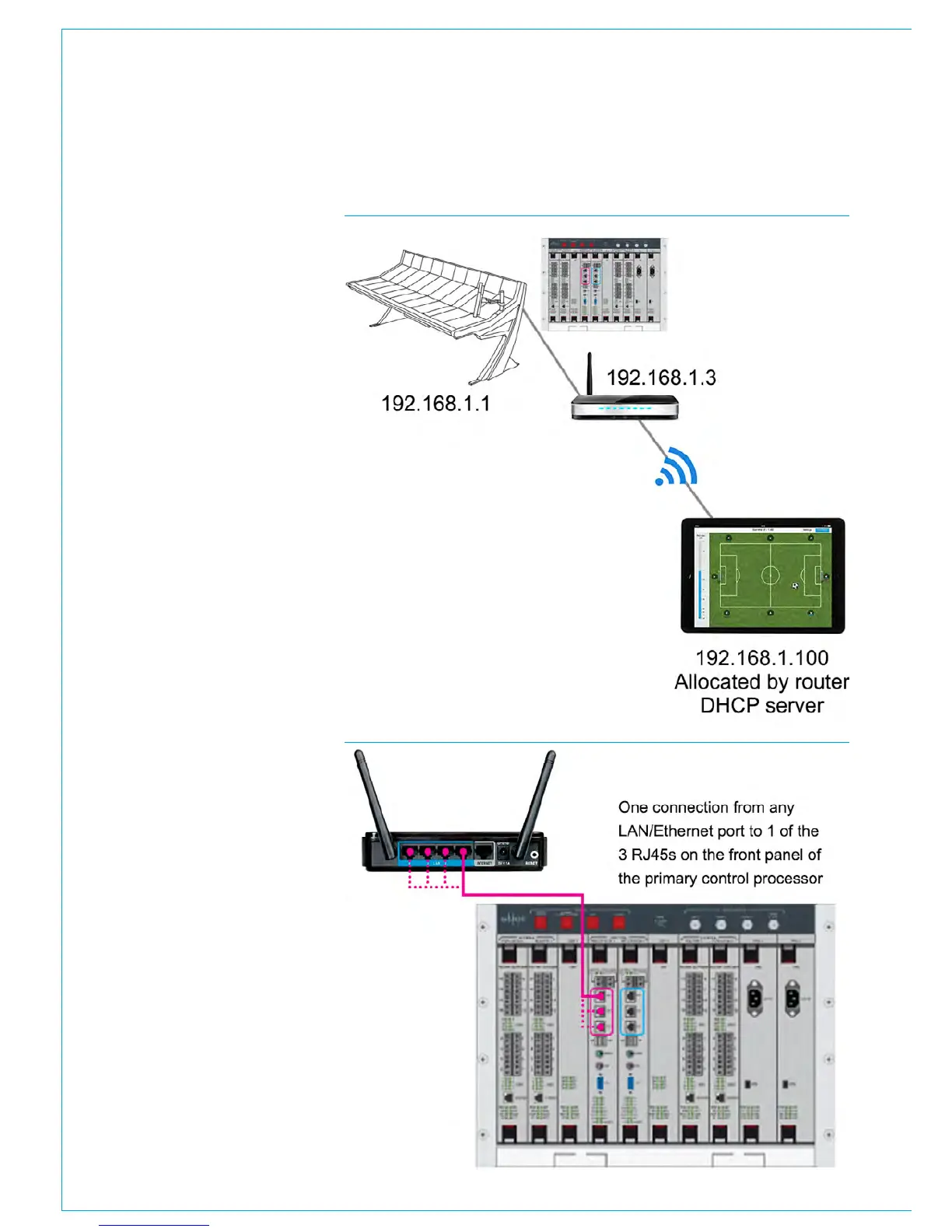
Wireless Router Configuration
When the basic ‘Assist’ configuration has
been enabled the console provides CSCP
connections on the 192.168.1/24 subnet
so the wireless router LAN connection
must be configured to be part of this
subnet. We advise that the wireless router
is configured with a LAN IP address of
192.168.1.3 and an IP subnet mask of
255.255.255.0
DHCP Configuration
To connect hand held wireless devices,
such as the iPad, the wireless router
should be configured to provide a DHCP
(Dynamic Host Configuration Protocol)
server to distribute IP addresses to these
hand-held devices.
The wireless router should be configured
as a DHCP server: The IP Start
address or IP Pool address should be
configured to be 192.168.1.100 and the
IP or DHCP pool size should be set to
4.
This allows up to four wireless devices
to be connected to the console
simultaneously. They will be allocated IP
addresses in the range: 192.168.1.100 to
192.168.1.103.
DNS (Domain Name System) parameters
are not required for this setup.
Other Configuration Parameters
Wireless routers provide many different
services and it is not possible to cover
all setup permutations in this document.
Some common considerations are:
• Firewalls should be disabled if possible.
If not then the firewall should be
configured to enable TCP/IP traffic in
both directions on port 49300.
• NAT (Network Address Translation)
should be avoided.
• Packet filtering and MAC address
filtering should be avoided.
FIGURE 3 - WIRELESS ROUTER TO CONTROL PROCESSOR CONNECTION
FIGURE 2 - IPAD, CONSOLE AND WIRELESS ROUTER CONNECTIONS



 To Next Page