Trouble? ._._
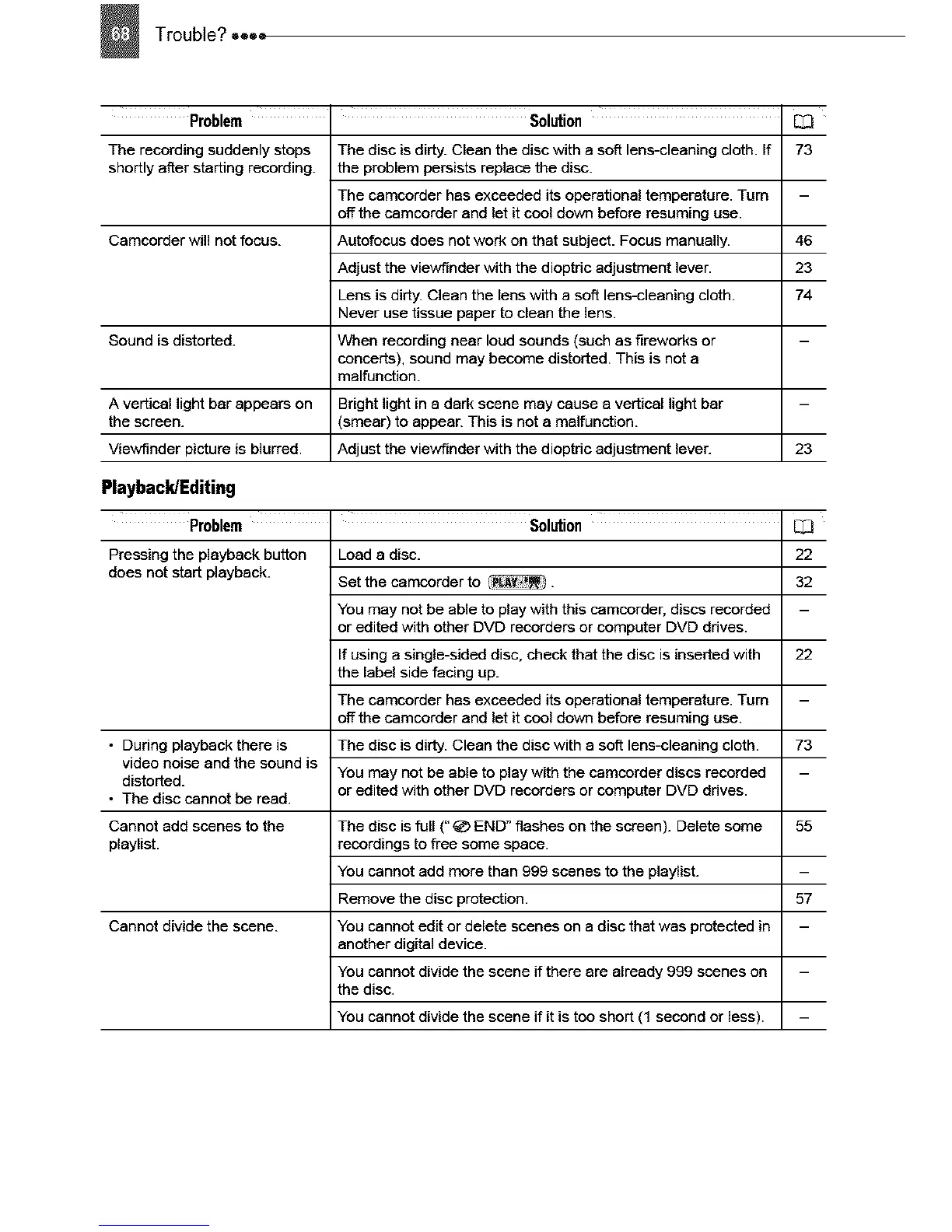
Problem
The recording suddenly stops
shortly after starting recording.
Camcorder will not focus.
Solution
The disc is dirty. Clean the disc with a soff lens-cleaning cloth. If
the problem persists replace the disc.
The camcorder has exceeded its operational temperature. Turn
off the camcorder and let it cool down before resuming use.
Autafocus does not work on that subject. Focus manually.
Adjust the viewfinder with the dioptric adjustment lever.
Lens is dirty. Clean the lens with a soft lens-cleaning cloth.
Never use tissue paper to clean the lens.
When recording near loud sounds (such as fireworks or
concerts), sound may become distorted. This is not a
malfunction.
[I3
73
46
23
74
Sound is distorted.
A vertical light bar appears on Bright light in a dark scene may cause a vertical light bar
the screen. (smear) to appear. This is not a malfunction.
Viewfinder picture is blurred. Adjust the viewfinder with the dioptric adjustment lever. 23
Playback/Editing
Problem Solution
Pressing the playback button Load a disc.
does not start playback. Set the camcorder to .
You may not be able to play with this camcorder, discs recorded
or edited with other DVD recorders or computer DVD ddves.
If using a single-sided disc, check that the disc is inserted with
the label side facing up.
The camcorder has exceeded its operational temperature. Turn
off the camcorder and let it cool down before resuming use.
• During playback there is The disc is dirty. Clean the disc with a soft lens-cleaning cloth.
video noise and the sound is
distorted. You may not be able to play with the camcorder discs recorded
or edited with other DVD recorders or computer DVD drives.
• The disc cannot be read.
Cannot add scenes to the The disc is full (" _ END" flashes on the screen). Delete some
playlist, recordings to free some space.
You cannot add more than 999 scenes to the playlist.
Remove the disc protection.
Cannot divide the scene. You cannot edit or delete scenes on a disc that was protected in
another digital device.
You cannot divide the scene if there are already 999 scenes on
the disc.
You cannot divide the scene if it is too short (1 second or less).
[13
22
32
22
73
55
57



 To Next Page