2
Software
Installation
Turn
on
the computer and start Windows. Check that the camcorder
is
not
connected to the computer.
1
Insert
the
Corel
Application
Disc
CD-ROM
into
the
computer's
CD
or
DVD drive.
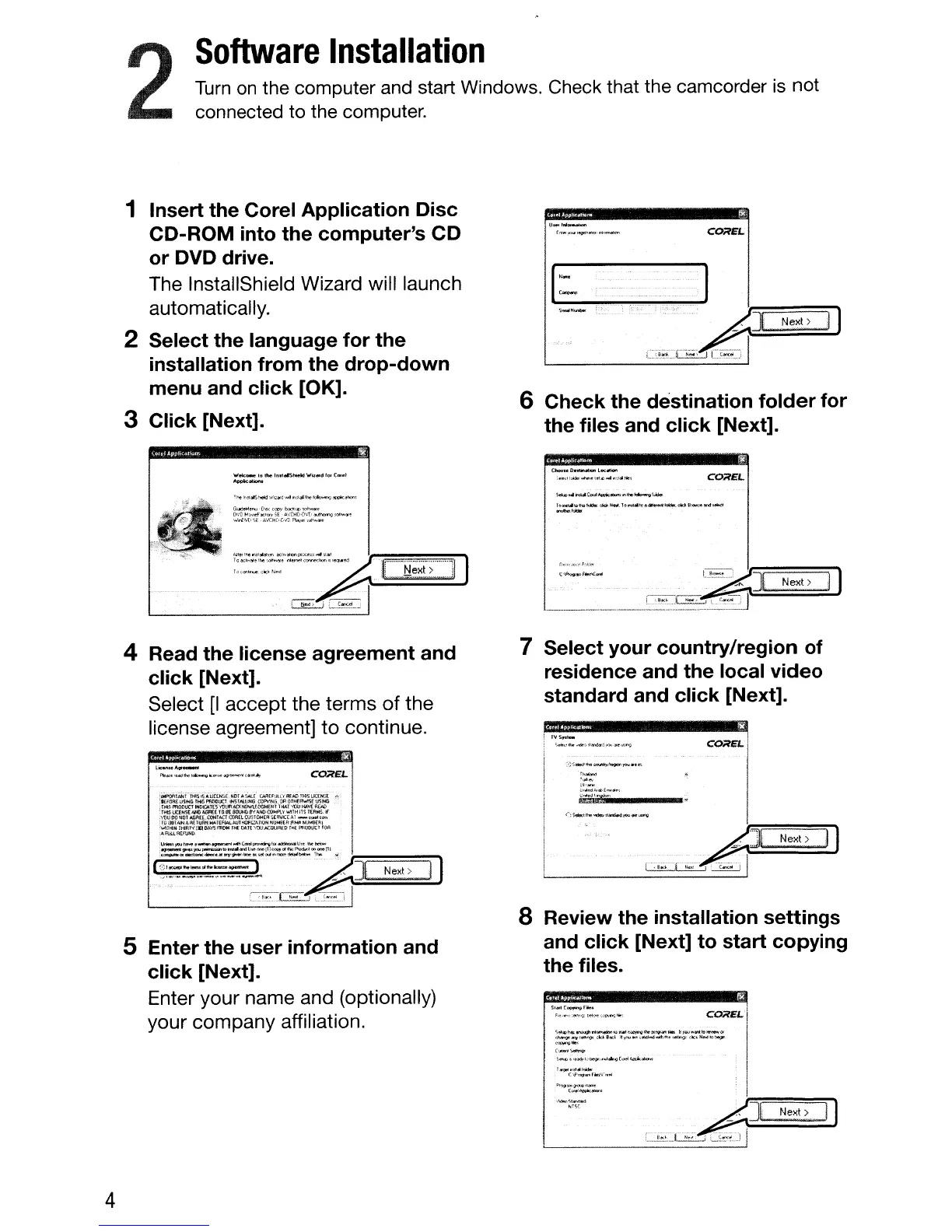
The InstallShield Wizard will launch
automatically.
2
Select
the
language
for
the
installation
from
the
drop-down
menu
and
click
[OK].
3
Click
[Next].
U_I""--_
E·'e,.,.."_,,,,"'~
COilEL
6
Check
the
destination
folder
for
the
files
and
click
[Next].
.....
*-
t.ltloe
ImtollShoekl'Wll.d
101
C.el
............
OoooteD._
...
L
......
,_"ooOW_.,.....c
n=
.......
CO;JtEL
(j_-..[l'""HllI!'llo.lcr'
.......
_~
O'JOM~¥.
......
$[-
'CHCi-v\,'O~ro<_
..
·"'rl,,,,,S{·..'JGt[.-r;
D~""""""t
"·"-=:=~A."~.:'·~".
.
...
r
'''~~''''''~
.L.
~i.i~
Next>
.11
)
Next>
. i I
4
4 Read
the
license
agreement
and
click
[Next].
Select
[I
accept the terms
of
the
license agreement]
to
continue.
La:
....
"AIIf_
f">a=.,
•
.wj"","I~".'''''C4'''''''''''e.
...
\.ty
COilEL
:~i~i
rH5~-"l.JCOISf;.H~r"'~E
t;AA£flA.lYflEAD1HlSUCOr'A. A
"l(roRElJSlt.C,rI'tlS
('tjP'l'lNIi.()POT~EV$IlfG.-:
TH,Al¥l:llJHoIMF/£JIl1
.Y\o'lTHil~tt.'lWS
..
Ai_eoool.-
I1(1N"'N8{Rt-NJHll(rq
FRtbIf;£QIo.lf'>1llJJlC:CUlR£D r"ll Pli.OOLCI'OA
5
Enter
the
user
information
and
click
[Next].
Enter your name and (optionally)
your company affiliation.
7
Select
your
country/region
of
residence
and
the
local
video
standard
and
click
[Next].
CQ;lEL
".,."
0~:"
lJ
....
""':~~E_
..
~,
E.&
8 Review
the
installation
settings
and
click
[Next]
to
start
copying
the
files.
P
·.!!:
ii
~r_
:
F
•.
....."
....
~.-
....
~
...
,
_.
~O;lEL
I
I
:;::.~~~f-;-''''~~"':.~~''''..::="':.''':'"~
I
=.-:::O_
......
4C""f'l~
..
_ "
1_~.1':'W
clPw.1_
r
....
;r...... l
F'~
....
~_
!
(
..
11I
...
_ i
,.",,;'::;"'"
:_'~;
__
L~"-~F[J::=:
=N=ex=t>==;-'lj



 To Next Page