3
User
Registration
After the installation files
have
been copied, connect to the Internet to complete
the user registration online.
You
will not be able to use the software without
successfully completing the user registration.
During the user registration, leave the
Corel Application
Disc
CD-ROM
in
the
computer.
I
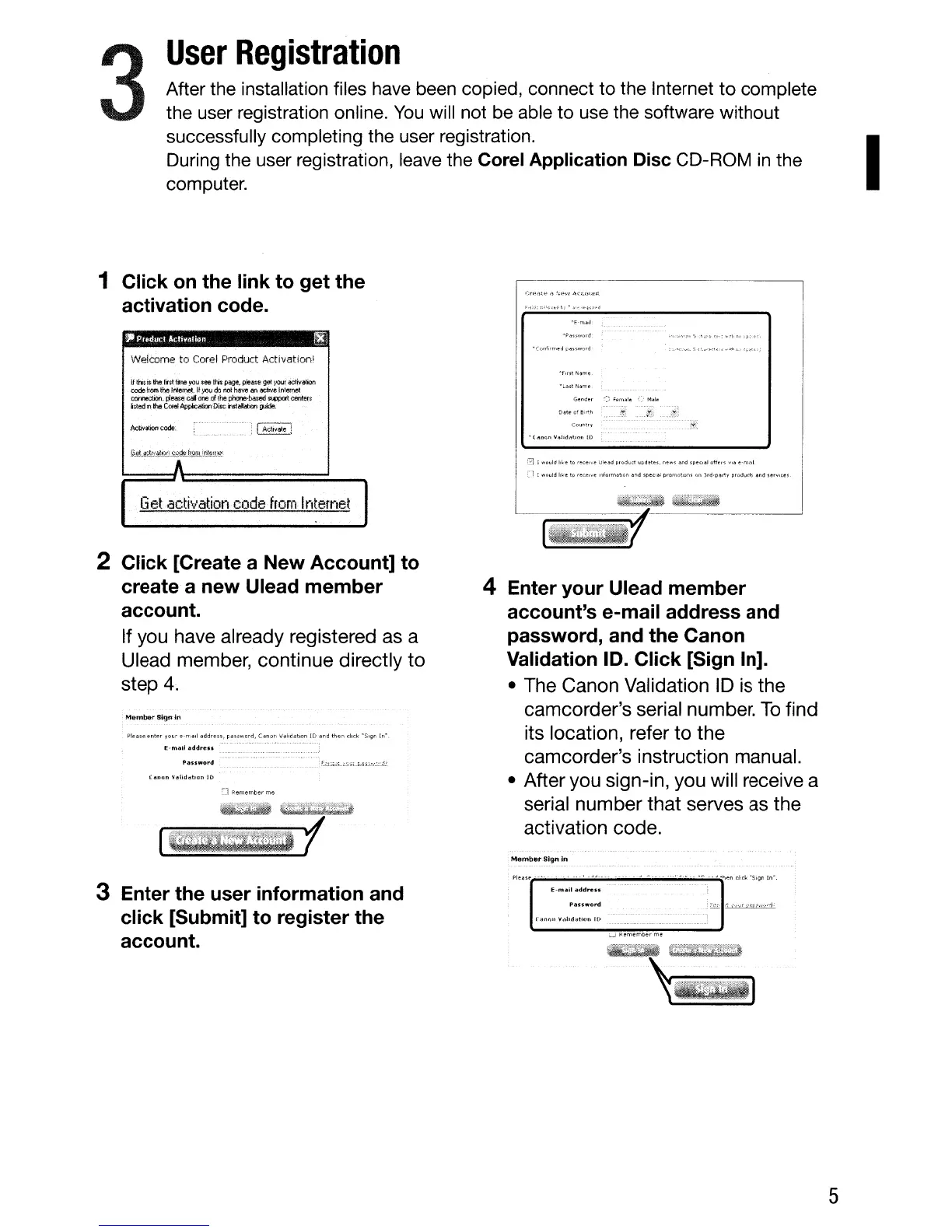
1 Click
on
the link to get the
activation code.
,.
Prvdul:! Al:bv.dion
~l
Welcome to Corel Product Activation!
8 I would
Ir~e
to
rete,.,'e
Ule~d
pro;j(Jct IJPdetes. ne
....
s
~nd
speCial
oft~,s
v,e "'ma,1
;--1
I would Irk"
to
rece,~e
Informat,~n
lind spec'51
promotions
on
Jrd-pertr
product~
and
ser~lc:es
Activalion~ode:
Gtt,<:K;!:lv.;dj.-jr:(:'Jrkln)in:nlE:WI':'"
···················i···················
If
this
is
the fist
time
you
see !hs
page.
pie!ls:e
gel:}'OUt.
activation
code
:ffom
the
Inl:emet
If
yot.l
do
no!
Mve
M
~
lJ'lIemet
C«itlectioo,
please
cal
one
of
thel#lne~
~Oft
centeJS
listed
in
the
Corel
Application
Dite iUl:alMion
~tM
Get
activatiofl
code
from
Internet
2 Click [Create a
New
Account] to
create a
new
Ulead
member
account.
If you have already registered as a
Ulead member, continue directly
to
step
4.
Member
Sign
irl
Please
er.tertour
e-mail
.!Jddress,
pa.,
....
ord,
(anon
Vdliddtion lD
and
then
click
·S"~,,
1,,'
(1lIHJn
..
~lid<ltIOIl
ID
C]
Remember
me
wmiZ)"ii$
jlll/;j('!{j.
'-----rl_;;;;;.;;;;;~'ij';;;;;J~;;;;;:lt;;;;;ij'II;;;;;':~'~:::r
4 Enter your Ulead member
account's e-mail address and
password, and the Canon
Validation
10.
Click [Sign In].
• The Canon Validation
10
is the
camcorder's serial number.
To
find
its location, refer
to
the
camcorder's instruction manual.
• After you sign-in, you will receive a
serial number
that
serves as the
activation code.
Member
Sign
In
3 Enter the user information and
click [Submit] to register the
account.
,-"
..
_~
--
.~
. _
..
-"'~n
dick
'SiQn In",
E-mail
addreu;
f1auword
fitnr>l'
'>Idhd;ltillU
10
:..J
Remernb!.<rme
.'(1[tD
~~qT[;i:i!(&Wg;g:@
'--I
5



 To Next Page