170
Contents
Preparation/
Setup
Print Using a
Computer
Appendix
IndexPrint/SaveInput/Edit
Names of
Components
Maintenance/
Printer Settings
Trouble-
shooting
6
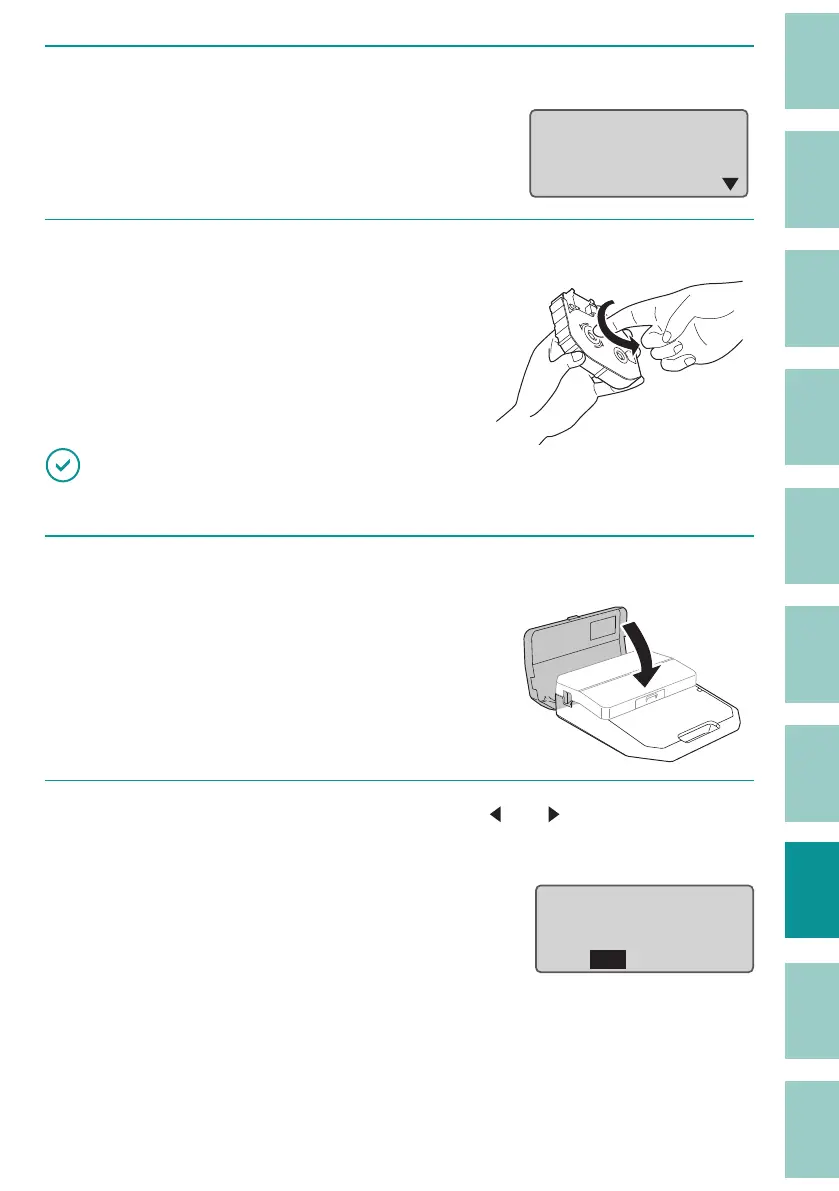
After removing the print media (or cassette), press any key.
After pressing a key, instructions will be
displayed on the screen.
Set the ribbon
cassette and close
the cover.
7
Remove any slack in the ribbon.
IMPORTANT
• If the ribbon is loose, it may not operate properly.
8
Replace the ribbon cassette and close the cover.
Insert the ribbon cassette straight in, and
press rmly until it clicks into place.
When the cover is closed, a con rmation
scr
een will be displayed.
9
When the print media has been removed, use [ ] or [ ] to select "Yes" and
press the [Enter] key.
The display returns to the character input
display.
If you select "No", a "Feed Error" message will
be displa
yed again. Follow the procedure
from step 1 to completely remove the print
media.
&DQ
WKH
SULQW
PHGLD
LQWKHPHGLDSDWKEH
UHPRYHG"
Yes No


 To Next Page