23
Contents
Preparation/
Setup
Print Using a
Computer
Appendix
IndexPrint/SaveInput/Edit
Names of
Components
Maintenance/
Printer Settings
Trouble-
shooting
5
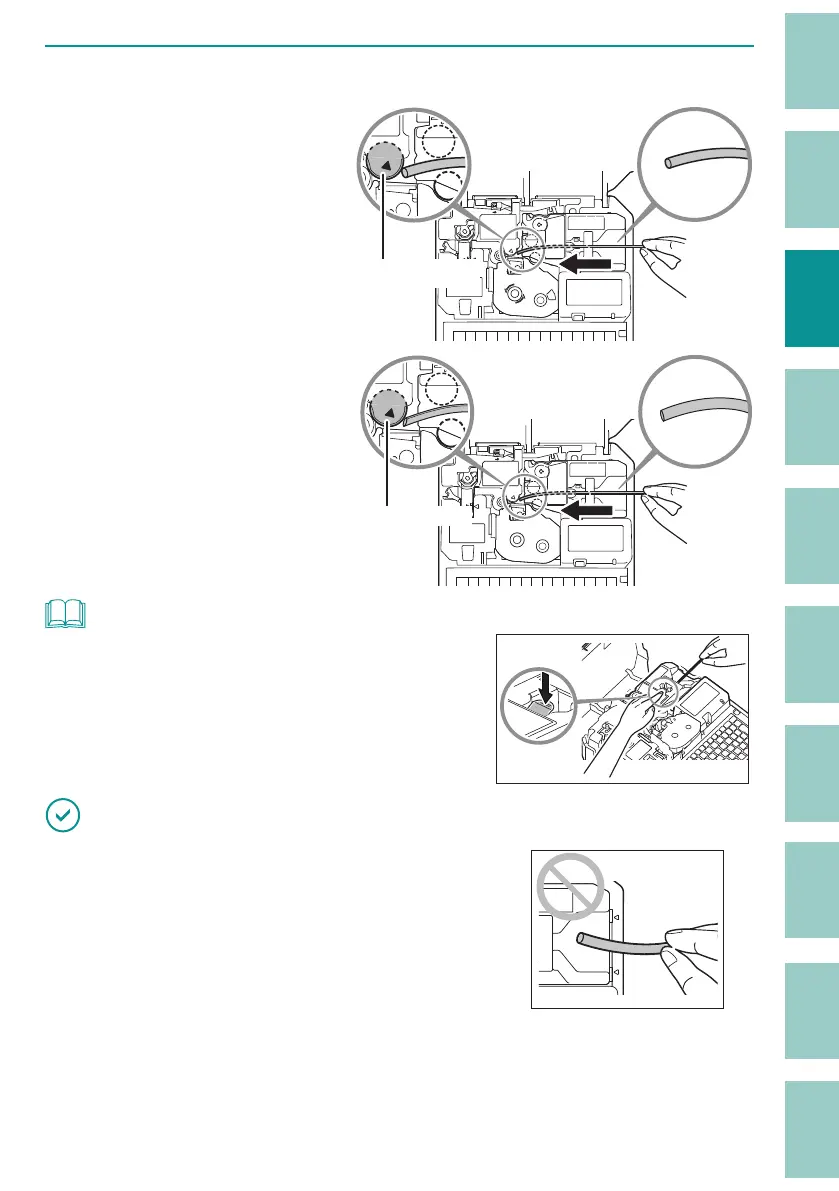
Insert the tube.
For tubes (round)
Insert the tip of the tube into
the media feed port in the
direction shown in the figure,
and push it in until it hits
transport roller 2.
Transport roller 2
For and flat tubes
Insert the tip of the flat tube
into the media feed port in
the direction shown in the
figure, and push it in until it
hits transport roller 2.
Transport roller 2
NOT
• If it is di cult to pass the tube through the attachment, set
the tube in place while pressing the tube retainer lever with
your nger.
IMPORTANT
• If the tip of the tube is inserted as shown in the gure,
the tube may get stuck during printing, the print may be
chipped, or the cut position may be o .
• If the tip of the tube is bent due to winding, etc., x it so that it is straight, or cut o the bent portion
before placing it in the printer.
• To prevent the print media from running out during printing, or to prevent the shortened print media


 To Next Page